
The PAF Model
During the Presentation phase, the instructor teaches the new knowledge or skills. During the Presentation you typically include some type of introduction which will include the what’s in it for me (WIIFM) for the students as well as some test for understanding to ensure that the knowledge or skill has been transferred.
Application is simply the time given to the learner to practice what they have learned. Although likely the simplest step in the process, Application is by far the most important. As far back as Aristotle we know that we learn by doing.
Feedback is needed to build the confidence in your learners who are performing well and to assist those that require further help.
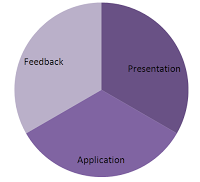 Each stage should represent about 1/3rd of the lesson time. Depending on the exercises that you introduce in a lesson, you can often combine Application and Feedback to occur simultaneously. This allows for more time to be applied to the Application and it allows for correcting or reinforcing behaviours as they happen.
 Most training that is considered boring or ineffective by the learners, likely did not have sufficient time allocated to the Application and Feedback phases. Instead it relied too much on Presentation. Using this model keeps you on point. It’s easy for a passionate instructor to ramble on, especially if the topic is one of personal interest.
There are other models of lesson design out there; however some can be rather complicated to easily remember. PAF keeps things simple and therefore far more likely to be used properly.
Digestible Chunks
One method of doing this is a part of Information Mapping, which I've spoken of before. Information Mapping is a method of organizing information into "maps" that only cover one topic. This information is further broken down into blocks which only contain one thing (set of instructions, piece of knowledge, etc). Information mapping's goal for how much information can be contained in either a map or block is 7 plus or minus 2 things. That seems a little strange but what it means is that the amount of information that we can remember is somewhere around 7 things. If you only have 2 other things to remember this is considered not enough information to break out into a new map or block of information, so up to 9 things are considered acceptable.
For those that doubt me about remembering 7 pieces of information, you can prove it to yourself by simply reciting your phone number. Also if you doubt the point about up to 9 pieces of information, include the area code (For North America this will in fact be ten pieces of information). Interestingly enough the phone companies who introduced direct dialing choose the format for telephone numbers because of this very fact of how people remember things.
Now what is interesting about the human mind is that we can interpret a great deal of information as a single piece of information. In fact most of us consider that 7 or 10 digit number as one piece of information. So in fact we as people may remember many phone numbers that seem important to each of us. I know my own phone number but I also know my wife's, my parents, my sister's, and I even know my mother-in-laws phone number. If you asked me to recite all that information it would actually be 50 individual digits that make up those 5 different numbers. It's easy for me to remember because I only think of it as 5 things.
You can do the same thing when organizing your training. For example; you may have determined that you need to train 18 individual concepts to a group of learners. Once you analyze the information you realize that these 18 steps fall into only a couple of larger categories. Here is an example as to how you might group the similar steps so that no single larger group of steps contain more than 7 smaller steps:
- First Step
- Step 1
- Step 2
- Step 3
- Step 4
- Step 5
- Step 6
- Step 7
- Second Step
- Step 8
- Step 9
- Step 10
- Step 11
- Third Step
- Step 12
- Step 13
- Step 14
- Step 15
- Step 16
- Step 17
- Step 18
Training = Customer Service / Customer Service = Training
Because we frequent this establishment so often, odds are that we will not get great customer service every single time we visit. Since new management has taken over some time ago, customer service has gone downhill. For me the major issue is that staff seems not to know what to do when something out of the ordinary takes place. An example of this occurred last week.
My wife and I stopped by as per normal, and attempted to purchase a fill up of gas. The pump seemed to act unusual and then suddenly reset to normal. I filled the tank and went inside with my wife to pay for the purchase. Due to some computer malfunction, they could not take our payment for anything other than cash. We offered debit card, or credit card, but the only thing they could accept was cash.
Well like most people now-a-days we don't generally carry cash. The attendant suggested that we withdraw the funds from their bank machine and simply pay for the purchase. While this is a great solution for them, we are charged an additional $1.50 service fee by our bank for using their machine. To both my wife and I this was unacceptable. We ended up writing essentially an IOU and vowed to return and pay the amount at a later time. We left the store frustrated and angry over how once again they were unable to satisfy us by making what should be a simple transaction, more complicated than it needed to be.
So you may ask where the training opportunity exists. It's simple - train your staff on the policies and procedures of the store. In this case there should be a policy and procedure on what actions to do when the computer responsible for taking payments for gasoline purchases fails. Maybe it's to deactivate the pumps, or maybe something simple as placing a sign out by the pumps informing customers that cash only purchases are acceptable. In either case the alternative of continually putting customers through the difficult situation my wife and I found ourselves in cannot be the solution. If you own a business, please train your staff. If you have trained your staff and they cannot cope with the unexpected than maybe you need to rethink your hiring decisions.
My wife and I worked for the same corporation when we met all those years ago. As my own sanity check, I quizzed her on many of the common scenarios we were trained on. For example; we both knew the procedures for what to do when our stores were held up for money or merchandise. We both recalled the procedures perfectly and would have been able to handle that situation. I should point out that neither of us has worked there in about a decade and neither of our stores where ever held up by criminals.
Training is crucial and no business can expect to function properly without it. It doesn't matter whether you hire a professional like myself or you conduct the training yourself. Ensuring your staff knows what to do when the unexpected occurs is the difference between your business running poorly or smoothly. My wife and I have decided not to return to this gas station for our future purchases, instead we will frequent their competition down the street. It's too bad because the competition does not offer all the conveniences that we enjoy.
Documentary Heaven
In every class you teach or for every online course you design, you will have learners who are just like me. If you want these learners to become engaged, the use of video will draw them right in. Of course continue to cater to all learning styles but the visual folks will love a good movie.
I stumbled across a great site that contains videos which seem to actually reside on Google or Youtube video. It's called Documentary Heaven. Unlike Youtube or Google Video, this site is organized into full feature length documentary films. If you maintain a blog like I do you can cut and paste the "embed code" from the video's source on Youtube directly into your blog. Double clicking on the videos found here will bring you to their source on Youtube where the "embed code" can easily be found.
For example, I love the history of the Mayan people. Ever since I visited the Mayan ruins in Mexico I have been fascinated with their history and culture. If I was teaching a course on Ancient Mexico I could embed the following video that I found by simply searching for "Maya" on Documentary Heaven, copy and past the "embed code" into the "Edit HTML" tab of your blog's entry page. The result is something like this...
Alternatively you could use this during an online or instructor led course as well. Your visual learners like me will become much more engaged and will certainly enjoy learning as well.
Use Screenr to Create PC Tutorials
So it seems that all you need is a browser, a microphone and a good idea. As I learn more about this really neat web application, I will post more details, however you can check out Tom's blog on rapid e-Learning and his other Screenr videos below:
http://www.articulate.com/rapid-elearning/
http://screenr.com/user/tomkuhlmann
75-year-old immigrant gets her third U.S. college degree - KansasCity.com
75-year-old immigrant gets her third U.S. college degree - KansasCity.com
Linking to External Content in e-Learning
The Internet is filled with free and easy resources for you to link to within your e-Learning. It's tempting to reuse much of this material rather than recreating it for your on-line learning. In fact in these busy times, it makes sense to do so. One of the steps that is considered an accepted part of the design and development process is to determine if training already exists elsewhere. The notion of not reinventing the wheel is of course an an axiom. That said linking to an external source of content creates much risk, and I caution any one considering this. Below are some of the risks to this practice for you to consider before making your own decision.
Dead Links
An obvious issue is the risk of links that go nowhere. Everyday, thousands of web pages come and go. Just because you may have found a particular page of content to be beneficial, doesn't mean the original author or their service provider will maintain it for you. In theory you could monitor all your links on a daily basis to ensure the integrity of your e-Learning, however most Instructional Designers just don't have the time. While linking to outside sources of information may save some time initially, may cost you additional time later when you have to repair your course for it's possible dead links.
Learner Compliance
Many organizations can still be challenged to get their learners to log in and take training in the first place. Adding links to external resourced may distract their learners and discourage the learner from returning and completing their online modules. As an Instructional Designer, it makes more sense to absorb the knowledge yourself and then incorporate it into your course. If you find a really stable and useful site you wish to share with your learners, put the links at the end of training as an additional or optional learning.
Author's Permission
Although linking to a site is considered the best and most ethical way to reference another's work, it doesn't mean the original author will agree to its use for your training purposes. There may also be bandwidth restrictions put in place by the author's service provider. Adding your 10,000 learners from your organization may exceed the expected bandwidth and cause problems for the original author. Others just may not agree with the organization you are apart of and therefore would not want their material to contribute to your learner's development. Whatever the reason, this may become an issue for you and subsequently the original author. Consider this before using their work.
Quality Control
This is the one area where I got burned and inspired me to change my mind about external linking. Ironically I was only linking to my own organization's web site. I thought I was very clever in that if anything changed about the content, my training would be updated by default. Unfortunately there was a spelling mistake on the page I was linking to. Even though I was not responsible for the spelling mistake on the corporate site, it did affect the quality of my training and therefore I had to shoulder some of the blame. I was lucky it was only a spelling mistake though. The web is outside your control and very colaborative through the use of forums and comment pages. You may end up linking to a page promoting a belief that is against the values of your organization or maybe even something worse.
Now I will break my own rule here and provide you a link to the Rapid eLearning Blog that has a great related article on the 10 Things to Consider Before Your E-Learning Goes Live.
Writing Proper Learning Objectives
you would likely run into trouble as some students would not be able to sell the products and services. In addition, how would you prove such a Learning Objective in a classroom environment. I have seen and even written a few poorly constructed training objectives in my time. Through experience and training I have learned what needs to go into a properly constructed Learning Objective.
Performance
The first thing you need to identify is the method of learner evaluation. This will need to be a skill or knowledge that can be demonstrated within the classroom or online setting. If your learners are going to write a multiple choice test at the end of a course, then selecting the correct answer during the test will be that performance, not how they might use that knowledge later on.
Conditions
You will also need to include any conditions for this learning objective. For example if there are specific tools needed to perform the skill or knowledge you will need to include them as part of your objective as well. For example if they need a PC to log into a computer system you will need to state that. It may seem obvious to us as trainers, however you would be surprised how something as obvious as a PC may be overlooked.
Standards
You also need to establish the standard that the learners will need to live up to. This should be established by those who are requesting the training. If they have not provided the standard then you will need to establish this before moving forward. For example if learners need to be 100% accurate, or they need to perform the skill every day, or within a certain time frame, then this needs to be stated in the Learning Objective.
Here is a simple formula that you can use to help you write Learning Objectives of your own:
For example;
There are of course some variations on the wording that you can play around with, however this will generally work for all situations. I also sometimes write "By the end of this training, the learner will..." Somehow that rolls better off the tongue for me, but that's just my personal preference.
Designing Usable Job Aids
 This No Parking sign is an example of a good yet simple job aid. The city council could ensure that every citizen memorize all the parking by-laws of the city, however it's easier to just provide some simple instructions in the form of a sign. As a job aid, the sign helps everyone obey the law. Of course people who break the law are not paying attention to the sign and that becomes a compliance issue rather than a training issue.
A job aid in the work place should do exactly the same thing. It instructs the worker on just what they need to know to correctly performing their job. Unfortunately many job aids don't do this. Often job aids are created for other purposes entirely. As training professionals it up to us to ensure that a job aid accomplishes it's goal of providing instruction on how to perform a job related task and that it be easy to use. The following is a simple template that I use to help me produce a job aid for a set of action steps.
| Job Aid Title goes here | |
| Introduction | A single statement or two that explains the purpose of this document. If someone is reading my job aid thinking it serves a different purpose, I don't want to waste their time reading the entire document to find this out. An example of an introduction statement might look like: This job aid will instruct you on the steps to complete the online order form for ordering supplies for your location. |
| WIIFM | This section is optional, however with much of your audience you may need to answer the "What's in it for me". It's purpose is to address the issue of compliance, expecially if the task being trained on is not the path of least resistance. Showing your audience why performing these skills is so beneficial to them is crucial in getting their buy-in. |
| Instructions part 1 | Here is where you provide the specific instructions for the tasks that need to be completed. It is recommended to use a Step/Action chart to make it easy for your learners to understand and follow. For example: 1. Instructions for step one 2. Instructions for step two and so on. |
| Instructions part 2 | When the instructions exceed around eight or so steps you may want to consider further breaking down the procedures by having a second set of instructions with sub steps as I have made space for here. Again it's far easier for you audience to follow and more likely that they will remember procedures that have no more than about 7 steps or so. |
Of course there are thousands of variables that may force me to change or expand on this, however this is where I typically start from. I may also fancy it up a little by being creative with my use of fonts and graphics to match the branding of an organization, however the beginning is always the same. I add additional sections as needed depending on the performance gap that I am attempting to fill. Again it's all about creating a tool that will truly help your people in the field perform there jobs correctly and comfortably.
Information Mapping
I use it specifically for the design of job aids. For those that don't use them, a job aid is a tool that guides learners through the steps of a particular task within their job. Job aids are particularly useful when the job is infrequently completed in the organization. For example in a retail store, the employees may be required to count the inventory on a quarterly basis.
I use Information Mapping for the creation of job aids because the learners out in the field often only want enough information to complete these tasks. Studies have been done that show people do not read business or training documents the same way they may read literature. Typically users scan a document to find the information they require at that moment. If they need to wade through countless paragraphs of information, it will make the task seem more difficult than it actually is. Because of this steps within the task may get completed incorrectly, or skipped altogether.
The first step to Information Mapping is breaking down the content into chunks of information. To do this you need to look at each and every sentence from your raw content. Place all like things together and exclude items that do not have to do with each topic. If a piece of information says essentially the same thing as another piece of information you don’t need both. Pick the one that explains the point most succinctly and then more on.
Once you have the chunks separated from one another, you need to block this information off, each with its own label along the left hand side of the page. Labels that all deal with the same topic is organized into what are called maps. Think of each map as a chapter within a book, and each label its own paragraph. This structure makes it easy for your readers to ignore what they are not looking for and zero in on what they need at that exact moment.
For more information about Information Mapping check out their web site at http://infomap.ca/
Information Mapping Demo