
Training for Different Language and Culture
Many instructional designers make the mistake of only thinking in their primary language, and forgetting that some things are simply not translatable. I try to keep simplicity in my course design so as to avoid the additional challenge that multiple languages creates. Designing only with English in mind is clearly a mistake when someone lives and works in a country like Canada. Here in Canada we have two official languages, English and French. Geographical speaking the majority of Canada speaks English, while French is mostly spoken in the province of Quebec.
A lesson designed for a new hire course revolved around the famous “Who is On First” routine by Bud Abbott and Lou Costello. This lesson illustrated how easy it is to misinterpret what someone is saying. Using tasteful humour such as this example can be very effective in training, however because this comedy routine was never translated nor performed in any other language except for English, it could not be used in French speaking Canada. To do so would create more initial work for the designer, and creating a break in continuity between versions. This would also create additional work in maintaining future updates as well.
In cases where lesson material is designed only for learners whose first language is English, many learners who first language is something other than English will often fall behind the rest of the class. The reasons for this are many; however some examples might be they:
Like as in language, you should be very careful with humour when it comes to cultural differences. A humorous video may seem harmless, yet it may completely go against the grain of another culture. The resulting offense to another culture can detract from the purpose of training and force you to spend time putting out unnecessary fires.
The following things to avoid in your training may seem obvious; however you would be surprised how often people break with these rules. Avoid opinion or discussion that includes...
There are several things you can do to ensure you don’t cross any lines. If you are unsure and think that a piece of material may be questionable, play it safe and simply leave it out. In this case it’s far better to avoid a potential problem with language and culture then to try and recover from it later.
Secondly you should always conduct a pilot or your training with a safe group of your peers. Try to include a culturally diverse group or bilingual group when possible, they certainly can point out problems that you may miss or may simply not be aware of.
A lesson designed for a new hire course revolved around the famous “Who is On First” routine by Bud Abbott and Lou Costello. This lesson illustrated how easy it is to misinterpret what someone is saying. Using tasteful humour such as this example can be very effective in training, however because this comedy routine was never translated nor performed in any other language except for English, it could not be used in French speaking Canada. To do so would create more initial work for the designer, and creating a break in continuity between versions. This would also create additional work in maintaining future updates as well.
In cases where lesson material is designed only for learners whose first language is English, many learners who first language is something other than English will often fall behind the rest of the class. The reasons for this are many; however some examples might be they:
- Only have a basic understanding of the language
- Do not share a cultural background and will miss certain references
- Are not familiar with technical terms or jargon
Like as in language, you should be very careful with humour when it comes to cultural differences. A humorous video may seem harmless, yet it may completely go against the grain of another culture. The resulting offense to another culture can detract from the purpose of training and force you to spend time putting out unnecessary fires.
The following things to avoid in your training may seem obvious; however you would be surprised how often people break with these rules. Avoid opinion or discussion that includes...
- Profanity of any kind
- Religion
- Politics
- Cultural stereotypes
- Sexuality
- Gender
- Sexual orientation
- Ethnic or racists remarks
There are several things you can do to ensure you don’t cross any lines. If you are unsure and think that a piece of material may be questionable, play it safe and simply leave it out. In this case it’s far better to avoid a potential problem with language and culture then to try and recover from it later.
Secondly you should always conduct a pilot or your training with a safe group of your peers. Try to include a culturally diverse group or bilingual group when possible, they certainly can point out problems that you may miss or may simply not be aware of.
Teaching Like Oprah
Although some lectures can be very exciting, you may be afraid to bore your learners to sleep. Here is a learning activity that may prove to be more engaging than the traditional lecture.
Ask for a volunteer to play the part of a talk show host. You will provide them a list of questions that must be asked of you the instructor so that the topic is well covered. Remember you are the one being intereviewed. In addition to the scripted questions, invite the host to ask their own follow up questions as they see fit. Toward the end of the activity, the talk show host will call upon questions from the audience to also address any knowledge that was missed. Use this time to evaluate what the students learned and address any missing pieces of knowledge.
The advantage of this learning activity is that it takes the learners from the more passive role of listening to a lecture to an active part of a mock television show. It may prove to be more engaging and will take some of the pressure off all involved as this will create an informal atmosphere.
Take a look at some popular talk shows and try to emulate some of the segments that they include to get the audience more active in participating with the show. You may want to avoid shows like Letterman and Leno and focus more on the self help style of shows like Oprah, and Dr. Oz. If you are successful, I promise your lesson will be far more memorable than a boring lecture.
Ask for a volunteer to play the part of a talk show host. You will provide them a list of questions that must be asked of you the instructor so that the topic is well covered. Remember you are the one being intereviewed. In addition to the scripted questions, invite the host to ask their own follow up questions as they see fit. Toward the end of the activity, the talk show host will call upon questions from the audience to also address any knowledge that was missed. Use this time to evaluate what the students learned and address any missing pieces of knowledge.
The advantage of this learning activity is that it takes the learners from the more passive role of listening to a lecture to an active part of a mock television show. It may prove to be more engaging and will take some of the pressure off all involved as this will create an informal atmosphere.
Take a look at some popular talk shows and try to emulate some of the segments that they include to get the audience more active in participating with the show. You may want to avoid shows like Letterman and Leno and focus more on the self help style of shows like Oprah, and Dr. Oz. If you are successful, I promise your lesson will be far more memorable than a boring lecture.
Learning Strategies for Teaching Adults with Learning Disabilities
We have all heard the term learning disability and may know one or two learning disabilities themselves, but what is a learning disability? Simply stated, a learning disability is a disorder that affects the acquisition, retention, understanding, organization or use of verbal and/or non-verbal information. This entry discusses those who have average to high intelligence, yet have an impediment that prevents them from learning skills or knowledge in the same method or rate of speed as others with similar levels of intelligence.
Many learning disabilities are genetic or possibly caused by an injury. These disorders can include difficulties in the following skills:
 Some people argue that accommodating those with a learning disability gives an unfair advantage over others. For example, you may provide a learner who has difficulty reading, more time to complete a written test. In this example, the additional time is needed to comprehend the question as it is written. The additional time you provide the learner does not give them necessarily more time to answer the questions. I like to compare these types of accommodations to other tools we use to assist our lives. For example it is common to wear eye glasses when you have trouble seeing or reading, yet no one would argue that wearing glasses gives those an unfair advantage.
Of course your learners with learning disabilities will still need to accomplish the learning objectives of the training. If the model of performance is to type 40 words per minute, then the student will still need to demonstrate this by the end of the training. Providing accommodation does not give them an unfair advantage, but rather removes or reduces any disadvantage their disability presents. Here are some examples of accommodation you could provide in the event that someone with a learning disability requires it:
Because so many learners with these types of disabilities will not be identified, there are some things you can do to ensure you are as accommodating as possible. Use...
Similarily here is another video that deals with how difficult a learning dissability can affect visual information:
Learning Disabilities Association of Canada http://www.ldac-taac.ca/
Learning Disabilities Association of Ontario http://www.ldao.ca/
Learning Disabilities Association of America http://www.ldanatl.org/
Many learning disabilities are genetic or possibly caused by an injury. These disorders can include difficulties in the following skills:
- Reading
- Writing
- Speaking
- Visual recognition
- Math
- Spatial or Mechanical
- Social
Of course your learners with learning disabilities will still need to accomplish the learning objectives of the training. If the model of performance is to type 40 words per minute, then the student will still need to demonstrate this by the end of the training. Providing accommodation does not give them an unfair advantage, but rather removes or reduces any disadvantage their disability presents. Here are some examples of accommodation you could provide in the event that someone with a learning disability requires it:
- Course outlines to reduce the need to take notes in class
- Copies of materials such as overheads, diagrams, PowerPoint files, etc.
- Access to alternative testing methods (oral, or online)
- Additional clarification of questions on tests
- Use of a calculator during math problems
- Extended time to complete evaluations (usually 1.5x)
- Open book testing
- Extra tutoring
Because so many learners with these types of disabilities will not be identified, there are some things you can do to ensure you are as accommodating as possible. Use...
- Easy to understand agendas so learners will know what to expect throughout the course
- Clear instructions both written and explained verbally
- Key concepts or terminology at the beginning of each lesson
- Clear visuals in your printed and overhead material (images should clearly look like what they are depicting)
- Physical examples such as models or actual items
- Point form to increase comprehension
- step-by-step instructions to break down tasks
- Group work where learners get to choose specific or unique roles within the group
- Words, pictures and sound to convey ideas (offering choices in how to learn)
- Multimedia when possible rather than reading or lecturing
- Job aids that can be referred to upon returning to the workplace
Similarily here is another video that deals with how difficult a learning dissability can affect visual information:
Learning Disabilities Association of Canada http://www.ldac-taac.ca/
Learning Disabilities Association of Ontario http://www.ldao.ca/
Learning Disabilities Association of America http://www.ldanatl.org/
A Better Level One Evaluation

I believe that very little thought is put into filling these out by most of your learners. The majority of your learners will very quickly determine which side of the check boxes are either good or bad and then arbitrarily check off all the answers to reflect their overall feeling. Usually the learners don't take time to read each question and select an answer that is truthful or accurate about how they feel. This is why I feel there may be a better way to administer a level one evaluation.
Here is an alternative to this method. Rather than waiting until the end of a course or session, pick a half way point to administer an evaluation. If you are running a one day session, hand it out just after lunch. If you are running a two day session, hand it out at the beginning of day two. At least this way they will take the appropriate amount of time to complete this activity, rather than rush through, hoping to get the extra time for a break or their departure home.
I recommend that you change the questions to reflect that you are only part way through the session. In addition avoid a rating scale. Ask open ended questions so that you can pinpoint exactly what concerns your learners have. Ask questions like:
- What am I as an instructor doing well?
- What would you like to see more of today?
- What would you like to see less of today?
You could also review these with the class and build an agenda to ensure that the topics identified in this evaluation are covered during the rest of the session. You may want to remind your learners beforehand that while you are open to covering additional topics you will need to stay on topic to achieve the learning objectives of the course. If you are teaching your learners about a new point of sale system, having an open discussion about payroll will not achieve the goals of today's training.
The advantage of this style of evaluation is that you can shift gears in your teaching style and hopefully provide what your learners need to be successful. Next time you have a course, try this as either a simple alternative to what you have done in the past or simply add it to your existing agenda. I'm sure you will see positive results.
The PAF Model
As far as I’m concerned, using a basic lesson structure of some kind is what makes a lesson teachable. There are several schools of thought out there, but what I like to follow is the PAF model for systematic learning. This was taught to me by Instructors from Friesen, Kaye and Associates. PAF stands for Presentation, Application, and Feedback. I find that it’s easy to implement in your design because of its simplicity, yet it is very effective.
During the Presentation phase, the instructor teaches the new knowledge or skills. During the Presentation you typically include some type of introduction which will include the what’s in it for me (WIIFM) for the students as well as some test for understanding to ensure that the knowledge or skill has been transferred.
Application is simply the time given to the learner to practice what they have learned. Although likely the simplest step in the process, Application is by far the most important. As far back as Aristotle we know that we learn by doing.
Feedback is needed to build the confidence in your learners who are performing well and to assist those that require further help.
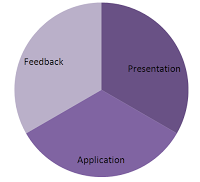 Each stage should represent about 1/3rd of the lesson time. Depending on the exercises that you introduce in a lesson, you can often combine Application and Feedback to occur simultaneously. This allows for more time to be applied to the Application and it allows for correcting or reinforcing behaviours as they happen.
Most training that is considered boring or ineffective by the learners, likely did not have sufficient time allocated to the Application and Feedback phases. Instead it relied too much on Presentation. Using this model keeps you on point. It’s easy for a passionate instructor to ramble on, especially if the topic is one of personal interest.
There are other models of lesson design out there; however some can be rather complicated to easily remember. PAF keeps things simple and therefore far more likely to be used properly.
During the Presentation phase, the instructor teaches the new knowledge or skills. During the Presentation you typically include some type of introduction which will include the what’s in it for me (WIIFM) for the students as well as some test for understanding to ensure that the knowledge or skill has been transferred.
Application is simply the time given to the learner to practice what they have learned. Although likely the simplest step in the process, Application is by far the most important. As far back as Aristotle we know that we learn by doing.
Feedback is needed to build the confidence in your learners who are performing well and to assist those that require further help.
Each stage should represent about 1/3rd of the lesson time. Depending on the exercises that you introduce in a lesson, you can often combine Application and Feedback to occur simultaneously. This allows for more time to be applied to the Application and it allows for correcting or reinforcing behaviours as they happen. Most training that is considered boring or ineffective by the learners, likely did not have sufficient time allocated to the Application and Feedback phases. Instead it relied too much on Presentation. Using this model keeps you on point. It’s easy for a passionate instructor to ramble on, especially if the topic is one of personal interest.
There are other models of lesson design out there; however some can be rather complicated to easily remember. PAF keeps things simple and therefore far more likely to be used properly.
Digestible Chunks
How much is too much training? I guess the only ones who can answer that are the learners themselves. What I try to do to make training easily digestible to my learning audience, is to break it down into easy to manage chunks.
One method of doing this is a part of Information Mapping, which I've spoken of before. Information Mapping is a method of organizing information into "maps" that only cover one topic. This information is further broken down into blocks which only contain one thing (set of instructions, piece of knowledge, etc). Information mapping's goal for how much information can be contained in either a map or block is 7 plus or minus 2 things. That seems a little strange but what it means is that the amount of information that we can remember is somewhere around 7 things. If you only have 2 other things to remember this is considered not enough information to break out into a new map or block of information, so up to 9 things are considered acceptable.
For those that doubt me about remembering 7 pieces of information, you can prove it to yourself by simply reciting your phone number. Also if you doubt the point about up to 9 pieces of information, include the area code (For North America this will in fact be ten pieces of information). Interestingly enough the phone companies who introduced direct dialing choose the format for telephone numbers because of this very fact of how people remember things.
Now what is interesting about the human mind is that we can interpret a great deal of information as a single piece of information. In fact most of us consider that 7 or 10 digit number as one piece of information. So in fact we as people may remember many phone numbers that seem important to each of us. I know my own phone number but I also know my wife's, my parents, my sister's, and I even know my mother-in-laws phone number. If you asked me to recite all that information it would actually be 50 individual digits that make up those 5 different numbers. It's easy for me to remember because I only think of it as 5 things.
You can do the same thing when organizing your training. For example; you may have determined that you need to train 18 individual concepts to a group of learners. Once you analyze the information you realize that these 18 steps fall into only a couple of larger categories. Here is an example as to how you might group the similar steps so that no single larger group of steps contain more than 7 smaller steps:
One method of doing this is a part of Information Mapping, which I've spoken of before. Information Mapping is a method of organizing information into "maps" that only cover one topic. This information is further broken down into blocks which only contain one thing (set of instructions, piece of knowledge, etc). Information mapping's goal for how much information can be contained in either a map or block is 7 plus or minus 2 things. That seems a little strange but what it means is that the amount of information that we can remember is somewhere around 7 things. If you only have 2 other things to remember this is considered not enough information to break out into a new map or block of information, so up to 9 things are considered acceptable.
For those that doubt me about remembering 7 pieces of information, you can prove it to yourself by simply reciting your phone number. Also if you doubt the point about up to 9 pieces of information, include the area code (For North America this will in fact be ten pieces of information). Interestingly enough the phone companies who introduced direct dialing choose the format for telephone numbers because of this very fact of how people remember things.
Now what is interesting about the human mind is that we can interpret a great deal of information as a single piece of information. In fact most of us consider that 7 or 10 digit number as one piece of information. So in fact we as people may remember many phone numbers that seem important to each of us. I know my own phone number but I also know my wife's, my parents, my sister's, and I even know my mother-in-laws phone number. If you asked me to recite all that information it would actually be 50 individual digits that make up those 5 different numbers. It's easy for me to remember because I only think of it as 5 things.
You can do the same thing when organizing your training. For example; you may have determined that you need to train 18 individual concepts to a group of learners. Once you analyze the information you realize that these 18 steps fall into only a couple of larger categories. Here is an example as to how you might group the similar steps so that no single larger group of steps contain more than 7 smaller steps:
- First Step
- Step 1
- Step 2
- Step 3
- Step 4
- Step 5
- Step 6
- Step 7
- Second Step
- Step 8
- Step 9
- Step 10
- Step 11
- Third Step
- Step 12
- Step 13
- Step 14
- Step 15
- Step 16
- Step 17
- Step 18
Training = Customer Service / Customer Service = Training
My wife and I frequent a certain local gas station for not only our fuel, but for other convenience needs as well. When we embark on a long drive to the city or to visit friends or family, we usually stop in to top up the gas tank and pickup a coffee or a snack for the drive. I estimate that at our peak (when gas prices were higher), we were spending approximately $500 per month at this one location.
Because we frequent this establishment so often, odds are that we will not get great customer service every single time we visit. Since new management has taken over some time ago, customer service has gone downhill. For me the major issue is that staff seems not to know what to do when something out of the ordinary takes place. An example of this occurred last week.
My wife and I stopped by as per normal, and attempted to purchase a fill up of gas. The pump seemed to act unusual and then suddenly reset to normal. I filled the tank and went inside with my wife to pay for the purchase. Due to some computer malfunction, they could not take our payment for anything other than cash. We offered debit card, or credit card, but the only thing they could accept was cash.
Well like most people now-a-days we don't generally carry cash. The attendant suggested that we withdraw the funds from their bank machine and simply pay for the purchase. While this is a great solution for them, we are charged an additional $1.50 service fee by our bank for using their machine. To both my wife and I this was unacceptable. We ended up writing essentially an IOU and vowed to return and pay the amount at a later time. We left the store frustrated and angry over how once again they were unable to satisfy us by making what should be a simple transaction, more complicated than it needed to be.
So you may ask where the training opportunity exists. It's simple - train your staff on the policies and procedures of the store. In this case there should be a policy and procedure on what actions to do when the computer responsible for taking payments for gasoline purchases fails. Maybe it's to deactivate the pumps, or maybe something simple as placing a sign out by the pumps informing customers that cash only purchases are acceptable. In either case the alternative of continually putting customers through the difficult situation my wife and I found ourselves in cannot be the solution. If you own a business, please train your staff. If you have trained your staff and they cannot cope with the unexpected than maybe you need to rethink your hiring decisions.
My wife and I worked for the same corporation when we met all those years ago. As my own sanity check, I quizzed her on many of the common scenarios we were trained on. For example; we both knew the procedures for what to do when our stores were held up for money or merchandise. We both recalled the procedures perfectly and would have been able to handle that situation. I should point out that neither of us has worked there in about a decade and neither of our stores where ever held up by criminals.
Training is crucial and no business can expect to function properly without it. It doesn't matter whether you hire a professional like myself or you conduct the training yourself. Ensuring your staff knows what to do when the unexpected occurs is the difference between your business running poorly or smoothly. My wife and I have decided not to return to this gas station for our future purchases, instead we will frequent their competition down the street. It's too bad because the competition does not offer all the conveniences that we enjoy.
Because we frequent this establishment so often, odds are that we will not get great customer service every single time we visit. Since new management has taken over some time ago, customer service has gone downhill. For me the major issue is that staff seems not to know what to do when something out of the ordinary takes place. An example of this occurred last week.
My wife and I stopped by as per normal, and attempted to purchase a fill up of gas. The pump seemed to act unusual and then suddenly reset to normal. I filled the tank and went inside with my wife to pay for the purchase. Due to some computer malfunction, they could not take our payment for anything other than cash. We offered debit card, or credit card, but the only thing they could accept was cash.
Well like most people now-a-days we don't generally carry cash. The attendant suggested that we withdraw the funds from their bank machine and simply pay for the purchase. While this is a great solution for them, we are charged an additional $1.50 service fee by our bank for using their machine. To both my wife and I this was unacceptable. We ended up writing essentially an IOU and vowed to return and pay the amount at a later time. We left the store frustrated and angry over how once again they were unable to satisfy us by making what should be a simple transaction, more complicated than it needed to be.
So you may ask where the training opportunity exists. It's simple - train your staff on the policies and procedures of the store. In this case there should be a policy and procedure on what actions to do when the computer responsible for taking payments for gasoline purchases fails. Maybe it's to deactivate the pumps, or maybe something simple as placing a sign out by the pumps informing customers that cash only purchases are acceptable. In either case the alternative of continually putting customers through the difficult situation my wife and I found ourselves in cannot be the solution. If you own a business, please train your staff. If you have trained your staff and they cannot cope with the unexpected than maybe you need to rethink your hiring decisions.
My wife and I worked for the same corporation when we met all those years ago. As my own sanity check, I quizzed her on many of the common scenarios we were trained on. For example; we both knew the procedures for what to do when our stores were held up for money or merchandise. We both recalled the procedures perfectly and would have been able to handle that situation. I should point out that neither of us has worked there in about a decade and neither of our stores where ever held up by criminals.
Training is crucial and no business can expect to function properly without it. It doesn't matter whether you hire a professional like myself or you conduct the training yourself. Ensuring your staff knows what to do when the unexpected occurs is the difference between your business running poorly or smoothly. My wife and I have decided not to return to this gas station for our future purchases, instead we will frequent their competition down the street. It's too bad because the competition does not offer all the conveniences that we enjoy.
Documentary Heaven
I am a visual learner. When someone like me decides to learn, their first instinct isn't to pick up a text book or to attend a classroom where they will listen to a professor speak for an hour. Our first instinct is to look for something visual. It may be a PowerPoint, or a flash demonstration or for that matter a full movie on the topic that we hope to learn about. For me there is nothing more pleasent than learning though a rich combination of visual and audio elements.
In every class you teach or for every online course you design, you will have learners who are just like me. If you want these learners to become engaged, the use of video will draw them right in. Of course continue to cater to all learning styles but the visual folks will love a good movie.
I stumbled across a great site that contains videos which seem to actually reside on Google or Youtube video. It's called Documentary Heaven. Unlike Youtube or Google Video, this site is organized into full feature length documentary films. If you maintain a blog like I do you can cut and paste the "embed code" from the video's source on Youtube directly into your blog. Double clicking on the videos found here will bring you to their source on Youtube where the "embed code" can easily be found.
For example, I love the history of the Mayan people. Ever since I visited the Mayan ruins in Mexico I have been fascinated with their history and culture. If I was teaching a course on Ancient Mexico I could embed the following video that I found by simply searching for "Maya" on Documentary Heaven, copy and past the "embed code" into the "Edit HTML" tab of your blog's entry page. The result is something like this...
Alternatively you could use this during an online or instructor led course as well. Your visual learners like me will become much more engaged and will certainly enjoy learning as well.
In every class you teach or for every online course you design, you will have learners who are just like me. If you want these learners to become engaged, the use of video will draw them right in. Of course continue to cater to all learning styles but the visual folks will love a good movie.
I stumbled across a great site that contains videos which seem to actually reside on Google or Youtube video. It's called Documentary Heaven. Unlike Youtube or Google Video, this site is organized into full feature length documentary films. If you maintain a blog like I do you can cut and paste the "embed code" from the video's source on Youtube directly into your blog. Double clicking on the videos found here will bring you to their source on Youtube where the "embed code" can easily be found.
For example, I love the history of the Mayan people. Ever since I visited the Mayan ruins in Mexico I have been fascinated with their history and culture. If I was teaching a course on Ancient Mexico I could embed the following video that I found by simply searching for "Maya" on Documentary Heaven, copy and past the "embed code" into the "Edit HTML" tab of your blog's entry page. The result is something like this...
Alternatively you could use this during an online or instructor led course as well. Your visual learners like me will become much more engaged and will certainly enjoy learning as well.
Use Screenr to Create PC Tutorials
I'm not an expert on this particular tool (yet), but I discovered it today and see a real application towards e-learning. Screenr is a web based tool for capturing on screen tutorials and other PC type actions for creating simulations. If you have already invested in Adobe Captivate or another similar tool then you don't need it, however as free web 2.0 type tools go, this is pretty cool. Here is a screenr produced by a fellow training blogger Tom Kuhlmann :
So it seems that all you need is a browser, a microphone and a good idea. As I learn more about this really neat web application, I will post more details, however you can check out Tom's blog on rapid e-Learning and his other Screenr videos below:
http://www.articulate.com/rapid-elearning/
http://screenr.com/user/tomkuhlmann
So it seems that all you need is a browser, a microphone and a good idea. As I learn more about this really neat web application, I will post more details, however you can check out Tom's blog on rapid e-Learning and his other Screenr videos below:
http://www.articulate.com/rapid-elearning/
http://screenr.com/user/tomkuhlmann
75-year-old immigrant gets her third U.S. college degree - KansasCity.com
Really neat how this woman continues to learn and grow even into her 70s. I hope I am as motivated when I'm 75.
75-year-old immigrant gets her third U.S. college degree - KansasCity.com
75-year-old immigrant gets her third U.S. college degree - KansasCity.com