

Convincing Your Boss to Send You to the Adobe Learning Summit, 2022
I’m so happy that Adobe has decided to return to in-person events with the Adobe Learning Summit from October forth until the sixth, 2022. The Adobe eLearning World virtual conference was a welcome substitution for the in-person conferences over the last couple of years, but one of the most significant benefits I enjoy is meeting my fellow Adobe Captivate users in person. I’ve developed relationships with various people in our industry, and it’s always a pleasure to see these folks in person, especially over a great meal or a few drinks.
I also want to emphasize that I enjoy meeting all of you who subscribe to my YouTube channel. If you see me at the conference, don’t be afraid to walk up and say hello. I’m always happy to meet the people who have supported me and helped me succeed in this industry I enjoy.
Las Vegas

Like in the past, this event will be held at The Mirage in Las Vegas, Nevada. I’ve stayed here for past Adobe Learning Summit summits, and it’s a beautiful location for a conference. Even if you are not a gambler, you can enjoy the sights and sounds of las vegas. You are just a few steps away from the famous Las Vegas strip, where you can see a show, visit various attractions, and just see the sights. While attending conferences in Las Vegas, I have seen various Cirque du Soleil shows, including KÀ at the MGM Grand and The Beatles Love at The Mirage.

Benefits of Attending
Of course, when you present to your manager why you need to be at this conference, you might not want to mention all the trappings that Las Vegas has to offer. That’s just between you and me. Instead, focus on the benefits your organization will receive with your attendance at this event.
Design Thinking & Strategy Track
If you are a leader in learning development, you can discuss that this conference focuses not only on tools that designers and developers need, this conference has an entire learning track dedicated to design thinking and strategy, where you will learn about the latest trends and challenges about the future of work and how you can tackle them. You will learn how to strategize, design, and implement successful learning programs and participate in workshops to solve real business problems using learning and technology. Here are the proposed session that falls into that category:
Design Thinking Workshop Intro
Design Thinking Workshop: Building Empath for Users
Design Thinking Workshop: Defining A Problem Statement
Design Thinking Workshop: Ideation
Learning Obsessed Leadership Powers Great EX & CX
Power Hour: How Learning Drives Revenue & Unlocks New Growth Channels
Building A Value Driven Learning Strategy for Your Sales & Partner Teams
Invest Today to Grow Tomorrow's Workforce
Fueling The Future of Work with Learning Technology
How To Retain Your Customers: Learning Strategies to Improve Experience & Loyalty
Leadership Laboratory: The Art of Connecting Learning Programs with Business Success
Leadership Laboratory: Transforming Talent with A Culture of Learning
Creators’ Labs
If you are a designer and developer, you will have access to workshops to learn about visual design and video and audio production. There will be workshops dedicated to being more organized with your design and development process and, of course, a chance to get some skills with Adobe Captivate.
Here are the proposed sessions that fall into this category
Visual Design Workshop - Photoshop and CCE Essentials
Visual Design Workshop - Illustrator Essentials
Video Production for Elearning
Voice-Over Workshop - Scripting and Audio Editing
Needs Assessment Workshop
Instructional Design Documentation Workshop
Elearning Storyboarding Workshop
Convert Storyboard to Elearning Content with Adobe Captivate
Creating Scenario-Based Learning Using Adobe Captivate
Advanced Elearning Authoring with Adobe Captivate
Building Effective Assessments and Knowledge Checks Workshop
Benefits to Your Organization
Here is a list of benefits you can include when presenting why you need to be in attendance at this year’s Adobe Learning Summit
Learn about the latest technologies and prepare for the next release of Adobe Captivate
Learning from industry professionals
Sessions will be practical and can be implemented upon your return
Keynote speakers with the expertise you would otherwise not have access to
Access to Adobe team members to answer your questions and help with your solutions
Project Charm
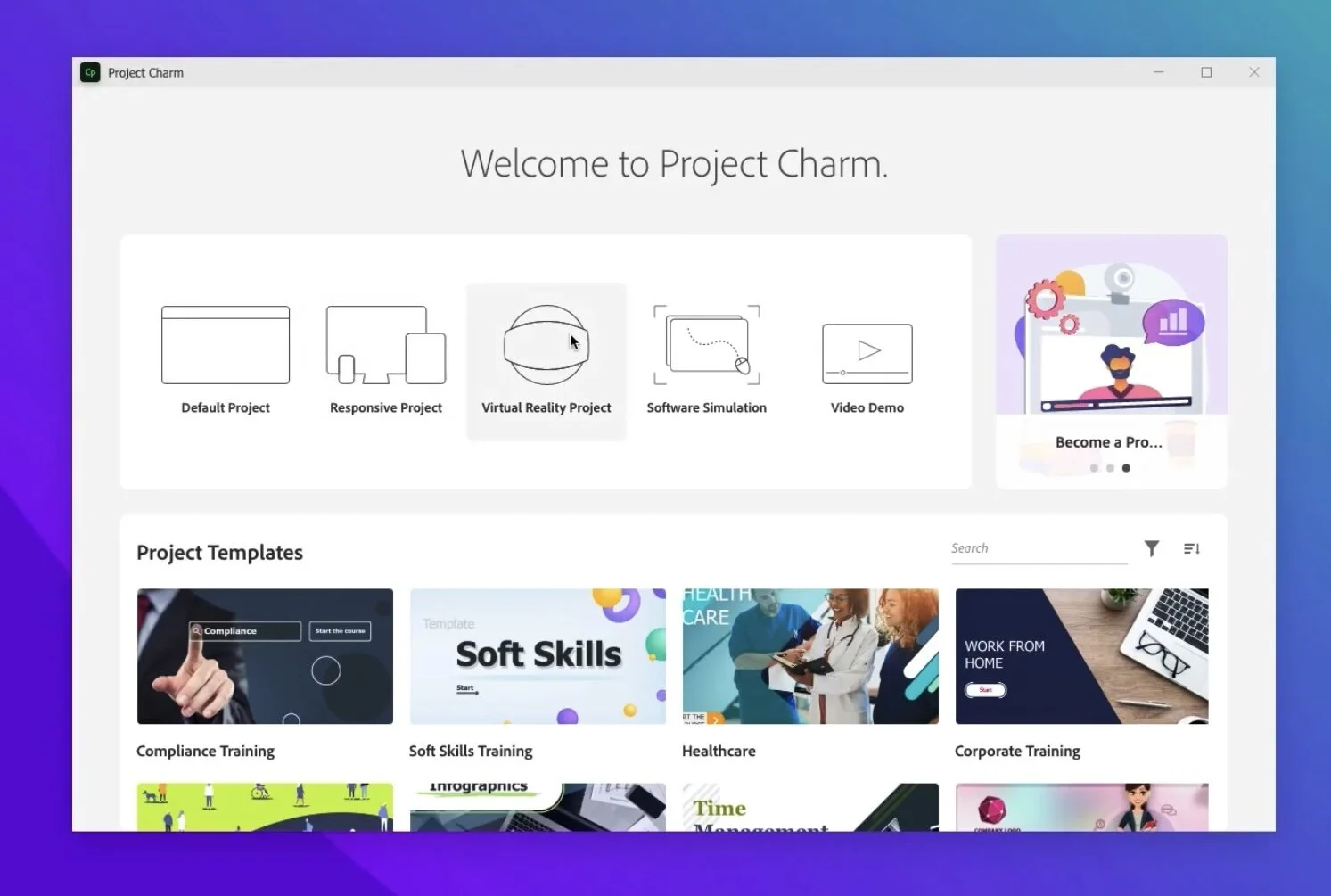
One of the elements that I’m looking forward to is the Project Charm Test Kitchen on day two of the conference. I don’t have any details yet, but I’m sure I’ll walk away with the information I didn’t have before the conference. Now I know what you are thinking. Sure, sure, we have heard promises of Project Charm before. I’m reasonably sure that things like the new Apple M1 and M2 processors have added delays to the development of this new software, and like with any new software development, there are unforeseen delays. I have it on good authority that this release is an entirely new version of Adobe Captivate. In the past, Captivate was built on top of the previous releases’ code base. Not so with Project Charm. I want them to take their time to get it right. I can still use Adobe Captivate 2019 to build practical training for my clients.
My Session
Of course, the one session I can guarantee I will be in attendance for is Creating Scenario Based Learning Using Adobe Captivate. I know this because this is the session I will be presenting. I will share my experience when stakeholders in my organization asked to take my old drab eLearning courses to something more exciting and engaging for the learners. I implemented scenario-based learning into my design and development, and the results were astounding. Don’t worry; this approach to design and development doesn’t require any skills you don’t already have. The feedback on this approach pleased my stakeholders, manager, and learners. This hands-on workshop will allow you to take a supplied project file created in Adobe Captivate and follow along with me as I turn it into something that will remind learners of situations they have experienced in the past. They will understand why they are learning the concepts and skills because of how familiar it will all seem. Anyway, I hope you can make it to my session.
Other Sessions I’m Interested In
I have to attend my session, but that doesn’t mean I’m just going to go back to my hotel room and take a nap. I want to learn too. Some of the other sessions I’m interested in are the Visual Design Workshop - Photoshop and CCE essentials: While I’ve been using Adobe Photoshop since version 7, I have no formal training in it. I could always use some extra design tools in my visual toolbelt. I’m very interested in Creative Cloud Express as well. I love the idea of putting more of my workflow in a mobile setting. I feel I know who will be asked to present Video Production for eLearning. If it is who I think it is, I can promise you’ll learn something new or unexpected in this session. I know I always do. Also, Advanced eLearning Authoring with Adobe Captivate - Custom Interactions, Game Based Learning will surely cover some skills for those who want to take their elearning to the next level. I hope to walk away with some incredible new knowledge from this session.
Convincing Your Boss
When you present this to your manager, be sure to mention the early bird pricing where your organization can save $200 off the regular price of this event. Early bird pricing ends on August 15th, so you will want to act now to get your manager’s approval to book this incredible event.

Custom Closed Caption Icon for Your Adobe Captivate eLearning Project
In this video, I show you how you can create a custom Closed Caption icon for your Adobe Captivate eLearning project.
In this video, I show you how you can create a custom Closed Caption icon for your Adobe Captivate eLearning project.

Customize Effects and Motion Paths in Your Adobe Captivate eLearning Project
In this video, I show you how you can customize effects and motion paths in your Adobe Captivate eLearning projects by exporting the XML file and making some minor edits.
In this video, I show you how you can customize effects and motion paths in your Adobe Captivate eLearning projects by exporting the XML file and making some minor edits.
Customize Effects and Motion Paths in Your Adobe Captivate eLearning Project

How I Create My Thumbnails for YouTube Using Adobe Photoshop
This video shows you how I create my thumbnails for YouTube using Adobe Photoshop.
This video shows you how I create my thumbnails for YouTube using Adobe Photoshop.

Top 5 Snagit 2022 Skills for eLearning Professionals
In this video, I share my top 5 Snagit 2022 Skills you will need as eLearning professionals.
In this video, I share my top 5 Snagit 2022 Skills you will need as eLearning professionals.
00:00 Introduction
01:02 Cropping an image
03:03 Resizing an image
04:41 Flipping an image
05:30 Blur an image
06:39 Record a video

Adobe Captivate Shared Action Mute Button for Responsive Design
In this video, I show you how to create a mute button using shared actions in your responsive design adobe captivate elearning project.
In this video, I show you how to create a mute button using shared actions in your responsive design adobe captivate elearning project.

Working with Backgrounds in Adobe Captivate Responsive eLearning Projects
In this video, I show you my process when working with backgrounds in my Adobe Captivate responsive elearning projects.
In this video, I show you my process when working with backgrounds in my Adobe Captivate responsive elearning projects.

Make Your Adobe Captivate Text Entry Boxes Mandatory
In this video, I will show you how you can make your text entry boxes in Adobe Captivate mandatory.
In this video, I will show you how you can make your text entry boxes in Adobe Captivate mandatory. In other words, learners will not be able to move forward in this elearning course until they enter some text into the field.
Current State of Affairs with Adobe Captivate
There have been many complaints about Captivate and Project Charm lately on the forums. I decided to weigh in with a few thoughts of my own. It's not uncommon for new technology to experience delays.
There have been many complaints about Captivate and Project Charm lately on the forums. I decided to weigh in with a few thoughts of my own. It's not uncommon for new technology to experience delays. For example, the period between Windows XP and Windows Vista was five years due to Microsoft trying to accomplish too much with this update.
I think the biggest mistake Adobe has made with Adobe Captivate was to switch from version numbers to version years. I wonder if we would be as upset as we are if, in August of 2018, Adobe marketed with version 11.0.0.243 and followed it up with the following updates:
11.0.1.266
11.5.0.476
11.5.4.499
11.5.4.613 (macOS only)
11.5.5.553 (Windows) / 11.5.5.676 (macOS)
11.8.0.586 (Windows subscription)
11.8.0.710 (macOS subscription)
Most of these were bug fixes, but Adobe added some new features to Adobe Captivate during this journey. As a result, Adobe would have been justified in releasing it as version 12 due to the new capabilities we didn't have before. I would have liked to see a version of the software that removed all the legacy features such as learning interactions incompatible with HTML5 and removed the ability to publish to PhoneGap and SWF. This update could have been called Adobe Captivate 2021 and released the same month when support for Flash Player ended. Adobe could have based on the same code base we have now, giving them time to work on a significant change like Project Charm.
Incidentally, I'm curious what feature(s) people feel they are missing in Adobe Captivate 2019. I use it every day and am capable of building effective elearning for my clients. Don't get me wrong. I'm not an apologist for Adobe, nor am I necessarily a fanboy, but while Adobe Captivate 2019 isn't as pretty as what we saw in the demo last year, I still feel it's an instrumental piece of software for me. But, of course, this is just my opinion. The rest of you may have some valid points that I'm not picking up on. However, I will say that I think many of you are running the software under less than ideal hardware or circumstances. I don’t experience the issues that some of you are complaining about.

Convert Old Adobe Captivate Captions to Smart Shapes
In this video, I show you how to convert the old-style question slide captions from older Captivate projects to the newer style that uses smart shapes.
In this video, I show you how to convert the old-style question slide captions from older Captivate projects to the newer style that uses smart shapes. Smart shapes are far more versatile, and they don't require you to write any code to make them work if you wish to customize them.