

Demand for the Adobe Learning Summit is High
Scarcity seems to increase demand. The Adobe Learning Summit Creator Labs Track is sold out, and you can only put yourself on the waiting list.
Registration
Scarcity seems to increase demand. The Adobe Learning Summit Creator Labs Track is sold out, and you can only put yourself on the waiting list. The folks at Adobe probably wouldn't endorse this suggestion, but here is my conference hack for this event. The FAQ for the conference says the following about switching to sessions in another track. Yes, you can build your own schedule with a mix of sessions from both tracks. However, the first preference for sessions on either track will be given to participants registered explicitly for that track due to capacity restrictions. Any additional seats remaining will be available on a first-come, first-served basis based on availability.
So I advise that if you want to go to the Adobe Learning Summit in Las Vegas in two weeks, register for the Design Thinking and Strategy Track but attend the sessions you can. Keep in mind that they have invited additional speakers to accommodate the demand. For example, Joe Ganci and I will deliver the same session, so there will be two sessions on the same topic.
Here is the link to the registration site for this conference: https://adobe-learning-summit.elearning.adobeevents.com/
Recommended Sessions
I don’t need to tell you why I want to attend the Project Charm Test Kitchen or the What’s New At Adobe session, but I think you should make a concerted effort to attend the following sessions, and I’ll tell you why.
Keynote: Digital Persuasion - Ignite your Influence
Erin King will be presenting this session. She is a best-selling author and a successful entrepreneur. The session will discuss how to persuade people in the digital world. I know one of the things I’ve always found challenging is compliance with my online learning. So I want to attend this keynote to learn a thing or two to get more people to put their eyeballs on my material.
Learning Is The Missing Piece Of Your CX Culture Plan
I’m looking forward to learning from Katy Tynan about getting the customer experience mindset into the learning in an organization. CX is a topic that I’m passionate about, and I’m hoping she can provide some insight as to what we can do to improve organizations in this area.
Creating scenario-based learning using Adobe Captivate
Of course, I hope you attend my session. I will be there. In my eLearning developer journey, I learned that creating training that incorporates a storytelling aspect and choices for your learners is more engaging than regular training. Still, I will show you how easy it is with Adobe Captivate. My hope is this session will inspire you to take your eLearning from the same old dull “click next to continue“ type of course into something that will remind your learners of real situations they have encountered in the workplace. Not only that, but they will learn by seeing the consequences of their choices in the safe space of eLearning.
Staying in Vegas
Hotels
In past years I have recommended the MGM MyVegas app. You accumulate points by playing online casino games, which can be exchanged for great bargains in Vegas. I have found this year that the deals are not so great. In the past, I have exchanged my “coins” for complimentary nights in hotels. This time around, I had trouble booking nights as certain days were blacked out, and the price per night was much higher than I remember. This year I got a Groupon for Ballys across the street from the Mirage. Here’s the link if you want to be close but save a few dollars: Bally's Las Vegas Hotel & Casino - Las Vegas, NV
Food
The conference provides complimentary breakfast and lunch for all three days, so make sure you keep your per diem in your pocket for dinner, as there are some excellent restaurants in the area. Besides, the Mirage food is above average for hotel food, so even if you take a break from sessions at the conference, come down from your room and join the rest of us for lunch.
Last year at another eLearning-related conference, I went out for dinner at Carmines, located in the Forum Shops at Caesars Palace. It was fantastic, with significant portions and real authentic Italian food. Here’s the website: https://www.carminesnyc.com/locations/las-vegas
If you are on a fast food budget, there are several restaurants within walking distance from the Mirage. Do yourself a favor, and try something you can’t just get at home. I’m from the East coast, so In and Out Burger is a treat for me, and I would much more likely grab a meal there instead of McDonald’s or something else similar.
Stuff to do
You will be in Las Vegas for at least three days, and the conference doesn’t run around the clock. If you don’t get to Las Vegas too often, I recommend you get out of the hotel and see some stuff. There is so much you can do in the Vegas area. I have gone to shows, including several of the Cirque du Soleil shows, I already mentioned dining out, which can certainly be a form of entertainment, and of course, gambling.
Overall my message to everyone is to be careful. Be cautious whether you decide to venture out on your own or see if you can double your bank balance before leaving this unique city. Keep your wallets in your front pocket and assume that if a person or character offers to take a selfy with you, they expect a tip.

Live Stream - Instructional Design Job Interview Secrets | September 19, 10 AM ET
Join me online for a live stream on instructional design job interview secrets on September 10th at 10 AM ET.
Join me online for a live stream on instructional design job interview secrets on September 10th at 10 AM ET. Anyone can watch, but you must become a member to participate in the live chat and ask questions. Here's the link to join: https://bit.ly/JoinCp
You can watch here or get a better live stream experience here: https://youtu.be/X3VqLDolBHs
Here are the questions and the answers I prepared for myself: https://drive.google.com/file/d/1btSLF0ilvVf3h6QC2Pb68Vh85_oWiQTM/view?usp=sharing
Write these for yourself, and you will be better prepared for your next interview.

Click All Links Before Next Button Appears in Adobe Captivate 2019
In this video, I will show you how you can require learners to click all links before the next button appears in your Adobe Captivate slides.
In this video, I will show you how you can require learners to click all links before the next button appears in your Adobe Captivate slides.

Upload Your Adobe Captivate eLearning Project to the Web
In this video, I will show you how to publish your Adobe Captivate project for the web, sign up for the Amazon AWS S3 service…
In this video, I will show you how to publish your Adobe Captivate project for the web, sign up for the Amazon AWS S3 service, configure the service for web hosting, and upload your published eLearning project for sharing on the web.

Dropdown Knowledge Check Interaction for Your Adobe Captivate eLearning
I'll show you how to create a dropdown knowledge check interaction for your Adobe Captivate eLearning in this video.
I'll show you how to create a dropdown knowledge check interaction for your Adobe Captivate eLearning in this video. Download members of my YouTube channel will be able to download this interaction for no additional cost.
Link to Other Adobe Captivate Projects From Within Adobe Captivate Projects
In this video, I show you how you can link to other Adobe Captivate projects from within another Adobe Captivate project.
In this video, I show you how you can link to other Adobe Captivate projects from within another Adobe Captivate project.
Top 7 Photoshop Skills for eLearning
In this video, I share my top 7 photoshop skills that I use almost daily for my eLearning design and development.
In this video, I share my top 7 photoshop skills that I use almost every day for my eLearning design and development.
In this video, I share my top 7 photoshop skills that I use almost daily for my eLearning design and development.
Adobe Captivate Drag and Drop With More Than One Correct Answer
In this video, I will show you how you can have more than one correct answer in your Adobe Captivate Drag and Drop interaction.
In this video, I will show you how you can have more than one correct answer in your Adobe Captivate Drag and Drop interaction. This is a deeper dive into the drag and drop interaction that doesn't use the normal three-step drag and drop wizard.

How to Improve Performance on Older PCs
In this video, I share some ideas on how to improve performance on underpowered Windows PCs.
In this video, I share some ideas on how to improve performance on underpowered Windows PCs. I recently purchased a second-hand Microsoft Surface Pro 3 as sort of a backup computer but mostly to use when I travel. The problem is that the Surface Pro 3, by today's standards is underpowered. I wanted to squeeze as much performance out of this machine as I could so I researched what I could do and I'm sharing that with all of you as well. Please let me know if you have any other suggestions in the comments of this video.
Notes from preparing this video
Goals for this computer
Performance over Battery life as I will run on AC Power
Storage is minimal, so I only run applications I need when traveling
Leave my primary PC safely home
Not using Windows 11 because the old computer doesn't support it
Specs
4th generation Intel Core i5
4GB RAM
128GB storage
Condition at start of the video
Wiped storage
installed Windows 10
installed software I need
Updated windows 10 and apps using Update and app store
Belief
Optimizations will be minor, but together, you can improve performance on an underpowered PC like this one.
Starting on the desktop
Right-click on the Taskbar and Select Search, uncheck Show search highlights or Show search icon instead of the Search box.
Right-click on the Taskbar, select News and Interest and unselect Show icon and text.
Click the battery icon in your system tray and change your Power Mode to Best performance.
Settings
System
Settings > System > Graphics Settings (bottom)
Settings > System > Notifications & Actions. Turn off notifications and Settings. Uncheck the three last items.
Settings > System > Focus assist - Alarms only
Settings > System > Storage - Configure
Settings > System > About - Advanced system settings
Devices
Settings > Devices > Autoplay - turn off
Settings > Devices > USB - Disable both items
Personalization
Settings > Personalization > Background - discuss wallpaper
Settings > Personalization > Colors - Turn off transparency effects
Settings > Personalization > Themes - Avoid themes with switching wallpapers - effects storage and performance
Settings > Personalization > Start - turn off anything you don't need or use
Apps
Settings > Apps > Apps & features - Optional features
Settings > Apps > Apps & features - uninstall anything you don't need or use
Settings > Apps > Apps for websites - turn off maps for maps.windows.com
Settings > Apps > Video playback - Optimize for video quality
Settings > Apps > Startup - unselect anything you don't use daily.

Convincing Your Boss to Send You to the Adobe Learning Summit, 2022
I’m so happy that Adobe has decided to return to in-person events with the Adobe Learning Summit from October forth until the sixth, 2022. The Adobe eLearning World virtual conference was a welcome substitution for the in-person conferences over the last couple of years, but one of the most significant benefits I enjoy is meeting my fellow Adobe Captivate users in person. I’ve developed relationships with various people in our industry, and it’s always a pleasure to see these folks in person, especially over a great meal or a few drinks.
I also want to emphasize that I enjoy meeting all of you who subscribe to my YouTube channel. If you see me at the conference, don’t be afraid to walk up and say hello. I’m always happy to meet the people who have supported me and helped me succeed in this industry I enjoy.
Las Vegas

Like in the past, this event will be held at The Mirage in Las Vegas, Nevada. I’ve stayed here for past Adobe Learning Summit summits, and it’s a beautiful location for a conference. Even if you are not a gambler, you can enjoy the sights and sounds of las vegas. You are just a few steps away from the famous Las Vegas strip, where you can see a show, visit various attractions, and just see the sights. While attending conferences in Las Vegas, I have seen various Cirque du Soleil shows, including KÀ at the MGM Grand and The Beatles Love at The Mirage.

Benefits of Attending
Of course, when you present to your manager why you need to be at this conference, you might not want to mention all the trappings that Las Vegas has to offer. That’s just between you and me. Instead, focus on the benefits your organization will receive with your attendance at this event.
Design Thinking & Strategy Track
If you are a leader in learning development, you can discuss that this conference focuses not only on tools that designers and developers need, this conference has an entire learning track dedicated to design thinking and strategy, where you will learn about the latest trends and challenges about the future of work and how you can tackle them. You will learn how to strategize, design, and implement successful learning programs and participate in workshops to solve real business problems using learning and technology. Here are the proposed session that falls into that category:
Design Thinking Workshop Intro
Design Thinking Workshop: Building Empath for Users
Design Thinking Workshop: Defining A Problem Statement
Design Thinking Workshop: Ideation
Learning Obsessed Leadership Powers Great EX & CX
Power Hour: How Learning Drives Revenue & Unlocks New Growth Channels
Building A Value Driven Learning Strategy for Your Sales & Partner Teams
Invest Today to Grow Tomorrow's Workforce
Fueling The Future of Work with Learning Technology
How To Retain Your Customers: Learning Strategies to Improve Experience & Loyalty
Leadership Laboratory: The Art of Connecting Learning Programs with Business Success
Leadership Laboratory: Transforming Talent with A Culture of Learning
Creators’ Labs
If you are a designer and developer, you will have access to workshops to learn about visual design and video and audio production. There will be workshops dedicated to being more organized with your design and development process and, of course, a chance to get some skills with Adobe Captivate.
Here are the proposed sessions that fall into this category
Visual Design Workshop - Photoshop and CCE Essentials
Visual Design Workshop - Illustrator Essentials
Video Production for Elearning
Voice-Over Workshop - Scripting and Audio Editing
Needs Assessment Workshop
Instructional Design Documentation Workshop
Elearning Storyboarding Workshop
Convert Storyboard to Elearning Content with Adobe Captivate
Creating Scenario-Based Learning Using Adobe Captivate
Advanced Elearning Authoring with Adobe Captivate
Building Effective Assessments and Knowledge Checks Workshop
Benefits to Your Organization
Here is a list of benefits you can include when presenting why you need to be in attendance at this year’s Adobe Learning Summit
Learn about the latest technologies and prepare for the next release of Adobe Captivate
Learning from industry professionals
Sessions will be practical and can be implemented upon your return
Keynote speakers with the expertise you would otherwise not have access to
Access to Adobe team members to answer your questions and help with your solutions
Project Charm
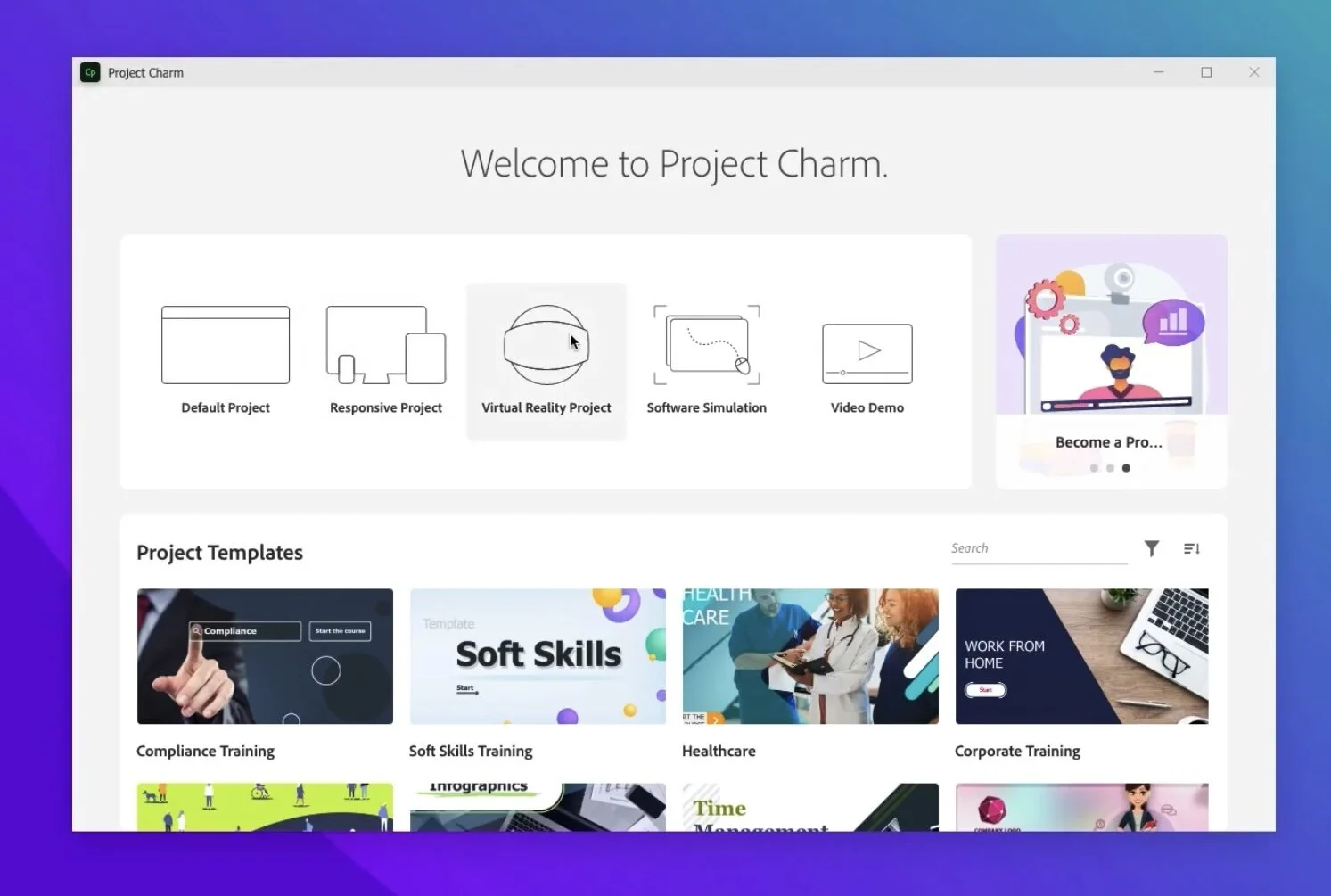
One of the elements that I’m looking forward to is the Project Charm Test Kitchen on day two of the conference. I don’t have any details yet, but I’m sure I’ll walk away with the information I didn’t have before the conference. Now I know what you are thinking. Sure, sure, we have heard promises of Project Charm before. I’m reasonably sure that things like the new Apple M1 and M2 processors have added delays to the development of this new software, and like with any new software development, there are unforeseen delays. I have it on good authority that this release is an entirely new version of Adobe Captivate. In the past, Captivate was built on top of the previous releases’ code base. Not so with Project Charm. I want them to take their time to get it right. I can still use Adobe Captivate 2019 to build practical training for my clients.
My Session
Of course, the one session I can guarantee I will be in attendance for is Creating Scenario Based Learning Using Adobe Captivate. I know this because this is the session I will be presenting. I will share my experience when stakeholders in my organization asked to take my old drab eLearning courses to something more exciting and engaging for the learners. I implemented scenario-based learning into my design and development, and the results were astounding. Don’t worry; this approach to design and development doesn’t require any skills you don’t already have. The feedback on this approach pleased my stakeholders, manager, and learners. This hands-on workshop will allow you to take a supplied project file created in Adobe Captivate and follow along with me as I turn it into something that will remind learners of situations they have experienced in the past. They will understand why they are learning the concepts and skills because of how familiar it will all seem. Anyway, I hope you can make it to my session.
Other Sessions I’m Interested In
I have to attend my session, but that doesn’t mean I’m just going to go back to my hotel room and take a nap. I want to learn too. Some of the other sessions I’m interested in are the Visual Design Workshop - Photoshop and CCE essentials: While I’ve been using Adobe Photoshop since version 7, I have no formal training in it. I could always use some extra design tools in my visual toolbelt. I’m very interested in Creative Cloud Express as well. I love the idea of putting more of my workflow in a mobile setting. I feel I know who will be asked to present Video Production for eLearning. If it is who I think it is, I can promise you’ll learn something new or unexpected in this session. I know I always do. Also, Advanced eLearning Authoring with Adobe Captivate - Custom Interactions, Game Based Learning will surely cover some skills for those who want to take their elearning to the next level. I hope to walk away with some incredible new knowledge from this session.
Convincing Your Boss
When you present this to your manager, be sure to mention the early bird pricing where your organization can save $200 off the regular price of this event. Early bird pricing ends on August 15th, so you will want to act now to get your manager’s approval to book this incredible event.