
Be Wary of Authoring Tool Comparisons
I often see articles, blog posts, or webinars entitled something like Storyline versus Captivate or How the Top 5 Authoring Tools Stack Up, or some other comparable title. I generally avoid this conversation because to me there are so many variables that there is never one defining thing that makes software A better than Software B. Also much of this debate is subjective since what I think is important may not be what you think is essential…
I often see articles, blog posts, or webinars entitled something like Storyline versus Captivate or How the Top 5 Authoring Tools Stack Up, or some other comparable title. I generally avoid this conversation because to me there are so many variables that there is never one defining thing that makes software A better than Software B. Also much of this debate is subjective since what I think is important may not be what you think is essential.
When I first got into designing and developing eLearning, it was around 2004, and the first authoring tool I used was Adobe Captivate 2.0. A year or two later, the company I worked for purchased a new LMS. That LMS was from SumTotal, and they also wanted to sell their authoring solution as well. This authoring tool was Toolbook, and I believe it was version 9. A year or two later I left that company and started working for another organization that used Adobe Captivate and I've used Captivate ever since. There were some small jobs done in Lectora and Storyline along the way as well, but I didn't spend enough time in either to form a solid opinion.
Based on that, you might think that I would be qualified to at least offer my opinion with a comparison between Toolbook and Captivate, but I feel differently. I presently use the current release of Captivate. I've not actively used Toolbook in many years. Most of what I learned about Toolbook has faded from memory. It was a powerful piece of software that published to HTML before many other authoring tools, but that's about all I recall. In fact, it doesn't matter what I remember because even if I had the perfect recollection of the software, Toolbook has updated several times since I used it. The best comparison I could give is to compare Toolbook from ten years ago with Adobe Captivate 2017 Release. Of course, this wouldn't be very fair to Toolbook.
Since most people are like me and don't use more than one authoring tool at a time, I would be suspect of any comparisons between multiple authoring tools. Also, if someone is trying to convince you that software A is better than software B, ask yourself what's in it for them? Does that so-called eLearning expert work for Software A and ultimately is trying to discredit the competition and boost their sales? Hmmm.
If you're a decision maker in your organization looking to purchase elearning authoring software for your people, make sure you talk to your eLearning developers and find out what they have used in the past. Ask them what they liked about that software and what they didn't like about it. Find out what sort of support the software creator offers. Consider what the software includes. If you have to purchase additional software to accomplish the same thing that a single competitor provides in one package, that great deal may not be so good after all.
The Future of Adobe Captivate
One of the most popular questions my viewers on YouTube ask me is what's going to be in the next version of Adobe Captivate? Of course, I don't know anything more than anyone else. However, one of the reasons that I enjoy attending the Adobe eLearning live events is the sneak peeks…
One of the most popular questions my viewers on YouTube ask me is what's going to be in the next version of Adobe Captivate? Of course, I don't know anything more than anyone else. However, one of the reasons that I enjoy attending the Adobe eLearning live events is the sneak peeks. This week did not disappoint. Here is what we learned.
Interactive video will be a big part of a future version of Adobe Captivate. You will be able to import a video from a file on your computer or from a video streaming service. From there you select various time stamps where you present questions to your learners. Depending on their input, the video can either continue playing from that point or jump back to another location if remediation is required.
360° virtual interactions will also be coming to Adobe Captivate. Imagine being able to present objects or locations to your learners that would be impossible to take them to under normal circumstances. For example, many workplaces may be too hazardous to conduct training sessions in, or perhaps it's too costly to bring learners on a tour of such facilities. With Adobe Captivate you will be able to capture 360° photos and incorporate them into your eLearning. You will be able to add hotspots where learners can click and learn more about specific areas within that location. At the end of the tour, you can add quizzes to test the knowledge of your learners before they move on.
Last but not least we will see some significant enhancements to Adobe Captivate Prime, Adobe's cloud-based learning management system that works with the Captivate authoring tool. In addition to the regular functions of an LMS, Prime will allow users to share outside content with their colleagues. Also, users will be able to create content to share with each other. Algorithms will determine if further content curation is required and can assign that curation to subject matter experts for review.
As with all the Adobe sneak peeks it's important to note that these features are in development and there is no guarantee they will end up in the next release of Adobe Captivate or Captivate Prime. It is interesting to learn about what the future might include and also encouraging to know that Adobe is working hard to make these products even better for us than they already are.
The Tools I Use
On a recent live stream, I was asked about which tools I use to create my eLearning and video tutorials. I gave a partial answer during the live stream but I thought I would go a little more in-depth on that question here...
On a recent live stream, I was asked about which tools I use to create my eLearning and video tutorials. I gave a partial answer during the live stream but I thought I would go a little more in-depth on that question here.
Adobe Captivate
I think it's obvious that I use Adobe Captivate and almost always have the latest version. I do also keep the previous version installed on my main system. Up to and including presently I have always purchased a perpetual license for Adobe Captivate. I know that Adobe would prefer me to tell you to buy the subscription version but I always feel more comfortable knowing that regardless of what my current situation is, I can continue to run my Copy of Captivate indefinitely.
One thing that the viewers of my YouTube tutorials are often surprised to learn is that I also use Adobe Captivate to record my videos. I use the Video Demo feature to record the features that I’m demonstrating on another instance of Captivate that I run simultaneously.
Adobe Creative Cloud
Going back several years I purchased the Adobe eLearning Suite which is no longer available. The suite came with Adobe Captivate plus several key applications that became part of my workflow. The main applications from that suite that were important to me were Photoshop and Audition. I relied on those apps for years after upgrading to newer versions of Captivate. Until very recently, Photoshop CS5 was more than enough for my needs. A few years ago I became very serious about my photography and began purchasing copies of Lightroom. Eventually, I signed up for the Creative Cloud photography plan for about $10 month. This last fall there was some great pricing on the full Creative Cloud that I decided to take advantage of. It allowed me to get the latest version of all my applications for only a few dollars more than I was spending on the Photography plan and another third party service that I no longer felt was needed. This now allows me to have the latest version of several other applications which have proven beneficial as well.
Microsoft Office
It’s almost automatic that a PC user will have some version of Microsoft Office. I took advantage of some really good pricing on Office 2013 a few years ago and I haven’t felt the need to upgrade to Office 2016. Perhaps in a few years, I will be forced to but for right now 2013 is fine.
Snagit
I purchased Snagit 11 a number of years ago and I install this on each computer I have used since then. It is the defector standard for screen capture applications. In a pinch, I could get away without it but it’s annotation and markup tools are really nice and certainly easy to use.
PureText
I’m not even sure when I first became aware of PureText but PureText is a simple application that sits in your system tray. When you copy some text from various sources, in most cases you are also copying some text formatting as well. One click on the PureText icon in your system tray will strip out any formatting before you paste it into your destination application, which for me is typically Adobe Captivate. Captivate doesn’t always play well with formatting, especially from Microsoft Word, so this is a nice feature to have at my disposal. Puretext can be downloaded for free from stevemiller.net.
FileZilla
At some point, I usually need to upload my published eLearning projects to a web server. For me, there is nothing I need from a file transfer protocol (FTP) application that FileZilla cannot provide. Like PureText, FileZilla is completely free. In this case, FileZilla is open source. At present, it falls under the GNU General Public License so there are no ads embedded in the application and unless you get the software from a disreputable source there is no bundled crapware that comes along with it. It’s a great choice for FTP software.
About Me
I've combined my passion for design, usic and photography; with my desire to teach, to become a highly sought after Instructional Designer, Developer, facilitator. If you need help building your next eLearning project, consider hiring me. I create learning solutions that are not only visually appealing, but effective at achieving not only the student's goals, but the organization's business goals as well.
Responsive Learning
When designing for mobile I find you need to rethink learning. I always try to imagine what my learner needs from each project. For example, if an employee wanted to access my lesson while commuting on the train, what needs to be on their screen? Do I need just the basics or should I try to cram my desktop design onto their tiny screen?
When designing for mobile I find you need to rethink learning. I always try to imagine what my learner needs from each project. For example, if an employee wanted to access my lesson while commuting on the train, what needs to be on their screen? Do I need just the basics or should I try to cram my desktop design onto their tiny screen?
Another colleague and I have coined the phrase responsive learning. This is not to be confused with responsive design. No, responsive learning is a theory that I have that true mobile learning should not only know what screen size you have and accommodate for that, but to also understand the environment your learner is in and adjust the learning to be suitable for that environment. Adobe Captivate has begun this process by integrating location based information into your course. For example you could design a course in Adobe Captivate that not only adjusts the on-screen content based on the size of screen you are using but also adjust the content based on where you are. One of the eLearning evangelists at Adobe designed a sample course that would act as a tour guide within a theme park. When users would change their physical location the Captivate project would present new information based on where the learner was located within the theme park. Here is a link if you want to see this in action.
Making of an Award-winning Location-aware App!
I think we are in early days of this type of technology. In fact I would like to see location aware technology go even further than just pinpointing where you are located on the planet but to gather enough information as to determine what type of activity you are currently engaged using sensors that can determine how fast you are moving and so on. For example, it wouldn't be appropriate to have text on screen for a course while you are driving. In such circumstances perhaps the learning switches to podcast mode and presents the material in a radio show format. Perhaps this is done through a combination of GPS location, speed of travel, or maybe it just asks you what you are doing at the present and adjusts the learning based on the answers you give.
In other words, I think mobile is just getting started and we can expect that the most successful instructional designers and developers are those that take advantage of each new mobile technology as they come out. It will no longer be acceptable to just pump out a series of PowerPoint slides any more. I think we are about to see some really cool technology implemented in some really original and different ways. Stay tuned…
Adding a Note Taking Capabilility to Your eLearning Project
I'm generally not a fan of using the Learning Interactions that are built-in to Adobe Captivate, however there are a handful of them that are really great. The reason I don't care for many of them is that they are just not customizable enough for me. I always feel that I would need to make changes to the rest of my Captivate project to ensure the interactions don't look out of place. One exception is the note interaction.
In this video, I show you how you can add this Note Taking interaction to your course to allow your learners to keep track of the items they are learning from your course. The best part of this interaction is that you can save your notes or simply print them when you are finished the course.
Watch the video to see how to set it up.
Packaging Published Adobe Captivate Files Together in One
In this video I attempt to answer a question about having multiple Captivate projects with their own assessments linked together using the Multi SCO Packager from Adobe...
In this video I attempt to answer a question about having multiple Captivate projects with their own assessments linked together using the Multi SCO Packager from Adobe. The Multi SCO Packager is included with Adobe Captivate.
Adobe Captivate - Externalize Resources
From time to time you may encounter the following error when attempting to publish your Adobe Captivate project file:
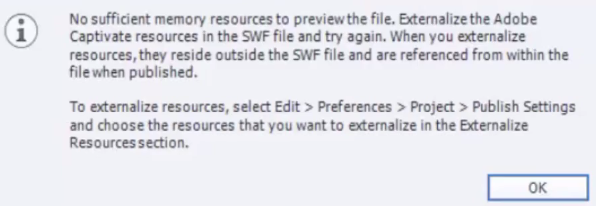
If you haven't run into this before, you may want to check out my video on how to externalize your resources when publishing. Check it out below.
Adobe Captivate 8 - Multiple Interactions in One
In this video, I show you how you can use the built-in features of Adobe Captivate to create a truly unique interaction. In this example, I combine three multiple choice questions to appear as if they are part of a single slide with pop-up characters.
Creating Your Own Smart Objects in Captivate 8
In this video, I show you how you can create your own smart objects by essentially tracing any image that you want to make into a smart object.
Creating Effective Evaluations That Are Tied To Learning Objectives
In this video I talk about how to make level 2 evaluations that are directly tied to your individual learning objectives using Adobe Captivate 8. The result for your learners are final quizzes that truly test a learners ability to demonstrate the competencies of the training.