
Virtual Reality Improvements in Adobe Captivate 2019 Update 2
In this video tutorial, I show you some of the improvements to virtual reality in Adobe Captivate 2019 when you install Update 2.
In this video tutorial, I show you some of the improvements to virtual reality in Adobe Captivate 2019 when you install Update 2.
Please note that videos such as this one were prepared in advance using the prerelease version of Adobe Captivate Update 2. There might be subtle differences in the appearance or functionality of the final publicly available software. I make no guarantee that the features of functionality are available in the final release.

Add Closed Captions to Your 360° Videos in Captivate 2019
In this Adobe Captivate video tutorial, I show you my workaround for getting closed captions into your 360° video slides or projects. Eventually, I hope that Adobe comes up with a simplified workflow that doesn't require this solution, but in the meantime, this will get you through it.
In this Adobe Captivate video tutorial, I show you my workaround for getting closed captions into your 360° video slides or projects. Eventually, I hope that Adobe comes up with a simplified workflow that doesn't require this solution, but in the meantime, this will get you through it.
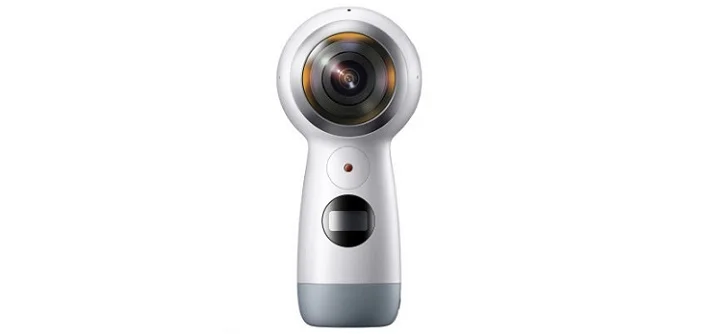
Samsung Gear 360 (2017 Edition) Review
In this review, I will talk about my experience with the Samsung Gear 360 (2017 Edition)…
In this review, I will talk about my experience with the Samsung Gear 360 (2017 Edition). I purchased this camera from Amazon from the following link: https://amzn.to/2O0zF34
I previously purchased and reviewed the Insta360 Air. My conclusion was the Insta360 camera limited your ability to use the camera in professional situations. You must mount the camera to the micro USB port on your smartphone, and you cannot operate it without your phone. What this means is that you will be visible in almost all of your photos or videos. Also, this camera is only 3k. I learned first hand that with 360-degree photography this isn't enough resolution to produce detailed images.
After sending the Insta360 back to Amazon, I purchased the Samsung Gear 360 (2017 edition). I ran the camera through similar tests as I did with the Insta360 hoping that the extra 1k in its 4k sensor would be more than enough. I liked the fact that it was a self-contained camera that didn't require your smartphone to function; however, the app for the smartphone made it easy to use the camera remotely. You can place the Gear 360 on a tripod or put it on a stable surface and hide behind an obstacle. This way you can take photos or videos of the area and keep yourself out of the shot, which would be more suitable for something like eLearning. Like the Insta360 the Samsung has two wide angle lenses that when stitched together produce a full 360-degree view. The Gear360 uses the dedicated app for your smartphone, or you can use the software for a Windows PC to accomplish the stitching. There is an iPhone app as well, but I didn't get a chance to test this out.
Here are some sample videos I created to try the different resolutions in video mode.
I don't know if the camera I received was defective, or the issue was software related; however, I encountered a quality issue along the seam from one lens to another. It was as if one of the lenses was fogged up or perhaps the glass was damaged somehow. It seemed to be the lens that was closest to the source of light. I didn't attempt to troubleshoot if it was the front or the back. Also, I suspected that it might be an artefact from the stitching process. In either case, I decided that perhaps ultimately a 4k 360-degree camera was not going to meet my needs for eLearning and I eventually sent the camera back to Amazon.
Pros
- The camera can operate independently from the smartphone
- The camera has a built-in microphone
- The build quality is excellent. sturdy design
- The camera accepts MicroSD card for storing images instead of storing on a smartphone
Cons
- Quality is not sufficient to show viewers a considerable amount of detail required for professional situations
- The camera is top heavy, and there is potential for it to tip and possibly damage the lenses.
- The stitching seam is noticeable especially when an object crosses the seam during a video as the camera tries to correct for alignment.
While I anticipate that 360-degree photography will be available in eLearning in the very near future, I think I'm going to hold off until the price of the higher resolution cameras come down. In my experience, the only people who are asking about 360-degree slides in eLearning are fellow designers hoping to distinguish themselves. My actual clients are not asking for this. They might start asking once some examples are out there in the real world. Hopefully, by then there will be some better quality camera to purchase within my budget.
Samsung Gear 360 Unboxing
In this video, I unbox my new Samsung Gear 360. I previously reviewed the Insta360 Air but decided to send that back to the seller. I read the specs and reviews of the Gear 360 and while I acknowledge that this is not the best VR camera around, it's certainly an improvement over the Insta360 and perhaps will be a nice compromise of quality and price…
In this video, I unbox my new Samsung Gear 360. I previously reviewed the Insta360 Air but decided to send that back to the seller. I read the specs and reviews of the Gear 360 and while I acknowledge that this is not the best VR camera around, it's certainly an improvement over the Insta360 and perhaps will be a nice compromise of quality and price.
Get your own here: https://amzn.to/2Nf1TG0
Here are some interesting accessories for this camera
https://amzn.to/2zEMnRW
https://amzn.to/2zFpnSJ
Insta360 Air Review
I'm a big believer in adding new tools to your eLearning tool belt and this latest tool has got me really excited for the potential that In this video tutorial, I review the Insta360 Air for the purposes of using for eLearning once the software catches up with the technology…
I'm a big believer in adding new tools to your eLearning tool belt and this latest tool has got me really excited for the potential that In this video tutorial, I review the Insta360 Air for the purposes of using for eLearning once the software catches up with the technology.


Create Your Own 360° Photos
In this video tutorial, I show you one way you can create your own 360° photos for use in your eLearning project…
In this video tutorial, I show you one way you can create your own 360° photos for use in your eLearning project once the eLearning industry introduces this feature into the authoring tools available.