
My YouTube Channel is Starting to Pay Back
The original purpose of creating my YouTube channel has come to fruition today. Last night I was contacted by a client in California who has seen my videos. She asked me to consult on a project that she is working on for a chain of hotels; I agreed. We discussed my fee through email and this morning I called her to discuss her technical needs for this project. I spent about an hour on the phone with her and I'd like to think I helped her out. I hope so.
I'm a big fan of Gary Vaynershuk, published author and entrepreneur, who teaches about the thank you economy. He teaches that if you put your content out there with no thought of reward, to just be helpful to the greater community, the rewards will come back to you. Thank you Gary.
Of course it also reminded me that I didn't have a simple video on my YouTube channel that discussed putting videos into your Adobe Captivate projects. So thank you Elizabeth, I now have this video and I hope it's well received by all my subscribers.
Adding a Note Taking Capabilility to Your eLearning Project
I'm generally not a fan of using the Learning Interactions that are built-in to Adobe Captivate, however there are a handful of them that are really great. The reason I don't care for many of them is that they are just not customizable enough for me. I always feel that I would need to make changes to the rest of my Captivate project to ensure the interactions don't look out of place. One exception is the note interaction.
In this video, I show you how you can add this Note Taking interaction to your course to allow your learners to keep track of the items they are learning from your course. The best part of this interaction is that you can save your notes or simply print them when you are finished the course.
Watch the video to see how to set it up.
Packaging Published Adobe Captivate Files Together in One
In this video I attempt to answer a question about having multiple Captivate projects with their own assessments linked together using the Multi SCO Packager from Adobe...
In this video I attempt to answer a question about having multiple Captivate projects with their own assessments linked together using the Multi SCO Packager from Adobe. The Multi SCO Packager is included with Adobe Captivate.
Adobe Captivate - Externalize Resources
From time to time you may encounter the following error when attempting to publish your Adobe Captivate project file:
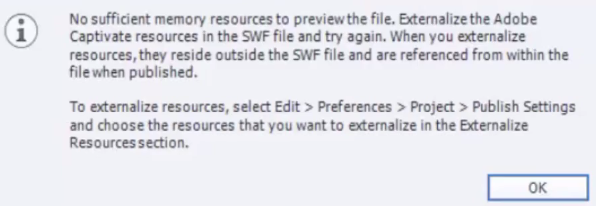
If you haven't run into this before, you may want to check out my video on how to externalize your resources when publishing. Check it out below.
Adobe Captivate 8 - Multiple Interactions in One
In this video, I show you how you can use the built-in features of Adobe Captivate to create a truly unique interaction. In this example, I combine three multiple choice questions to appear as if they are part of a single slide with pop-up characters.
Provide Feedback For Each Answer in Adobe Captivate 8
I thought of this idea this morning to produce a video on how to create a multiple choice, single answer question with unique feedback messages for each answer selected by the learner. I started to put this together and I was convinced I had done a video on this before. I was surprised that I haven't because while this is a relatively unknown feature in Adobe Captivate, it's something that I try to use whenever possible. The reason is that it not only simulates a facilitator answering a question much in the way you would expect them to do so during instructor led training, but it also provides for the opportunity to create a foundations for scenario based learning with branching.
Anyway, take a look at the process and hopefully you can use this technique to improve your eLearning knowledge checks and quiz questions.
Creating Your Own Smart Objects in Captivate 8
In this video, I show you how you can create your own smart objects by essentially tracing any image that you want to make into a smart object.
Exporting and Importing Project Captions and Closed Captions in Adobe Captivate
In my latest video on YouTube, I explain how you can export all your captions and closed captions from your Adobe Captivate project file into a MS Word document. This is a great way to get your hands on all your text, narration (with a little extra work), and closed captioning text for various reasons. Here are the reasons you may want to do this:
To have your text, narration, and closed captions translated into another language - Most people don't have Adobe Captivate on their desktop so sending them the Captivate project file is out of the question, however almost everyone uses MS Word.
To have someone else edit your captions - sometimes you may need to have someone else edit your work. Again, if they don't have Captivate software on their desktop, this isn't going to happen. Exporting to Word just makes sense.
An easy way to ensure that you have consistent use of fonts, colour, font size, and so on - I've run into this where your title is 25 point on one slide, but it's 28 on another. You could edit this in Captivate but you could also use the Format Painter in MS Word for an easy edit to all your content.
Send all text of course content to subject matter experts - This is an easy way for your subject matter experts to follow along with the course and provide suggestions or edits for your consideration. It's not a storyboard, but it's the next best thing.
What the video to learn how to export project captions and closed captions and how to import them back in as well. The video includes a few additional pointers on working with these files.
Google Honours Sally Ride
I opened up Google's search page today and found myself faced with the latest in Google Doodles, a montage of animated images honouring famed astronaut Sally Ride. Sally Ride was the first female American in space and later started her own organization to foster education in children with an emphasis on girls and minority students. She wanted to overcome the issue of kids being turned off by science, technology, engineering and math because society sends a false message about who you have to be to be an astronaut or a physicist like Sally Ride.
Today would have Sally’s 64th birthday. She passed away on July 23rd, 2012 from pancreatic cancer. Check out this video from the animator explaining her process for making the Google Doodle.
How to Import a Photoshop File into Captivate 8
In this video, I show you how you can import a Photoshop file (PSD) directly onto your stage in Adobe Captivate 8. I don't use this feature very often but I can see when it may be advantageous to import images this way. Being able to turn on or off the various layers can add flexibility that you wouldn't have in a merged or flattened image.