
What Is The True Cost of Training?
Jean Ventose was doing some shopping at his local Walmart store in Calgary and had picked up a set of headphones from the electronic department. As he continued shopping he noticed that a store employee was following him and not at a discrete distance like you might expect, but rather in a manner that could be construed as a way to harass him...
Jean Ventose was doing some shopping at his local Walmart store in Calgary and had picked up a set of headphones from the electronics department. As he continued shopping he noticed that a store employee was following him and not at a discrete distance like you might expect, but rather in a manner that could be construed as a way to harass him. The employee wore a security uniform. It was at this point that Ventose decided to take out his smartphone and begin recording the incident. Here is his video directly from his Facebook page.
My guess is that Walmart Canada is now in crisis mode, scrambling to come up with solutions to the public relations nightmare that has already begun. Hundreds of thousands have already viewed and commented on this video from across the country. All the major news agencies have covered this story and it has brought the kind of attention on Walmart Canada that I'm sure they didn't want. I suspect that many regular Walmart customers may end up buying their merchandise elsewhere this week. The cost to Walmart Canada could easily be in the millions of dollars.
It would be easy to suggest a training program that would include learning in the areas of preventing discrimination, harassment, creating a respectful workplace, customer service and so on. This would certainly be the week to propose to the higher ups that more and better training is required. Unfortunately, your proposal for such training typically happens when things are going well for your company and there isn't a crisis that needs to be addressed. My advice is to share this story now with the persons in your organization responsible for approving the additional budget for training so that you can remind them what the true cost of training really is.
And don't forget, I have designed training for large corporations that would address all the issues that this video has demonstrated and I am available to hire to design similar learning solutions for your organization as well.
Adobe eLearning Conference – Not Just a Free Lunch
Another member of the Adobe eLearning Community asked a great question on a post I did about the 2nd Annual Adobe eLearning Conference. I started to write this reply below but I changed my mind and decided to make it a blog post on its own. She asked what did we like best about this gathering...
Another member of the Adobe eLearning Community asked a great question on a post I did about the 2nd Annual Adobe eLearning Conference. I started to write this reply below but I changed my mind and decided to make it a blog post on its own. She asked what did we like best about this gathering. Below is my answer but I encourage members of the community to also include their own remarks either here or on the original post (elearning.adobe.com).
Well, there were several things that stood out for me but to disclose fully, I was a speaker of one of the sessions last year, but just as importantly to my career development, I was also an attendee like anyone else.
First and foremost, I met other people like myself who were in the eLearning industry. I got to meet industry experts who I might have communicated with in the past, but nothing beats face to face interaction. While I have worked closely with subject matter experts and stakeholders from various organizations that I have worked for, this was the first time in many years I got to really talk with people who did the same job as I do. I probably learned more from that than anything else.
The second was the chance to hear from Adobe themselves; where the direction of the eLearning software was going. For example, in a similar event held in Las Vegas this past fall, Adobe revealed some really cool sneak peeks into what was going into the next major release of Captivate. This leg up will mean that I can prepare to implement by learning the appropriate skills between now and when the next major release comes out. I imagine that Adobe key personnel will be updating us on this development.
The third item but not the least item was my chance to sit in on some of the other speaker’s sessions and learn some new skills from them as well. I sat in on Anita Horsley’s session on responsive design, which I now feel more comfortable working with, I also sat in on Kirsten Rourke’s session on the Creative Cloud which taught us how to work with some of the other applications.
The single most important thing about this conference was the value. To my knowledge, there is no better value for an eLearning Instructional Designer or developer than the Adobe eLearning Conference in Washington DC. Most conferences are priced in the hundreds of dollars and many are in the thousands of dollars. While you will likely have some travel and lodging expenses the event is absolutely free. Not only is it free but you also will have breakfast and lunch provided as well. This and more importantly the other reasons I mentioned are why this event sold out within weeks of its announcement last year. Make sure you register for this year as well.
http://www.carahsoft.com/learn/event/7450-2nd-Annual-Adobe-eLearning-Conference
Learning to Fly
Have you ever gotten to that point in the storyboard where you suddenly realize that you don’t know how to achieve the desired effect or interaction? I know I have. Especially early in my career. over ten years ago I worked alongside a more seasoned eLearning designer/developer who saw me struggling with a difficult project...
Have you ever gotten to that point in the storyboard where you suddenly realize that you don’t know how to achieve the desired effect or interaction? I know I have. Especially early in my career. over ten years ago I worked alongside a more seasoned eLearning designer/developer who saw me struggling with a difficult project. He said, “Why are you so stressed out and trying to reinvent eLearning?”
I said, “I want this eLearning course to be really good.”
He said something I have never forgotten, which I first thought was just an older designer being lazy, “Never add an interaction to your eLearning course that you are not 100% sure you know how to deliver.”
I said, “But don’t we always want to raise the bar and continuously improve?”
He said “Yes, but not while you are supposed to be building your project and meeting or exceeding your project deadlines.” He went on to say, “While you are searching the internet and asking questions online on how to build this particular interaction, who’s working on getting your project done?”
I told him, “nobody.”
“Exactly”, he said, “When you have some downtime work on reinventing the eLearning wheel and add those items to your eLearning tool belt for the next project. When you have a hard and fast deadline, get the job done with the tools that you have right now.”
I learned a lot that day and I think it’s something that we can all learn from. Sometimes I get questions from designers who have taken on more than their current knowledge can produce. My advice is to master the basics before trying to turn your first eLearning into something epic. Don’t worry, you will get there. It just takes time.
The Tools I Use
On a recent live stream, I was asked about which tools I use to create my eLearning and video tutorials. I gave a partial answer during the live stream but I thought I would go a little more in-depth on that question here...
On a recent live stream, I was asked about which tools I use to create my eLearning and video tutorials. I gave a partial answer during the live stream but I thought I would go a little more in-depth on that question here.
Adobe Captivate
I think it's obvious that I use Adobe Captivate and almost always have the latest version. I do also keep the previous version installed on my main system. Up to and including presently I have always purchased a perpetual license for Adobe Captivate. I know that Adobe would prefer me to tell you to buy the subscription version but I always feel more comfortable knowing that regardless of what my current situation is, I can continue to run my Copy of Captivate indefinitely.
One thing that the viewers of my YouTube tutorials are often surprised to learn is that I also use Adobe Captivate to record my videos. I use the Video Demo feature to record the features that I’m demonstrating on another instance of Captivate that I run simultaneously.
Adobe Creative Cloud
Going back several years I purchased the Adobe eLearning Suite which is no longer available. The suite came with Adobe Captivate plus several key applications that became part of my workflow. The main applications from that suite that were important to me were Photoshop and Audition. I relied on those apps for years after upgrading to newer versions of Captivate. Until very recently, Photoshop CS5 was more than enough for my needs. A few years ago I became very serious about my photography and began purchasing copies of Lightroom. Eventually, I signed up for the Creative Cloud photography plan for about $10 month. This last fall there was some great pricing on the full Creative Cloud that I decided to take advantage of. It allowed me to get the latest version of all my applications for only a few dollars more than I was spending on the Photography plan and another third party service that I no longer felt was needed. This now allows me to have the latest version of several other applications which have proven beneficial as well.
Microsoft Office
It’s almost automatic that a PC user will have some version of Microsoft Office. I took advantage of some really good pricing on Office 2013 a few years ago and I haven’t felt the need to upgrade to Office 2016. Perhaps in a few years, I will be forced to but for right now 2013 is fine.
Snagit
I purchased Snagit 11 a number of years ago and I install this on each computer I have used since then. It is the defector standard for screen capture applications. In a pinch, I could get away without it but it’s annotation and markup tools are really nice and certainly easy to use.
PureText
I’m not even sure when I first became aware of PureText but PureText is a simple application that sits in your system tray. When you copy some text from various sources, in most cases you are also copying some text formatting as well. One click on the PureText icon in your system tray will strip out any formatting before you paste it into your destination application, which for me is typically Adobe Captivate. Captivate doesn’t always play well with formatting, especially from Microsoft Word, so this is a nice feature to have at my disposal. Puretext can be downloaded for free from stevemiller.net.
FileZilla
At some point, I usually need to upload my published eLearning projects to a web server. For me, there is nothing I need from a file transfer protocol (FTP) application that FileZilla cannot provide. Like PureText, FileZilla is completely free. In this case, FileZilla is open source. At present, it falls under the GNU General Public License so there are no ads embedded in the application and unless you get the software from a disreputable source there is no bundled crapware that comes along with it. It’s a great choice for FTP software.
About Me
I've combined my passion for design, usic and photography; with my desire to teach, to become a highly sought after Instructional Designer, Developer, facilitator. If you need help building your next eLearning project, consider hiring me. I create learning solutions that are not only visually appealing, but effective at achieving not only the student's goals, but the organization's business goals as well.
Retaining Your Best Employees
One aspect of a training manager's job is to retain valuable employees. Think about it, as a training manager, part of your job is to manage a budget for training your organization. It's far more cost-effective to train skill gaps than it is to fully train new employees from scratch...
One aspect of a training manager's job is to retain valuable employees. Think about it, as a training manager, part of your job is to manage a budget for training your organization. It's far more cost-effective to train skill gaps than it is to fully train new employees from scratch. Turnover has a direct impact on your department’s ability to deliver truly effective learning opportunities, ones that increase the effectiveness of your employees, rather than helping employees gain the skills to get hired elsewhere.
According to a recent survey conducted by ADP Canada, two-thirds of your employees are ready to leave your organization. Elizabeth Williams, Director of Brand and Communication from ADP Canada recently spoke with CJOB in Winnipeg about this. You can listen to the interview here:
Essentially 33% of your workforce is what ADP calls the Uninspired. These are the folks who are not necessarily looking for work elsewhere but if an opportunity presented itself they would be gone. Another 16% of your employees are what ADP calls the Casual Daters. These folks have not started a full on job hunt but are keeping an eye on places like LinkedIn, and other career related sites to see what's out there. The remaining 16% of the two-thirds of your company are the Dissed. These are people who are completely dissatisfied with working at your workplace and are aggressively looking for their next opportunity.
The reason you need to be concerned is that some of your best employees might be in one of these three groups. Your department has spent thousands of dollars getting these people trained during their tenure with your company. Not only will the costs be higher to train their replacements but you could be losing a valuable training advocate or a subject matter expert that your department could leverage for the next training project.
How can you be sure you don’t lose these folks? You need to make them aware that they are valued by the company. Engage them with learning opportunities that show your department is listening to their needs. Make sure training is designed to be effective and targeted toward business goals. Ensure that training is timely, interesting and addresses your learner's true needs.
If you are interested in learning more about this, please reach out to me and we can discuss how I can help your organization deliver training that is truly effective and not just another boring eLearning session.
Choosing an LMS for Your Organization
There are many reasons why you might be in the market for a Learning Management System (LMS). You might be new to the role of Learning Design and Development Manager, or you might be due to replace an ageing LMS that no longer suits your organization’s needs. In any case, you shouldn’t simply purchase the first LMS that fits your budget...
There are many reasons why you might be in the market for a Learning Management System (LMS). You might be new to the role of Learning Design and Development Manager, or you might be due to replace an ageing LMS that no longer suits your organization’s needs. In any case, you shouldn’t simply purchase the first LMS that fits your budget. It needs to meet your needs, as well as the needs of your entire organization. The trick is that you might not know what those needs are. Hopefully, this article can help.
What Do Learners Need?
Learners need an LMS that is easy and intuitive. It needs to be able to provide them with the answers they are looking for. Getting your organization to complete the required training is challenging enough. The last thing you want is for your LMS to be a barrier to that training. It should contribute to the motivation to learn.
Think about what competes with the LMS in your organization. Some examples are Google Search, YouTube, other training sites like Lynda.com and so on. All of these have one thing in common. They are all easy to use and there are no barriers to finding what a learner needs and launching it. Your LMS should be the same. Learners should be able to find the training that they want in the same way they Google something. If there is an elaborate login and enrollment process, learners will look for training elsewhere.
What Do Managers Need?
Managers are busy people. They don't have time to look at complicated reports and chase after their employees for not completing their training. Your LMS should demand minimal amounts of their time. I once worked for an organization that was capable of producing completion reports for all the learners who completed training. This report was sent to managers so they could follow up on their employees who hadn't completed training. The irony was that the report only showed a list of employees who had completed the training. This was the exact opposite of the information managers needed. Needless to say, Managers want reporting that helps them do their job, not add additional work for them.
Managers also need to be part of the evaluation process. When learners complete training, at some point in the future we need to hear from managers if their employees have shown improvement in the areas related to the training. This should be an automated process and shouldn't be complicated for the manager to complete. A lengthy survey isn't necessary. You usually only need to ask one or maybe two questions relating to the improvement of employee performance.
What Do You Need?
The number one thing a learning design manager needs from an LMS is the ability to report on employee results. Think about it. What does the CEO, or the VP of Human Resources want to know when they come calling. I would say there are four things your LMS needs to tell you through reporting in the following order:
Employees ability to perform their job
Employee compliance with regulatory training
Employee immediate reaction to training
Test results
You might be thinking that this order is incorrect but I assure you that items like test results or smile sheets, while important, are at the bottom of my list. The reason is that an employee's ability to pass a written exam in an eLearning or classroom setting is not an indicator of an employee's ability to perform their job. The best way to measure employees ability to perform their job is to information from their manager some time after employees have completed training (Level 3). As for compliance, while this may not be the priority for an organization, not being fined by regulatory bodies, or sued for safety violations is a priority.
At your next meeting with potential LMS vendors, you will be better equipped to address what your potential next LMS can do for you.
How to make Adobe Captivate mLearning Location Aware
In this video, I’ll show you how to make a mobile scavenger hunt project that uses the Geo Location Aware feature in Adobe Captivate 9...
In this video, I’ll show you how to make a mobile scavenger hunt project that uses the Geo Location Aware feature in Adobe Captivate 9.
At the 2016 Adobe Learning Summit I presented a session on creating mLearning in 60 minutes. I think my talk was successful in getting everyone excited about the possibilities behind using location aware features in Adobe Captivate, but my demo didn’t work as planned, so I thought I would share the correct procedures in today’s video.
I apologize for the length of this video, but I recorded this one three or four times and this was the shortest version. I edited out some of the boring bits and finally got it below 20 minutes.
Inserting Video Demo Files Into Other Projects
I had a viewer from my YouTube channel ask me about the Video Demo feature in Adobe Captivate. Specifically, this viewer was having trouble getting his video demo to play automatically within another Captivate project. In all likelihood he was using a video demo that had been published out to a video file, however, I thought I would blog about the options for inserting video demos into other project files...
I had a viewer from my YouTube channel ask me about the Video Demo feature in Adobe Captivate. Specifically, this viewer was having trouble getting his video demo to play automatically within another Captivate project. In all likelihood he was using a video demo that had been published out to a video file, however, I thought I would blog about the options for inserting video demos into other project files.
The first method is the easiest way. Simply record your Video Demo project, save it as a CPVC file. From your target project, you could simply click on the Insert drop down menu and select CPVC Slide. This will allow you to insert your Video Demo as a slide within your target project.
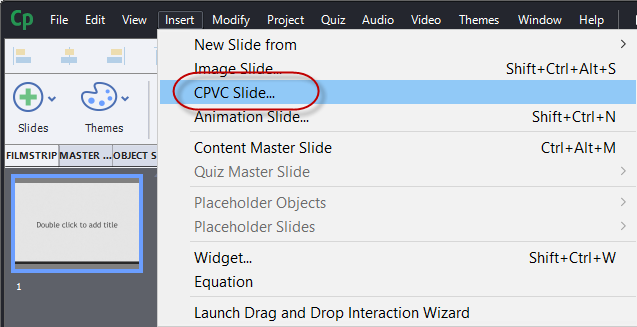
When your target project comes to that slide it simply plays your Video Demo movie. I usually include some explanation to the users as to what is about to happen on the previous slide so they don’t get confused by this. You can use this capability in either responsive design or standard (blank) projects, however, keep in mind that when your target project doesn’t match the size and aspect ratio of your Video Demo, the target project will leave some blank space on the sides of the CPVC slide. In this day and age of portrait selfies and videos, most users are not too distracted by this.
If you have published out your Video Demo as an MP4 movie, you have two additional ways you can insert the resulting MP4 video. In both cases, you would click on the Media drop down Icon from the Adobe Captivate toolbar and select the Video Icon.
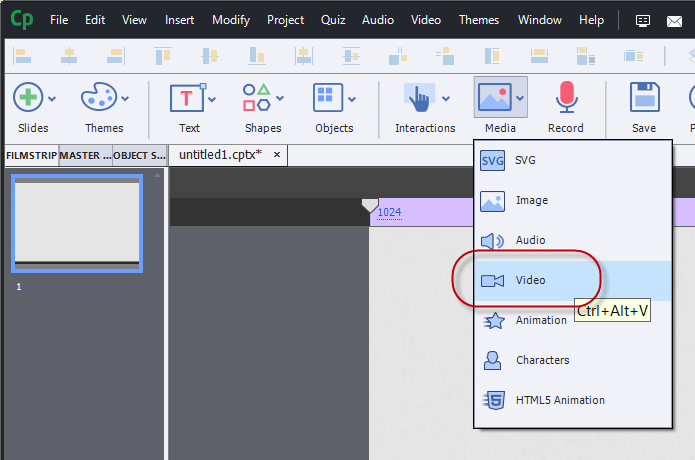
Once you have done that you have a choice to make.
The first choice is Event Video.
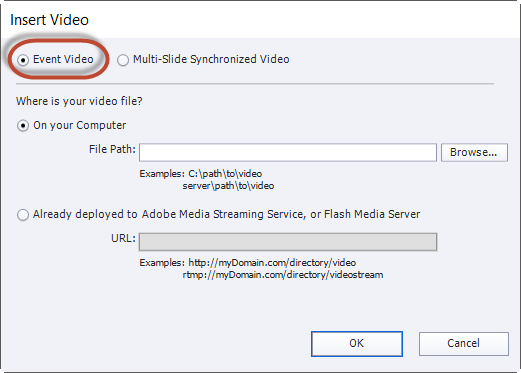
If you select Event Video you are inserting the video onto a blank slide where other Captivate objects could exist. This is an advantage of the previous method of inserting CPVC files as slides within your project. To have Event Video automatically play when your users reach that slide, be sure to select the video and check off the Auto Play check box in the video’s properties.
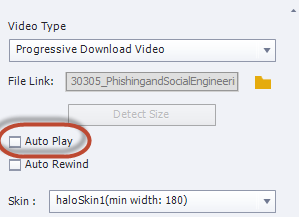
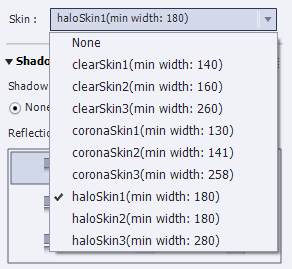
In addition, you can select one of the several skins for your video which gives your users playback controls that your users could use to control the video.
This is an asynchronous solution which means that the video’s timeline is separate and apart from your main project timeline. The actions of other objects on your timeline cannot by synchronised with Event Video. For example, you cannot use Adobe Captivate’s Closed Captioning features to add captions for Event Video. This could be a problem if your project needs to be accessible by persons with disabilities such as some or all hearing loss.
Alternatively, you could select Multi-Slide Synchronized Video which will play automatically when the user reaches that slide. Keep in mind that Multi-Slide Synchronized Video doesn’t have to be on multiple slides, that is just an option and I wish that Adobe would reconsider the name of this feature as many people get confused by it.
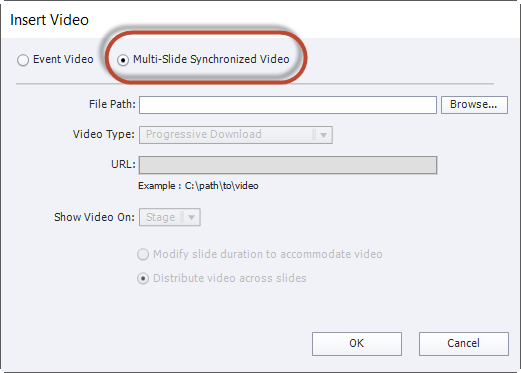
Multi-Slide Synchronized Video is synchronous with the rest of your target Captivate project so the video will automatically play when the user reaches that slide. You could also add Closed Captioning to Multi Slide Synchronized Video and synchronise other items on your timeline to occur at certain points during your video playback.
If you wish to take a look any of the 170 plus video tutorials I have created on Adobe Captivate. You can view them at https://YouTube.com/paulwilsonlearning
Adobe Learning Summit
The Adobe Learning Summit at the MGM Grand in Las Vegas Nevada is fast approaching and I’m really looking forward to it. The Adobe Learning Summit is held at the MGM Grand Conference Center, part of the MGM Grand Hotel...
The Adobe Learning Summit at the MGM Grand in Las Vegas Nevada is fast approaching and I’m really looking forward to it. The Adobe Learning Summit is held at the MGM Grand Conference Center, part of the MGM Grand Hotel in Las Vegas. The Adobe Learning Summit is a concurrent event held alongside the eLearning Guilds DevLearn conference, which is also held at the MGM Grand hotel. If you want to go and haven’t already signed up you can do so here.
This is my first Adobe Learning Summit and only my second Adobe sponsored conference. The first was the Adobe eLearning Conference held in the spring of this year, in Washington D.C. At this conference, I will be conducting a session entitled Create mLearning in 60 Minutes where I will review the techniques for integrating location-based technology into your Adobe Captivate eLearning and specifically mLearning projects. I will be sharing many of my secrets for not only preparing for rapid development but also how to design with mobile in mind.
One of the advantages of being asked to conduct a session at Adobe Learning Summit is that I will get to enjoy all the event has to offer as well. There are four tracks that are occurring simultaneously throughout the day. There is the Design & Authoring track, which my session is a part of; the eLearning Strategy track, which focuses on strategies that make your eLearning projects effective; the Hands-on track, where participants get hands-on experience with the applications from Adobe; and lastly the Future of eLearning, which addresses more of the bleeding edge of where the technology is taking us. My session is only an hour long so I have to decide what to participate in for the remainder of the day. Of course, I would love to have the time to see everything, however, that would require that I clone myself or get everyone to agree to come to my house and present their sessions all over again.
In the morning there will be the usual stuff like registration, a little continental breakfast and a kickoff with some opening notes, however right after all that will be the Keynote from Dan Lyons who will speak about his learning from a year in start-up hell. This will be in the grand ballroom and I’m looking forward to learning from him. I myself am around the year and a half mark with my freelance business and I still have many questions that are presently unanswered. Perhaps I’ll get some insight.
After Dan Lyons will be a thirty-minute session on what’s new from Adobe. There are some rumours that we will learn about the next release of Adobe Captivate. I’m not sure if this is when we will learn those details but I will be there to gather as much information as I can.
From 10:00 AM until 11:00 I have a choice between Storyboarding Essentials for Better Course Design with Sarah Gilbert, Gamify the Learner Experience with Lucas Blair, or the Modern LMS: Smart, Simple, Self-service with Jesse Novak. Alternatively, if I’m willing to dedicate my whole morning to it, I could also join my friends Anita Horsley and Pooja Jaisingh for their hands-on session Get the Best out of Adobe Captivate. I can’t decide but you can bet you will see me in one of these sessions.
From 11:15 AM until lunch time I can also choose between Make the Best Use of Multimedia Assets with Andrew Scivally, Foster a Learning Culture with Allen Partridge, or Interactive Video Learning: The Next Big Thing with Steve Haskin. I have to admit that I’m most interested in how to foster a learning culture. I know this is something one of my previous employers struggled with and I know that Allen is extremely knowledgeable when it comes to this sort of thing, however, I’m very interested in the use of multi-media in learning so Andrew and Steve are giving Allen some stiff competition. I’m just not sure.
After lunch, I will obviously be in my own session on the previously mentioned techniques on mLearning but if this doesn’t interest you, I totally understand if you want to check out Learner Evaluation Strategies with Jane Bozarth, Microlearning: Small Bytes, Big Returns with Ray Jimenez. In addition, fellow Canadian Phil Cowcill, and one of my eLearning heroes Joe Ganci will be conducting a hands-on session called Build Custom Interactions Using Advanced Actions, Variables, and JavaScript, which promises to allow you to get your hands dirty (in a good way).
In the last set of sessions, you can also pick up some great skills from my friend Damien Bruyndonckx who will be conducting a session called Ten Design Hacks with Adobe Creative Cloud and Adobe Captivate. In addition, there will be a session called Putting Mobile at the Center of Your Learning Strategy with Robert Gadd, and once again my friend Pooja Jaisingh will be addressing shrinking attention spans in her session.
We will all regroup in the Grand Ballroom at the Conference Center and hear once again from Allen Partridge with a tech sneak peek. It’s my guess that this is when we might learn something about the next version of Adobe Captivate. Followed by a closing session, likely with more people from the Adobe eLearning team. My guess is this is where you may get some time for questions and answers.
I’m really looking forward to getting together with all my Adobe Captivate friends and making some new friends. I hope to see you all there.
The Adobe Learning Summit / DevLearn
I must be drunk. I've known about the fact that I'm conducting a session at the Adobe Learning Summit, for some time now, and I haven't posted anything about my attendance there. The Adobe Learning Summit is co-located with DevLearn.
Anyway, here are the details of this event.
Devlearn is from from November 16 until the 18 at the MGM Grand Hotel in Las Vegas. To attend the Adobe Learning Summit you require a separate fee, however the good news is that right now the price has been reduced from $395 to $249. You will have an opportunity to not only attend my session, but you'll also get to attend up to three other hour long events. Alternative you attend one of two Hands-on events which will have some true industry experts teaching you how to get the best out of Adobe Captivate.
Here is a link to the event
https://www.elearningguild.com/DevLearn
and a specific link to information about my session on mLearning in 60 minutes. You should show up just to see if I make it.
103 Create mLearning in Less than 60 Minutes
I hope to see you all there.