
Tiny App Tuesday #5 - VLC
This edition of Tiny App Tuesdays I'm sharing VLC…

One of the more unusual skins for Windows Media Player
I guess Windows 95 was the first version of Windows where I actually got onto the internet and downloaded software from various sources. By the early 2000s, I was serious about multimedia on my PC. Of course, Windows users had Windows Media Player. When it first showed up on my Windows PC it was fine but almost immediately you would discover that it wouldn’t play certain formats of multimedia. Microsoft tried to compete with some of the new media players by adding cool features like being able to skin the player, however the problem was that Microsoft was like your Dad. They just were never going to be cool.
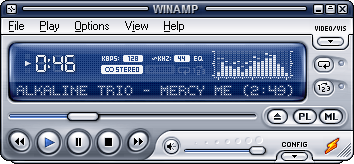
Winamp 5 with one of the optional skins
As filesharing and MP3s became more popular I started looking at other media players that offered more capabilities. I recall using Winamp for a time. It offered skins like Microsoft Media Player but they reminded me more like the components of your home stereo system. Winamp had a really neat parametric equalizer built-in, which Microsoft eventually added as well. But Winamp was cool because it wasn’t Microsoft.
I used iTunes for a time when you could store your entire library in their cloud service but again, their product wouldn’t play everything that I wanted to play.
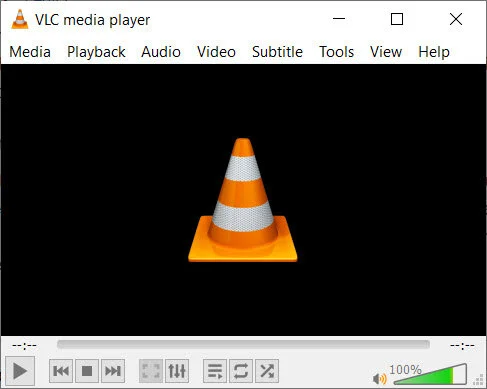
VLC media player version 3.0.16 Vetinari, currently installed on all my PCs
Eventually, I stumbled upon Video Lan Client or more commonly called VLC. VLC is what I use presently and I don’t recall when I started using it but my guess was during the Windows XP era. VLC is open-source, which means that the software is written by people like me and you. There is no big company like Microsoft or Apple behind it. I have used it for so long because I can install it on my current PC in seconds and it plays everything (certainly everything I need it to play). I have to admit that some of the videos I have on my media PC are not official copies of movies so the formats of some of the videos I keep on my media PC are sometimes bizarre. I’ve even discovered strange encoding that wouldn’t play on Windows Media Play will play just fine in VLC.
When Windows 8 came there was Groove Music and I thought I would try it out. It was really just a front end for the music streaming service from Microsoft, which you know will ultimately be a failure. Sure enough, Groove Music Pass has been discontinued. You could still use the player in Windows 10 but I think most people have walked away. It’s one of the first things I uninstall on my Windows 10 installation.
For me, it really just comes down to the fact that for over a decade I have used VLC because it just works. It’s my default music player, it’s my default video player, it’s fast and installs super easy and just works. Also because it’s open-source I never have to worry about it installing advertising or tracking. Here is a cool interview with the founder that should give you an idea about how trustworthy he and his company are (I’m not even sure if they count as a company).
There are a ton of features in VLC I don’t take advantage of but if you wish to stop using other media players or wished you had a nice simple media player that plays videos and audio. VLC would be my recommendation. It’s one of the first items I install on new PCs. Here is the link to download the latest version. https://www.videolan.org/

Connect To Other Windows PCs Using a Free App from Microsoft
In this video, I show you how I connect to other Windows PCs on my home network using a free app from Microsoft called Remote Desktop.
In this video, I show you how I connect to other Windows PCs on my home network using a free app from Microsoft called Remote Desktop.

Build Your Own Template for Adobe Captivate Multiple Choice Question Slide
In this video, I show you how to build your own template for an Adobe Captivate multiple choice question slide that is ideal for a knowledge check that includes remediation.
In this video, I show you how to build your own template for an Adobe Captivate multiple choice question slide that is ideal for a knowledge check that includes remediation. You can literally build this once and copy and paste it over and over again from one project to the next.
00:00 Introduction
01:01 Setup the slide
02:52 On-enter shared action (reset the slide)
04:19 Button press advanced action
07:07 Apply the shared action to each answer button
08:58 Preview the project
09:44 How you can use this as a template
Free Download Members of my YouTube channel can get the project file for free. Join my channel as a member for additional perks: https://bit.ly/JoinCp

Freelance Series — Keeping the Cost of Training Low
One of the biggest challenges a training department has is justifying its existence. In most cases, learning and development only show up on the expense side of the balance sheet. So how do we justify our existence to the powers that be?
One of the biggest challenges a training department has is justifying its existence. In most cases, learning and development only show up on the expense side of the balance sheet. So how do we justify our existence to the powers that be? Here are several strategies that you can include in training to keep the cost low and justify the existence of learning and development to the decision-makers in your organization.
Avoid expensive technology for technology’s sake

Virtual Reality Goggles may be an unnecessary expense
I had an experience a number of years ago with an organization that hired me for consultation. They were really excited about Adobe Captivate’s new virtual reality solution. The designer who wanted to use this new technology was more interested in the technology but didn’t consider if virtual reality lent itself to this situation. The organization purchased several virtual reality headsets for the learners to use when completing this course. This expense wasn’t needed and many in the organization were left wondering why this equipment was purchased.
Don’t reinvent the learning wheel
Some of the requests I get from new or less experienced eLearning developers look something like this…
My eLearning project is due on Monday morning and I promised this really cool interaction that I just can’t figure out. Can you help me get this completed on Sunday evening?
Of course, I help as many people in this situation as I can but I learned much earlier in my career to build what I call an eLearning utility belt. Remember how amazing Batman was at pulling out just what he needed at the moment to solve just about any crime-fighting challenge.
eLearning Superheroes
I spend a certain amount of my week working on new learning interactions. I like to design them in such a way that I can simply copy them from the original project and paste them into any project that requires them. I might spend many hours developing these solutions but can implement them into new projects in a matter of minutes. This greatly decreases my development time but also lowers my stress level. I never promise anything to a stakeholder that I don’t already have in my eLearning utility belt.
Keep learner seat time low
This one can be more challenging but worth it. It usually requires that you manage the expectations of your subject matter experts. Subject matter experts or SMEs are often assigned to you by the stakeholder for a project. These folks know everything about that area of the business. If it was up to them you would teach everything they know and the training would take many days for learners to complete. The reality is that most learners only need to know a small portion of the knowledge that the SME contains. Your eLearning projects should only include the knowledge and skills required to meet expectations. Optional material can be converted to another format. Also, material that would allow learners to take their knowledge and skill to the mastery level that an expert has can be reserved for when the stakeholder funds such a master level training program.
Use job aids whenever possible
Job aids are a great way to move content into an easy to development format that can be made available in a just-in-time way. My classic example of a parking sign is a good example of this. Sure you can make an eLearning course that teaches employees how to park in and around the various facilities at your organization but a simple parking sign (which is really just a job aid) can eliminate the need for your organization to develop a training course about parking. In this example, the parking sign (job aid) is made available in the exact location where it’s needed and there is no memorization required by your employees. They just need to follow the directions on the sign.

Rely on informal learning
There is some risk in informal learning but if you create a learning culture within your organization you can ensure that informal learning takes place. It can be as simple as giving people supervisory roles within your organization. Setting performance measurements on supervisors to include a certain amount of time in any given week to dedicate to training will ensure that regular employees learn from their mentors. You can develop job shadowing programs for very little expense (if any). Also, check if your organization has material you can already leverage. For example, one organization provided access to LinkedIn Learning. Most employees were unaware of this. By promoting this benefit, many employees will rely on this valuable resource to gain skills not only for their current role but for future positions as well.
Keep track of when learning is successful
Finally make sure that when learning proves to be successful, keep track of those successes. I like to include feedback from employee managers approximately 30-45 days after completing training. I simply ask one question.
How is your employee performing in the area related to the training?
If you can demonstrate that a previous performance gap is now addressed you might even be able to quantify it. For example, if last year there were a certain number of on the job accidents and this year your training has contributed to fewer accidents you can show the higher ups that your training has saved the company the cost associated with an injured employee.

Resize and Align Your Adobe Captivate Drag and Drop Objects for Best Appearance
In this video I will show you how you can resize and align your Adobe Captivate drag and drop objects for best appearance.
In this video I will show you how you can resize and align your Adobe Captivate drag and drop objects for best appearance.

Freelance Series — Business Expenses
In this article, I'm going to talk about two business-related expenses I recently had to incur — business insurance, yeah, I know sexy, and booking a trip to Las Vegas for an upcoming conference.
When I worked for a large organization, I always thought that it must be nice to be in charge and use the company resources on a whim; dinners with clients for free, flights and other travel expenses paid for, and so on. However, once I started my own business, I soon discovered that it wasn't just all fun and games. I won't go into the specific tax laws in this article, but I will talk about the decision-making process when considering incurring business-related expenses.
In this article, I'm going to talk about two business-related expenses I recently had to incur — business insurance, yeah, I know sexy, and booking a trip to Las Vegas for an upcoming conference.
I recently was approached by a previous client who hired me to teach them a class on Adobe Captivate but now needed me to develop an eLearning course for their organization. One of their requirements for any contractors was that they produce proof of liability insurance. I've always gotten away with not having insurance. Typically, I work in my own home office, and the types of eLearning courses I've designed haven't had any liability associated with them. You know, respect in the workplace type courses.
This decision is straightforward. I merely look at the cost of the insurance versus the revenue I expect to earn from the client. The insurance isn’t a small expense. It represents about 10 percent of the revenue I expect to earn. That said, if I don’t get the insurance the revenue would be $0. To me, it's a no-brainer. I can also use the insurance to cover me for other clients during the following year since I need to purchase an entire year’s worth. After a year, I can decide if I want to continue to have this type of insurance. Again, I could probably live without it, but if I have more work of a similar nature, I may hang on to it.
One scenario that's more challenging is speaking at conferences and the expenses associated with travel. First, there are many expenses associated with speaking at a conference that is difficult to calculate when you are first submitting a proposal to speak at a conference. I speak at conferences because it promotes my name out in the industry and my hope is that it will lead to paid work from clients. There is obviously a risk that I will spend this undetermined amount of money and not see a return on my investment. Figuring out if speaking at a conference is worth it is a little more complicated than the previous example. Here is a rough breakdown of what conference expenses include:
Airport shuttle to the airport from my home and back at the end of the trip
Flights to and from the conference cities
Cab ride from the airport to the hotel and then back to the airport at the end of the conference
Hotel stays usually in the same hotel as the conference
Food expenses such as dining out or room service
The government has all these rules, especially around food, when it comes to what is an allowable expense. Regardless of that, I need to figure all of the expenses into my costs regardless of if I can write off these expenses as business expenses. Let's say a trip to Las Vegas will cost me $1,500. I need to not only generate that same amount in incremental revenue but I also need to consider that while I'm in Vegas I'm not earning regular income either, so I need to really double it just to break even. An ideal situation is to gain about $4,500 in revenue for it to be worth the lost time, lost business and expense of going.
Another challenge is attributing any revenue to one promotional activity over another. I always try to ask my clients where they heard about me. Most usually say my YouTube channel but sometimes they saw my name at a conference or better, yet they attended one of my sessions. I have to be honest; I really don’t know if conferences have helped my business or not. Here is a scenario that I can easily imagine. Someone attends the conference in question and is exposed to my name but doesn’t necessarily attend my session. Later, once they are home and wish to learn something about Adobe Captivate, they google Adobe Captivate plus whatever other search terms are related to their interest. My name pops up in the results and they decide to click one of the links to my articles or videos. They don’t know me from any other links in the search results but somewhere in the back of their mind I seem familiar. They watch some of my videos and as a result of those videos decided to hire me to help with their eLearning development. I may never know if the conference had that effect on them or not, but I don’t discount the possibility.
It's up to you if you decide to take on an expense associated with running your business but certainly looking at what you expect to earn is a good indicator if the expense is worthwhile. Remember that you may not see that return on investment for some time to come, like in my case with the conferences. A big part of incurring these expenses has to do with past success as well. For example, if I was having a bad year and simply didn’t have the cash flow to put the money up for an expense, I may back out of a particular opportunity. As it stands, I had a good year and even if the conference I intend to attend later this year in Las Vegas doesn’t earn me any revenue, I will still go. I can afford it (presently). Hopefully, I can continue to say the same thing next year and the year after that.

Convert MOV Videos to MP4 And Optimize Them for Adobe Captivate
In this video you will learn how to convert MOV videos to MP4 and optimize them for your Adobe Captivate eLearning project.
In this video you will learn how to convert MOV videos to MP4 and optimize them for your Adobe Captivate eLearning project.

Optimize your Stock Photography for Adobe Captivate
How to optimize stock photography for your Adobe Captivate eLearning projects.
It’s common for us to download stock photography from whatever site we have access to. I personally use Adobe Stock or Storyblocks.com. Most of these sites provide these images in the highest possible resolution possible. The problem for us eLearning people these images are too large and will quickly grow your eLearning project to an unmanageable size, especially for our end learners. In this video I show you how you can use Photoshop to optimize such images to be the right size and resolution for your eLearning project.

Hiring Freelancers To Free Up Your Time
Business owners must juggle a variety of tasks to keep their companies running. If you struggle to keep up, you may wonder whether hiring more employees is the right option. Before committing to a new staff member, CaptivateTeacher.com advises that you may want to consider bringing in a freelancer.
Business owners must juggle a variety of tasks to keep their companies running. If you struggle to keep up, you may wonder whether hiring more employees is the right option. Before committing to a new staff member, CaptivateTeacher.com advises that you may want to consider bringing in a freelancer.
Set Clear Expectations
You can find freelance workers to perform nearly any task necessary in your company. However, it is a mistake to hire someone without a clear idea of how they will benefit the business. Before looking for a freelancer, you should determine the timeline of the job and the desired outcome.
Determine the Budget
Creating a budget for a project allows you to get a clear view of how much money you can spend on recruiting and paying a freelance worker. Freelancers typically set their own rates, although they may be willing to negotiate certain terms. Depending on your resources, you may need to reallocate funds to ensure you can hire the right contractor.
One way to determine how much you need to budget for working hours is by using spreadsheets to calculate the anticipated workload on your freelancer(s). Once hired, of course, you can use these spreadsheets to schedule and calculate payroll. While it’s possible to process timesheets in Excel, knowing the ins and outs of creating formulas can be complicated, which is why many managers prefer using automated timesheets like QuickBooks Time, software that comes with additional benefits like allowing users to retrieve, send and approve time remotely.
Search for Freelancers
Freelancers have specific skills, so look for someone who specializes in the exact area needed. Whether you need someone to come into the office once a month to train staff members or want a bookkeeper to work remotely for an hour a day, the right person is out there. Create a list of the necessary tasks and qualifications needed and, as Undercover Recruiter suggests, write a detailed job description.
There are many ways to find freelancers. Asking people in your network for referrals is a great place to start. Looking online can also be fruitful as long as you frame your searches correctly. Comb through the results and evaluate the qualifications of the contractors who appear on the page.
Some online marketplaces and employment agencies specialize in connecting businesses with freelancers. Depending on your needs, you may be able to find a website that offers these services free of charge, while others may require a fee.
Utilizing social media platforms can help you search more effectively. If your company has a social media account, you can create a post asking for freelancer applications. Encourage your friends, family members and business associates to share the post, enhancing its reach.
Interview Wisely
The interview process can be daunting. FreeUp says to have a list of questions ready and talk about the details of the project. If you withhold information, it may result in unqualified freelancers agreeing to take on a project. Interview multiple candidates and compare their qualifications. Resist the temptation to hire contractors because they have the lowest rates. While they may do a wonderful job, it could be an indication of inexperience in the industry.
Research Labor Laws
There are different laws in place regarding the payment of freelance employees. While hiring a contractor can help you save money, it is important to understand the payroll requirements, independent contractor rights, and labor laws involved. Note that freelance workers are typically considered to be self-employed; however, factors including the type of relationship, control over the worker’s job, and financial considerations come into play when determining how your business can classify workers.
Use a Recruiting Agency Instead
The work associated with hiring freelancers can be time-consuming, and if you’re already burning the candle at both ends, this extra task may prove overwhelming and difficult to keep up with. If this is the case, your best bet is to connect with a recruiting agency that can connect you with vetted professionals for roles like chief of staff, an executive or personal assistant, or an office manager. With the background details taken care of through a recruiter, you will have an easier time bringing on a temp or a new hire.
Bringing a contractor in to tackle projects or provide other valuable services can help your company thrive. When looking for freelancers, focus on how they can add value, research labor laws, and set realistic expectations to help ensure a positive experience. And if this task becomes too much, turn to a trustworthy recruiting firm to help take the lead.

Publish Your Adobe Captivate for xAPI and HTML Scaling
How you can publish your Adobe Captivate eLearning project for xAPI and HTML Scaling.
How you can publish your Adobe Captivate eLearning project for xAPI and HTML Scaling.