

How To Use The Carousel Widget in the All-New Adobe Captivate
In this video, I show you how to use the carousel widget in the All-New Adobe Captivate (Adobe Captivate 12).
In this video, I show you how to use the carousel widget in the All-New Adobe Captivate (Adobe Captivate 12). Free Download members of my YouTube channel can download the project file for free.

Demand for the Adobe Learning Summit is High
Scarcity seems to increase demand. The Adobe Learning Summit Creator Labs Track is sold out, and you can only put yourself on the waiting list.
Registration
Scarcity seems to increase demand. The Adobe Learning Summit Creator Labs Track is sold out, and you can only put yourself on the waiting list. The folks at Adobe probably wouldn't endorse this suggestion, but here is my conference hack for this event. The FAQ for the conference says the following about switching to sessions in another track. Yes, you can build your own schedule with a mix of sessions from both tracks. However, the first preference for sessions on either track will be given to participants registered explicitly for that track due to capacity restrictions. Any additional seats remaining will be available on a first-come, first-served basis based on availability.
So I advise that if you want to go to the Adobe Learning Summit in Las Vegas in two weeks, register for the Design Thinking and Strategy Track but attend the sessions you can. Keep in mind that they have invited additional speakers to accommodate the demand. For example, Joe Ganci and I will deliver the same session, so there will be two sessions on the same topic.
Here is the link to the registration site for this conference: https://adobe-learning-summit.elearning.adobeevents.com/
Recommended Sessions
I don’t need to tell you why I want to attend the Project Charm Test Kitchen or the What’s New At Adobe session, but I think you should make a concerted effort to attend the following sessions, and I’ll tell you why.
Keynote: Digital Persuasion - Ignite your Influence
Erin King will be presenting this session. She is a best-selling author and a successful entrepreneur. The session will discuss how to persuade people in the digital world. I know one of the things I’ve always found challenging is compliance with my online learning. So I want to attend this keynote to learn a thing or two to get more people to put their eyeballs on my material.
Learning Is The Missing Piece Of Your CX Culture Plan
I’m looking forward to learning from Katy Tynan about getting the customer experience mindset into the learning in an organization. CX is a topic that I’m passionate about, and I’m hoping she can provide some insight as to what we can do to improve organizations in this area.
Creating scenario-based learning using Adobe Captivate
Of course, I hope you attend my session. I will be there. In my eLearning developer journey, I learned that creating training that incorporates a storytelling aspect and choices for your learners is more engaging than regular training. Still, I will show you how easy it is with Adobe Captivate. My hope is this session will inspire you to take your eLearning from the same old dull “click next to continue“ type of course into something that will remind your learners of real situations they have encountered in the workplace. Not only that, but they will learn by seeing the consequences of their choices in the safe space of eLearning.
Staying in Vegas
Hotels
In past years I have recommended the MGM MyVegas app. You accumulate points by playing online casino games, which can be exchanged for great bargains in Vegas. I have found this year that the deals are not so great. In the past, I have exchanged my “coins” for complimentary nights in hotels. This time around, I had trouble booking nights as certain days were blacked out, and the price per night was much higher than I remember. This year I got a Groupon for Ballys across the street from the Mirage. Here’s the link if you want to be close but save a few dollars: Bally's Las Vegas Hotel & Casino - Las Vegas, NV
Food
The conference provides complimentary breakfast and lunch for all three days, so make sure you keep your per diem in your pocket for dinner, as there are some excellent restaurants in the area. Besides, the Mirage food is above average for hotel food, so even if you take a break from sessions at the conference, come down from your room and join the rest of us for lunch.
Last year at another eLearning-related conference, I went out for dinner at Carmines, located in the Forum Shops at Caesars Palace. It was fantastic, with significant portions and real authentic Italian food. Here’s the website: https://www.carminesnyc.com/locations/las-vegas
If you are on a fast food budget, there are several restaurants within walking distance from the Mirage. Do yourself a favor, and try something you can’t just get at home. I’m from the East coast, so In and Out Burger is a treat for me, and I would much more likely grab a meal there instead of McDonald’s or something else similar.
Stuff to do
You will be in Las Vegas for at least three days, and the conference doesn’t run around the clock. If you don’t get to Las Vegas too often, I recommend you get out of the hotel and see some stuff. There is so much you can do in the Vegas area. I have gone to shows, including several of the Cirque du Soleil shows, I already mentioned dining out, which can certainly be a form of entertainment, and of course, gambling.
Overall my message to everyone is to be careful. Be cautious whether you decide to venture out on your own or see if you can double your bank balance before leaving this unique city. Keep your wallets in your front pocket and assume that if a person or character offers to take a selfy with you, they expect a tip.

Safely Test Beta Software in Windows
In this video, I show how to safely test Windows software such as beta versions of the elearning authoring tool without interfering with the production software you use for developing elearning for your clients.
In this video, I show how to safely test Windows software such as beta versions of the elearning authoring tool without interfering with the production software you use for developing elearning for your clients.

Secrets Revealed About the New Captivate
Learn about the next release of Adobe Captivate for 2022
A world of information is presented to you when a company like Adobe does a sneak peek. I think they assume that everyone is going to merely follow the presenter as they show you one thing or another. What I like to do is look at the individual screens regardless of what the presenter is showing us and see what else I can learn about the future of this software. Here is what I've discovered so far. You can watch the video and/or read the article below:
Remember these are early days for what Adobe is calling Project Charm. It’s safe to say that most of what I'm showing here will end up in what will probably be called Adobe Captivate 2022, but there are no guarantee. Also, I wish to emphasize that I’m not revealing anything that cannot be found in their publicly available video found here on their YouTube channel. https://youtu.be/y4Wnnc7e9kY
Spectrum
At around 0:47 seconds into the video, Pooja Jaisingh, Lead eLearning Evangelist, Adobe Digital Learning Solutions, mentions Spectrum when referring to Captivate being completely redesigned. Spectrum is Adobe’s modern design system that I expect will eventually influence all their products moving forward. Pooja mentions that Spectrum is built to be inclusive. When you research Spectrum you learn that accessibility standards are something you can expect from products that are designed with this design system. While Captivate has been capable of publishing out eLearning that meets accessibility standards the product itself doesn’t meet those standards. I hope this means that future versions of Captivate will be accessible themselves. Meaning that accessible eLearning can be developed by the very people for who it was designed for. If this is true that’s very exciting news. You can learn more about what goes into Spectrum by visiting Adobe’s website here:
https://spectrum.adobe.com
The Welcome Screen
The welcome screen has been streamlined so that new projects are easy to select and create. An emphasis on project templates now exists that didn’t before. I think this will be a welcome addition for new Captivate users who might not know how to get started. in the upper right corner, there appears to be dynamic content that Adobe will push out to you to share the latest upcoming webinar or certification.
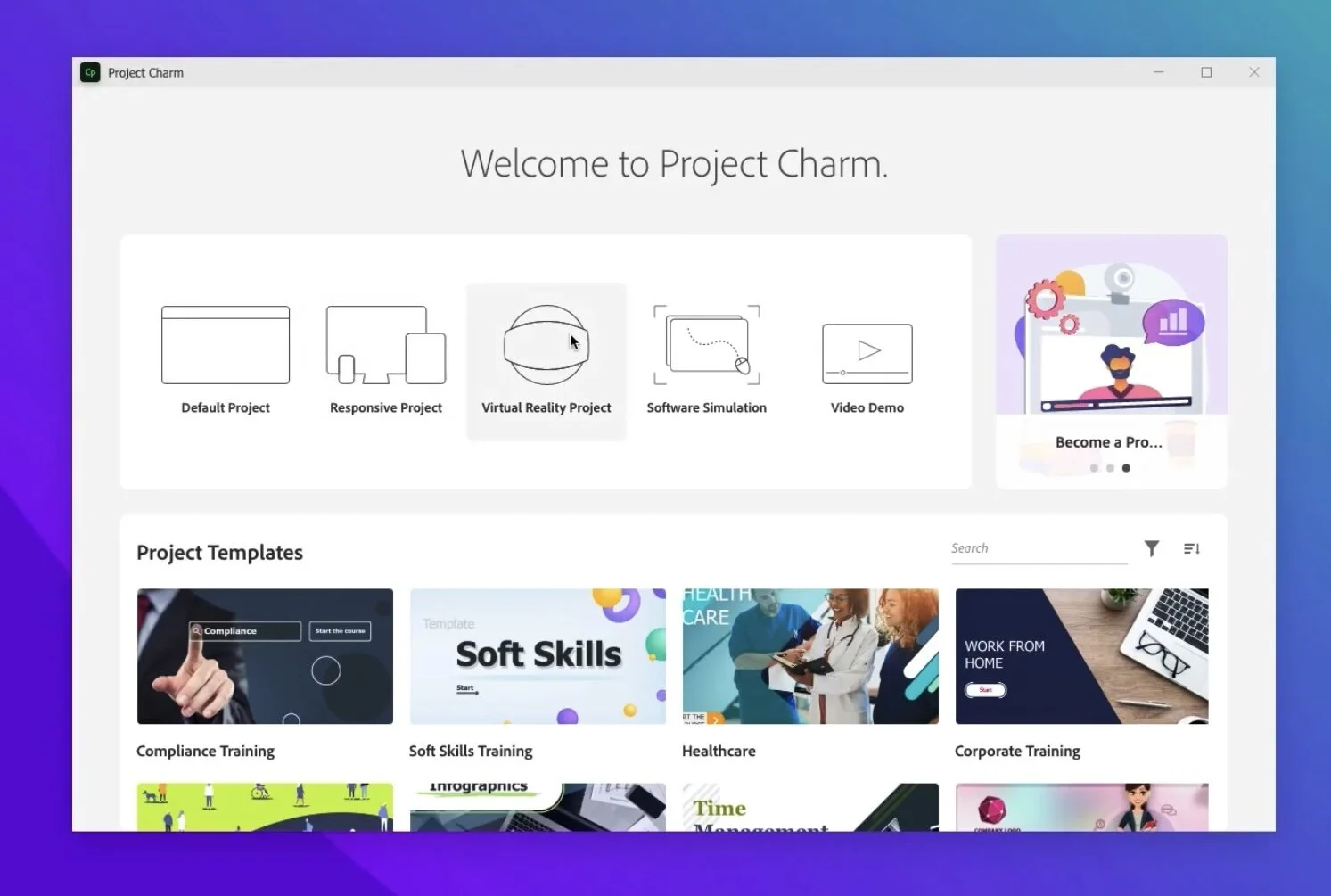
Welcome screen
User Interface
at around two minutes twenty seconds, we see the Spectrum interface in action. Pooja mentions a left-to-right workflow philosophy and I think that’s a great way to think about design. You will start on the left and select the type of object you wish to add, you move to the center where your canvas exists and place the object. finally, you will look to the properties inspector on the right where you will customize the parameters of that object you just added.
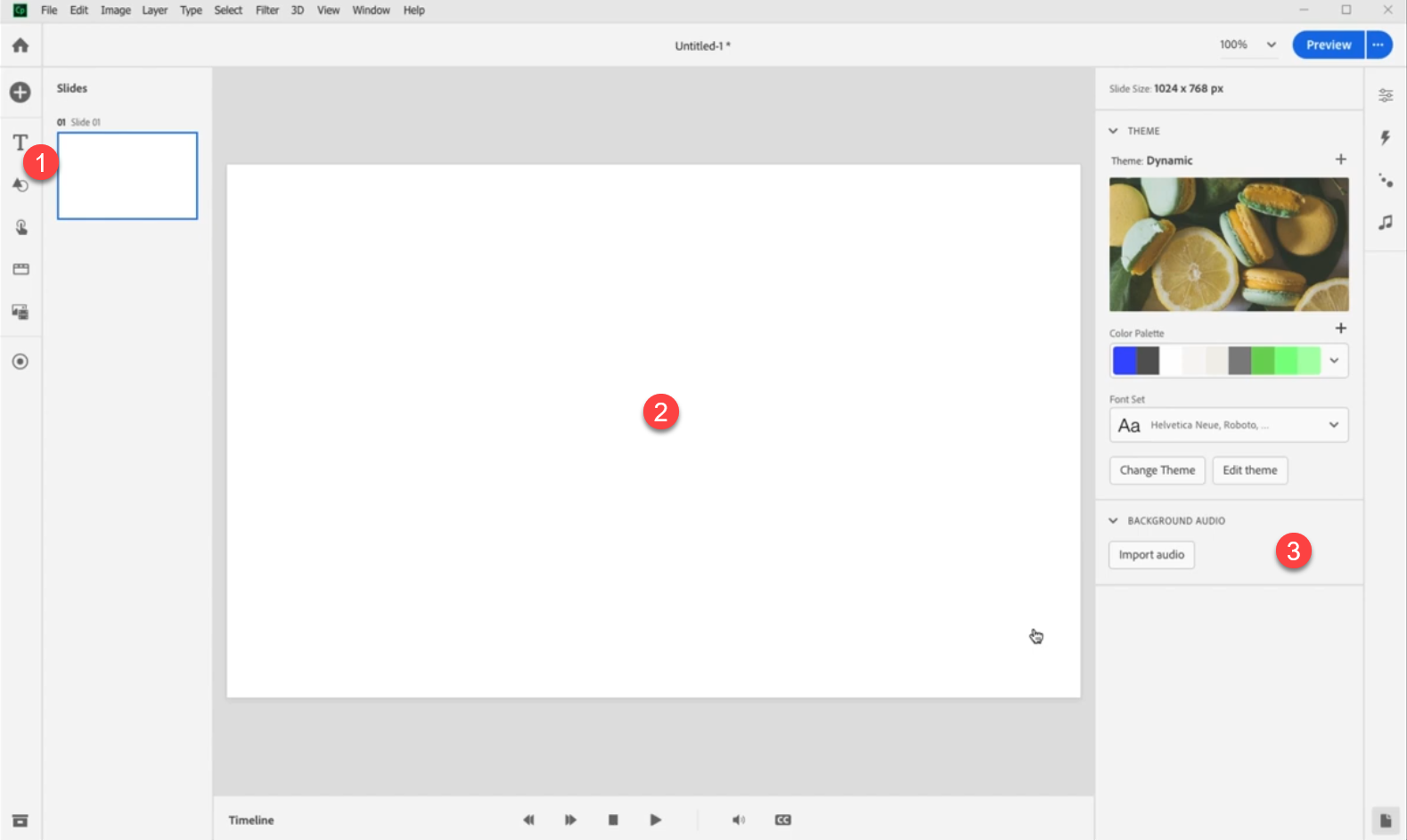
User interface
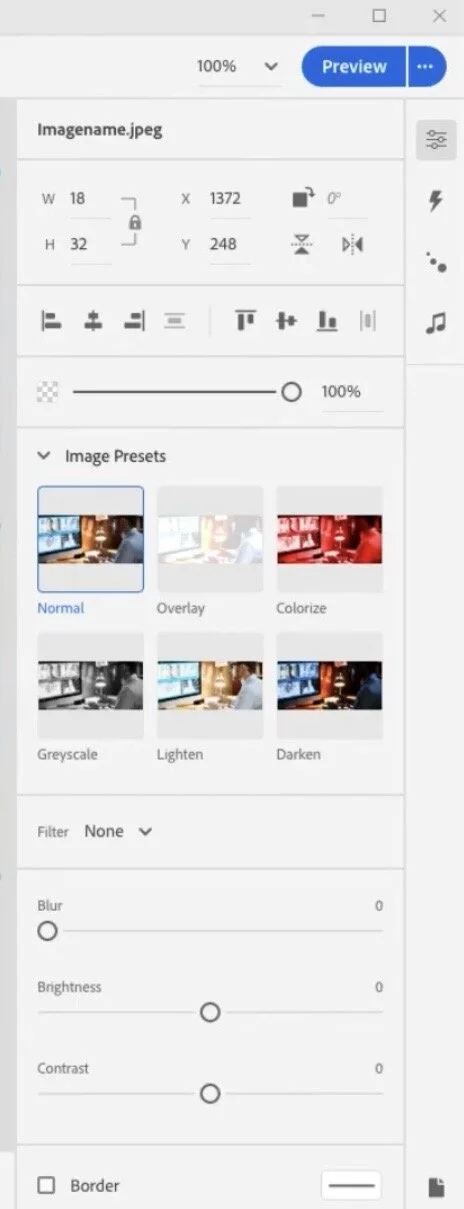
Options for images
It looks like there are some interesting choices for modifying images in this next version of Captivate. I like the idea of editing images at the touch of an option rather than round-tripping to an external app or opening a separate edit window. Of course, the hope is that this provides enough options. I'm very interested in the Blur option you can see in this screen capture.
Button options
Up to and including Adobe Captivate 2019, buttons have meant different things. Mostly what I call a button is a shape or image used as a button. I haven't used the classic Captivate button in years. Perhaps this is something new and better suited to HTML5.

Button options
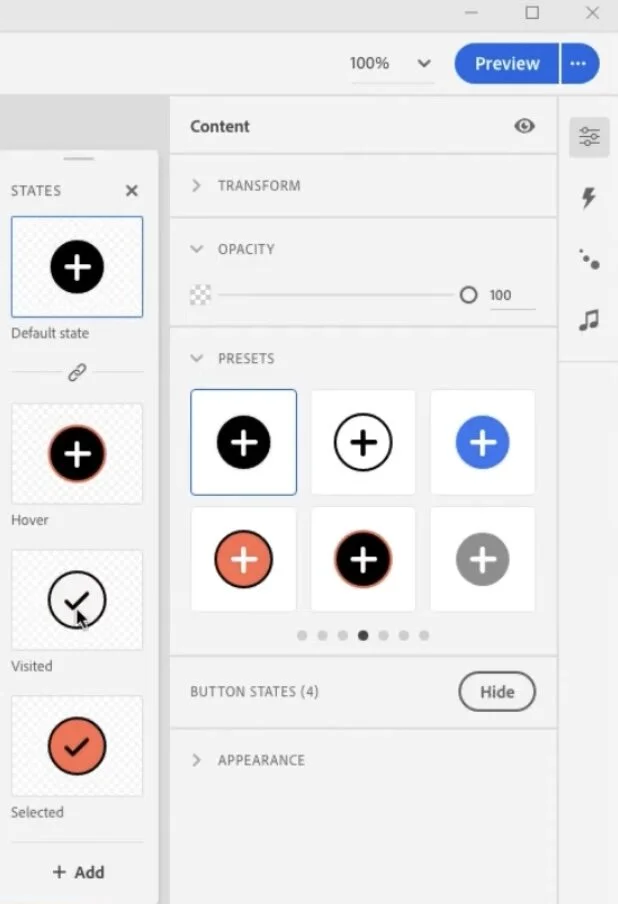
Button states
One thing I would like to see is more in-built states that are saved as part of the object style. This screenshot teases the possibility that there will be visited and selected states. I hope that I can save these as part of the object style so they can be applied to other similar buttons. Also selected would be a wonderful addition to the functionality of buttons as well. If I didn't have to write advanced actions for selected states that would save me a bunch of time.
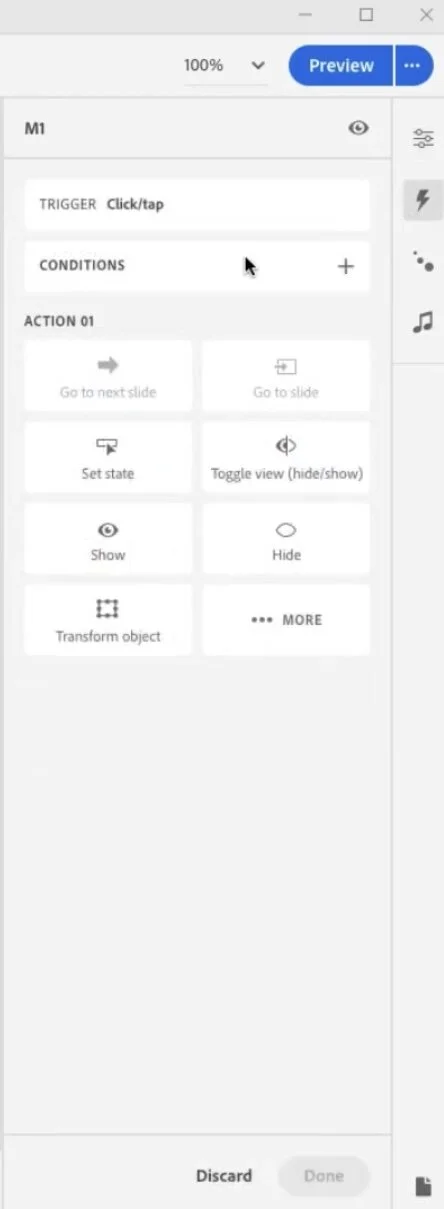
Triggering actions (advanced actions?)
Here you can see you can trigger actions for clicking on certain objects. Pooja demonstrated the ease of creating a click to reveal interaction that required far fewer steps than a similar interaction today.
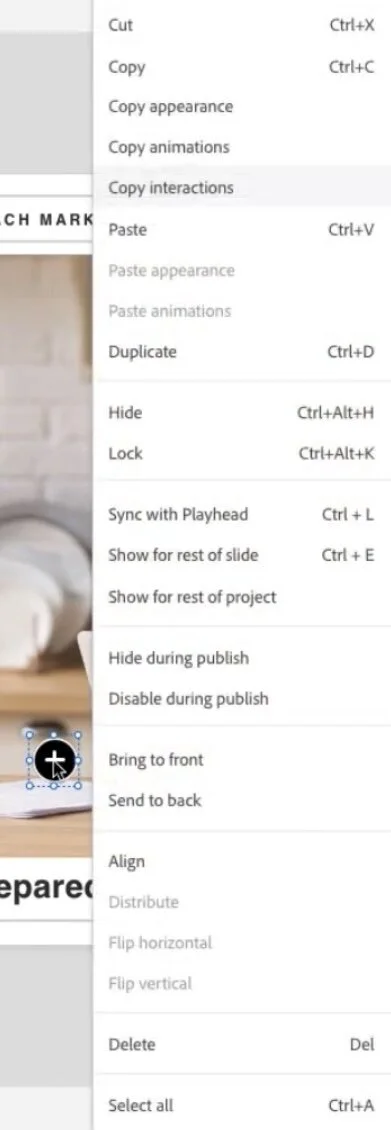
Copying and pasting interactions
I love that you can copy and paste interactions once you have built one example. Here Pooja created one click on her click to reveal and merely copied and pasted the action make a small revision to the action to Shaw a different state. What a time saver.
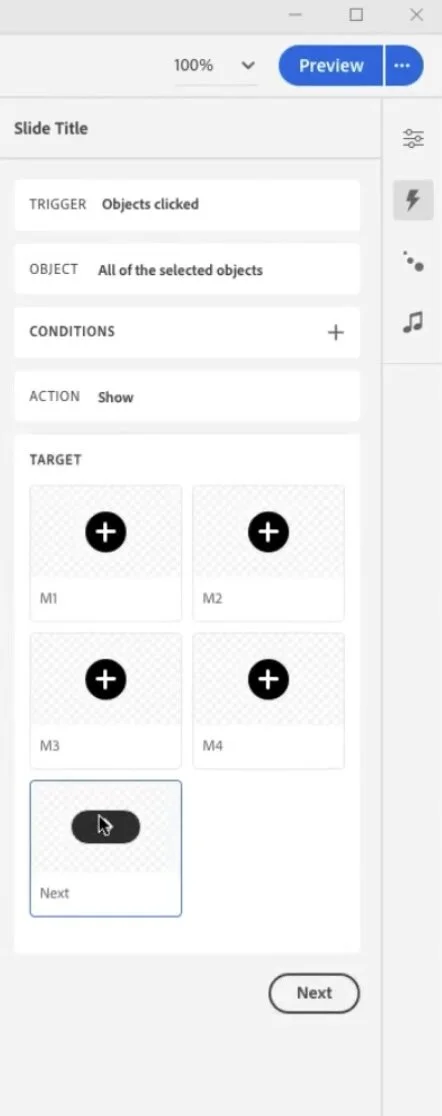
All selected objects clicked
And then with a simple work flow you can select a final action to run when all the objects have been clicked. This offers a huge time saver for creating forced navigation interactions. A great replacement for the time consuming advanced actions. I'm curious if I can do everything I can presently do with advanced actions but I definately like what I'm seeing.
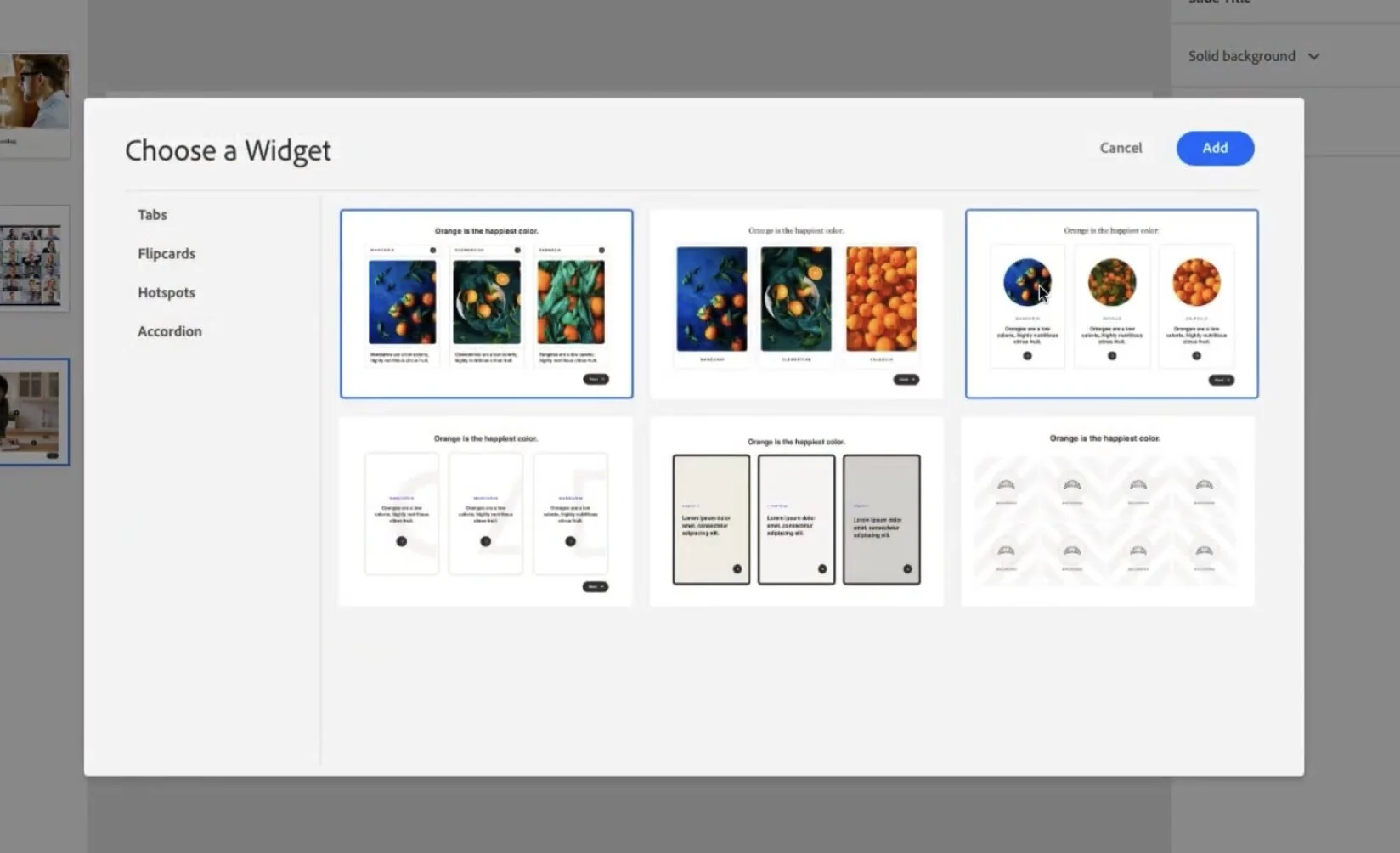
The new widgets
When I think of widgets I think of the old SWF based widgets from past versions of Captivate, or perhaps the learning interactions that only offered limited abilities to customize. In this new release widget looks like it means something else. These widgets have a modern look that I wouldn't hesitate to use in my eLearning projects.
Question slides
Workflow is something we don't think about too often but every extra click allows you down. Over the course of using software for years that can really add up to wasted time. Adding question slides has always been a multiple step process. Nice to see that we can just add a matching slide with two simple clicks.
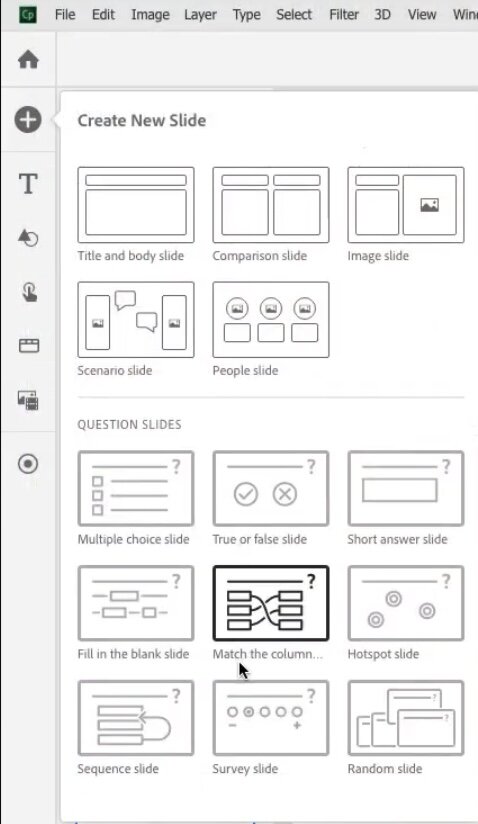
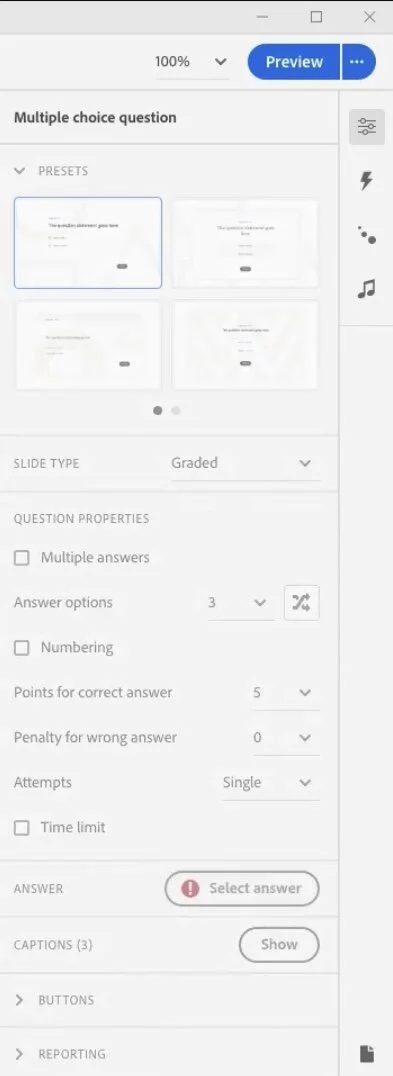
Multiple question slides layouts
We've always been able to design extra matter slides to advocate different question slides layouts. I'm wondering if this is now built in. You can see the quiz panel has this selection option for quickly changing the look and feel of your question slides. Looking forward to getting my hands on this to try it out. This quiz results slide has something similar as well. Like I said can't wait to see it for real.
I love the sneak peeks we get from Adobe. Don't forget that some or all of what's in this sneak peek may not be in the final release of Adobe Captivate. I'd love to hear what features you would like to see in the next release. Put your thoughts below. Also if you saw something I missed let me know. I will cover responsive design in a seperate and future post.
By the way here is the link to view the sneak peek for yourself.
Additionally, if you would like to sign up for the beta for this project you can provide your personal information here: https://forms.office.com/r/d3bjdwhqbG