
What’s New in Adobe Captivate 9: SVG Support
One of the challenges of creating HTML5 responsive design projects is working with various screen sizes. A small image on one screen size, say on your mobile phone, might end up looking distorted and lower quality when the same course is run on a desktop PC. The addition of support for the SVG format solves this. SVG is open image format that uses vector graphics. Since vector graphics aren’t affected by resizing they look great across all screen sizes. If you have the opportunity to use this format with Captivate 9, I strongly encourage you to do so. Here is a video that includes a tutorial.
What’s New in Adobe Captivate 9: Quiz Review Buttons
In the past, users would often get confused by what buttons to press during the quiz, i.e. “should I click the next button or the submit button?” Now Captivate 9 solves this problem by hiding the Next and Back buttons during the quiz and only reveals them during review mode. Also during review mode the submit button is hidden so there is absolutely no confusion over what the learner needs to do. Also the chance of getting stuck on a quiz question slide that is locked without navigation controls is now gone.
Audio Narration: Human vs. Robot
For the last half decade or so I have generally only worked with one client. Early on when we were making the first decisions around what eLearning was going to look like at their organization, it was decided that they would use text-to-speech. The rationale was that if six month or a year went by, they could have anyone update the course material rather than hire back an expensive voice actor; makes sense.
Fast forward five years and I'm still the main person creating eLearning for this organization and I could have easily supplied them with my voice for no additional cost to them. In every update that has been done to my courses in that time, only one was redesigned and updated by another designer.
Take a look at this video to see me compare the two methods of creating narration for Adobe Captivate.
One complaint that I have had in the past is that it was difficult to get the studio quality that clients would expect. One way around that is to use Adobe Audition to clean up your audio recordings and remove any undesirable noise or pops. Check out this video to see me apply the noise reduction to another human recording
Simulate Real Feedback in eLearning
Of course there is no way to truly recreate what it's like for a student to interact with an instructor but one way you can come close to this in eLearning is to provide specific feedback that is unique for each answer selected. Watch this video to see how this can be done.
Allow Users to Change Their Answers to Quiz Questions
One of my readers / viewers asked me a question this morning about allowing users to change their answers to quiz questions. I thought about this for a moment and wondered if the Submit All feature that was introduced to Adobe Captivate awhile ago would satisfy his needs. I was aware of the feature but never felt compelled to use it. I did a little experiment with a demo course and was pleasantly surprised with the results of using this feature. Watch the video to see how this works.
Obviously you need to think about how you use this. Some of my evaluations, especially scenario based learning have to be completed in a certain order as how you answer the first question will dictate what the learner's experience is with subsequent questions. If learners could make decisions in the work place and then change their mind and make new decisions, using this Submit All option is very applicable to adult employee training.
Adobe Captivate - Custom Messages for Quiz Reviews
Here is the video that shows you how you can provide custom messages during a quiz review in Adobe Captivate.
I'm not sure some of the requests that I get to produce YouTube videos make a lot of sense. I recently got a request to have customized messages on each quiz question during the quiz reviews. While this is entirely possible as you can see from the video I created below, I'm not sure it's necessary nor would you necessarily want it.
Of course my assumption is that you are designing eLearning for an adult employee type audience. I honestly have no idea how each subscriber to my channel uses Captivate, but that is essentially what I use it for. I think it's important that we remember that we are not trying to trick our learners into selected the wrong answer, anymore than we should not be giving the answers away. Remember that the purpose of an evaluation at the end or during training is to test if our learners are ready to perform these taught tasks on their own. For example, If I'm testing an employee's ability to react to an emergency situation, I want them to synthesize, based on what I taught them in the course, what the correct behaviour should be. They should have to rely on hints from an instructor who isn't with them on the work site.
Here is the video that shows you how you can provide custom messages during a quiz review in Adobe Captivate.
My YouTube Channel is Starting to Pay Back
The original purpose of creating my YouTube channel has come to fruition today. Last night I was contacted by a client in California who has seen my videos. She asked me to consult on a project that she is working on for a chain of hotels; I agreed. We discussed my fee through email and this morning I called her to discuss her technical needs for this project. I spent about an hour on the phone with her and I'd like to think I helped her out. I hope so.
I'm a big fan of Gary Vaynershuk, published author and entrepreneur, who teaches about the thank you economy. He teaches that if you put your content out there with no thought of reward, to just be helpful to the greater community, the rewards will come back to you. Thank you Gary.
Of course it also reminded me that I didn't have a simple video on my YouTube channel that discussed putting videos into your Adobe Captivate projects. So thank you Elizabeth, I now have this video and I hope it's well received by all my subscribers.
Adding a Note Taking Capabilility to Your eLearning Project
I'm generally not a fan of using the Learning Interactions that are built-in to Adobe Captivate, however there are a handful of them that are really great. The reason I don't care for many of them is that they are just not customizable enough for me. I always feel that I would need to make changes to the rest of my Captivate project to ensure the interactions don't look out of place. One exception is the note interaction.
In this video, I show you how you can add this Note Taking interaction to your course to allow your learners to keep track of the items they are learning from your course. The best part of this interaction is that you can save your notes or simply print them when you are finished the course.
Watch the video to see how to set it up.
Packaging Published Adobe Captivate Files Together in One
In this video I attempt to answer a question about having multiple Captivate projects with their own assessments linked together using the Multi SCO Packager from Adobe...
In this video I attempt to answer a question about having multiple Captivate projects with their own assessments linked together using the Multi SCO Packager from Adobe. The Multi SCO Packager is included with Adobe Captivate.
Adobe Captivate - Externalize Resources
From time to time you may encounter the following error when attempting to publish your Adobe Captivate project file:
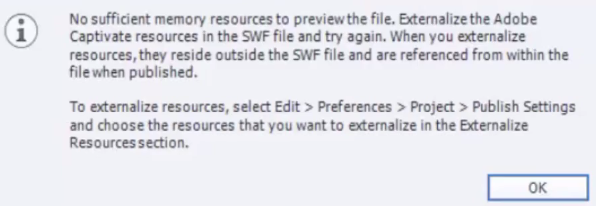
If you haven't run into this before, you may want to check out my video on how to externalize your resources when publishing. Check it out below.