Full Review - Adobe Captivate 2017
So I've been using the official release of Adobe Captivate 2017 for about two weeks now and I thought it was about time to share a full review...
So I've been using the official release of Adobe Captivate 2017 for about two weeks now and I thought it was about time to share a full review.

First of all, let me talk about Fluid Boxes. The best way I can describe Fluid Boxes is that they are object containers that resize themselves in predictable ways. They eliminate objects from overlapping with one another when shown on various different devices with different aspect ratios and resolutions. To me, this is a huge improvement over wrangling with breakpoints and trying to get content to work across all the different breakpoints. It's no secret that I was not a fan of breakpoints. To me, it just increased development time. Fluid Boxes, while they take some getting used to, will reduce your development time versus using breakpoints in Captivate 9.
When Captivate 8 was released and introduced responsive design to eLearning, one question came up again and again. "What about my old projects?" I was hoping to see this addressed in Captivate 9 but unfortunately, it was not. In a way, I'm glad because I don't think Captivate 9 would have handled it well. With Captivate 2017 I can open a non-responsive project and save it as responsive. It literally is that easy. Of course when you open the newly created responsive project there will be some work ahead of you as you tweak most of the items and their placement on each slide, however, it will be a fraction of time compared with what it would be prior to Captivate 2017.
Adobe Captivate 2017 Edition also comes with Typekit integration. I like this feature but I want to give a warning. If you are a casual Adobe Captivate user, in other words, if you might not have or maintain a license of Captivate in the future you might want to think long and hard about using this feature. Typekit integration expects that you maintain your license to use the fonts that are included with any paid subscription. For example, if you subscribe to the Creative Cloud, there are certain fonts that are available to you. If you use those fonts in an eLearning project and your Creative Cloud membership lapses, so do your access to those fonts. You could be breaking your clients eLearning project if you don;t keep your subscription up to date. Of course, there are many fonts that you can use just by maintaining your free Adobe ID. You might want to consider using those if you don't know what the future has in store for you.
Responsive text support in Adobe Captivate 2017 is really good. There are two aspects to this. The first is that fonts will scale down as your project is displayed on smaller screen sizes. You can control what the bottom limit is. For example, on a desktop computer, your course could display a 28 point font, as you view that course on increasing smaller devices that font size will shrink until it reaches a limit that you get to set. If the amount of text cannot be further scaled down your users will see a small pop out icon that when tapped will open a semi-transparent window that will display the full text of what your user isn't able to see. tapping a second time will close the text window and return the user to the regular project. If there is too much text even for the pop out window users will be able to scroll up and down and see all the text.
If you are a learning department manager or a freelance designer like me, this upgrade gets a recommendation from me. Adobe Captivate 2017 Edition is an important milestone in the goal of responsive design eLearning. To me, there continues to be no better value in eLearning design tools. Adobe has cemented their position as the industry leader in mobile eLearning design for years to come.
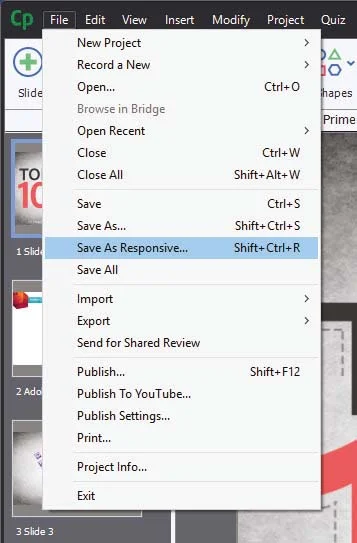
When Captivate 8 was released and introduced responsive design to eLearning, one question came up again and again. "What about my old projects?" I was hoping to see this addressed in Captivate 9 but unfortunately, it was not. In a way, I'm glad because I don't think Captivate 9 would have handled it well. With Captivate 2017 I can open a non-responsive project and save it as responsive. It literally is that easy. Of course when you open the newly created responsive project there will be some work ahead of you as you tweak most of the items and their placement on each slide, however, it will be a fraction of time compared with what it would be prior to Captivate 2017.
Adobe Captivate 2017 Edition also comes with Typekit integration. I like this feature but I want to give a warning. If you are a casual Adobe Captivate user, in other words, if you might not have or maintain a license of Captivate in the future you might want to think long and hard about using this feature. Typekit integration expects that you maintain your license to use the fonts that are included with any paid subscription. For example, if you subscribe to the Creative Cloud, there are certain fonts that are available to you. If you use those fonts in an eLearning project and your Creative Cloud membership lapses, so do your access to those fonts. You could be breaking your clients eLearning project if you don;t keep your subscription up to date. Of course, there are many fonts that you can use just by maintaining your free Adobe ID. You might want to consider using those if you don't know what the future has in store for you.
Responsive text support in Adobe Captivate 2017 is really good. There are two aspects to this. The first is that fonts will scale down as your project is displayed on smaller screen sizes. You can control what the bottom limit is. For example, on a desktop computer, your course could display a 28 point font, as you view that course on increasing smaller devices that font size will shrink until it reaches a limit that you get to set. If the amount of text cannot be further scaled down your users will see a small pop out icon that when tapped will open a semi-transparent window that will display the full text of what your user isn't able to see. tapping a second time will close the text window and return the user to the regular project. If there is too much text even for the pop out window users will be able to scroll up and down and see all the text.
If you are a learning department manager or a freelance designer like me, this upgrade gets a recommendation from me. Adobe Captivate 2017 Edition is an important milestone in the goal of responsive design eLearning. To me, there continues to be no better value in eLearning design tools. Adobe has cemented their position as the industry leader in mobile eLearning design for years to come.
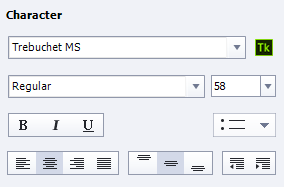
Adobe Captivate 2017 Edition also comes with Typekit integration. I like this feature but I want to give a warning. If you are a casual Adobe Captivate user, in other words, if you might not have or maintain a license of Captivate in the future you might want to think long and hard about using this feature. Typekit integration expects that you maintain your license to use the fonts that are included with any paid subscription. For example, if you subscribe to the Creative Cloud, there are certain fonts that are available to you. If you use those fonts in an eLearning project and your Creative Cloud membership lapses, so do your access to those fonts. You could be breaking your clients eLearning project if you don;t keep your subscription up to date. Of course, there are many fonts that you can use just by maintaining your free Adobe ID. You might want to consider using those if you don't know what the future has in store for you.
Responsive text support in Adobe Captivate 2017 is really good. There are two aspects to this. The first is that fonts will scale down as your project is displayed on smaller screen sizes. You can control what the bottom limit is. For example, on a desktop computer, your course could display a 28 point font, as you view that course on increasing smaller devices that font size will shrink until it reaches a limit that you get to set. If the amount of text cannot be further scaled down your users will see a small pop out icon that when tapped will open a semi-transparent window that will display the full text of what your user isn't able to see. tapping a second time will close the text window and return the user to the regular project. If there is too much text even for the pop out window users will be able to scroll up and down and see all the text.
If you are a learning department manager or a freelance designer like me, this upgrade gets a recommendation from me. Adobe Captivate 2017 Edition is an important milestone in the goal of responsive design eLearning. To me, there continues to be no better value in eLearning design tools. Adobe has cemented their position as the industry leader in mobile eLearning design for years to come.
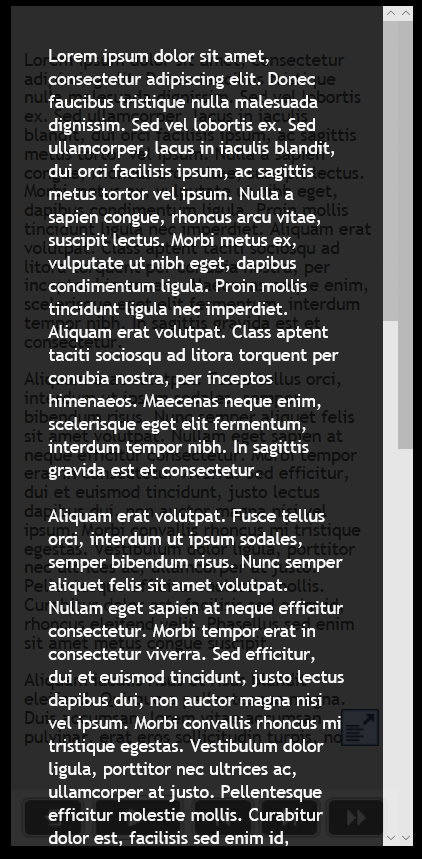
Responsive text support in Adobe Captivate 2017 is really good. There are two aspects to this. The first is that fonts will scale down as your project is displayed on smaller screen sizes. You can control what the bottom limit is. For example, on a desktop computer, your course could display a 28 point font, as you view that course on increasing smaller devices that font size will shrink until it reaches a limit that you get to set. If the amount of text cannot be further scaled down your users will see a small pop out icon that when tapped will open a semi-transparent window that will display the full text of what your user isn't able to see. tapping a second time will close the text window and return the user to the regular project. If there is too much text even for the pop out window users will be able to scroll up and down and see all the text.
If you are a learning department manager or a freelance designer like me, this upgrade gets a recommendation from me. Adobe Captivate 2017 Edition is an important milestone in the goal of responsive design eLearning. To me, there continues to be no better value in eLearning design tools. Adobe has cemented their position as the industry leader in mobile eLearning design for years to come.
If you are a learning department manager or a freelance designer like me, this upgrade gets a recommendation from me. Adobe Captivate 2017 Edition is an important milestone in the goal of responsive design eLearning. To me, there continues to be no better value in eLearning design tools. Adobe has cemented their position as the industry leader in mobile eLearning design for years to come.
Adobe Captivate Fluid Boxes
In my most recent live stream, we discussed some of the known issues surrounding fluid boxes and how you can work around them...
In my most recent live stream, we discussed some of the known issues surrounding fluid boxes and how you can work around them.
Captivate 9 - Still Relevant
I'm seeing several people on the Adobe eLearning Community and my own YouTube channel who are upset that they don't qualify for the complimentary upgrade to Adobe Captivate 2017. You would qualify for the complimentary upgrade if you purchased Adobe Captivate 9 very recently...
I'm seeing several people on the Adobe eLearning Community and my own YouTube channel who are upset that they don't qualify for the complimentary upgrade to Adobe Captivate 2017. You would qualify for the complimentary upgrade if you purchased Adobe Captivate 9 very recently. I don't have the exact time frame in front of me but it's approximately 1 month or less. You can check your eligibility here:
https://helpx.adobe.com/x-productkb/policy-pricing/upgrade-policy-product-announcement.html
When I purchased Captivate 7, I did so very late in the Captivate 7 product life cycle. So late in fact that less than 30 days after I purchased version 7, Captivate 8 was launched. I reached out to the Adobe eLearning team and asked if I would be eligible to receive a complimentary license upgrade. I was pleased to learn that I was and former eLearning evangelist Pooja Jaisingh arranged to get me a new license key for version 8.
If you fall outside of the eligibility, please remember that if you are using Adobe Captivate 9 or even Adobe Captivate 8 you still have an incredible piece of software that is capable of producing some amazing eLearning. Sure there are some great new features in Captivate 2017 and I'm looking forward to using most of them. Several of my clients will not be ready for Captivate 2017 for some time. I will continue to develop content for them in Captivate 9 as I need to maintain compatibility with the software that they are still using. Try not to fret too much.
Adobe Captivate 2017 Released!
I'm really excited to report that the next major release of Adobe Captivate has launched. Adobe has made the decision to break from the product numbers of the past and with what would have been version 10 is now simply called Adobe Captivate 2017. In this article, I cover off some of the new features for you to consider...
I'm really excited to report that the next major release of Adobe Captivate has launched. Adobe has made the decision to break from the product numbers of the past and with what would have been version 10 is now simply called Adobe Captivate 2017. In this article, I cover off some of the new features for you to consider.

The most notable addition to this software is a new way to develop responsively designed courses. A feature known as fluid boxes allows users to divide up their slides into containers where the objects placed within them respond in a much more predictable manner than with other methods. Here is a tutorial that shows some of the basics of working with fluid boxes.
Another area related to responsive design is the ability to save non-responsive projects as responsive design projects. In the past, if users wanted to convert an older project into responsive design, it required a much more manual process of copying individual slides and their elements usually one slide at a time. Here is a tutorial that shows this process in action.
With the migration to HTML5 and responsive design, text in eLearning projects became actual text instead of just another graphical image as was the case when Flash based eLearning was the norm. HTML5 offer many advantages but this limited developers to the commonly used fonts, namely web safe fonts. This prevented developer's ability to use new and interesting fonts in their design. With Adobe Captivate 2017 that problem has been solved through the introduction of being able to add Typekit fonts to your eLearning projects. Typekit fonts are cloud-based and with a Typekit account, many of these cloud-based fonts will now be available to Captivate 2017 developers as well. Creative Cloud customers get a limited number of Typekit fonts at their disposal. Here is a tutorial that shows how easy it is to add Typekit fonts to your eLearning projects.
When Captivate 9 was released, many developers were excited at the number of multi-state objects available to them. Most notable was the ability to have a variety of buttons that were previously just static. There were some exceptions to which types of buttons could have multi-states, however, this has been addressed in Captivate 2017. Developers now can have multi-state buttons on question slides, shape buttons on master slides, buttons on drag and drop slides, and buttons on your quiz results slide. Here is a video where I demonstrate these enhancements.
About five years ago I had a client ask me if I could make the closed captioning window on a course I had developed smaller. They complained that users who wished to use closed captioning had to read the text across the entire width of the project window and this was causing fatigue for users of closed captioning. There was no way to modify the closed captioning window size in previous versions. Adobe Captivate 2017 has introduced the ability to not only create custom sizes of closed captioning windows but their placement can now be on any part of the slide. Furthermore, developers can also use custom font formatting for part or all of the captions they display to their audience. Watch this video to see me customize my closed captions for a small project.
Lastly, there have been some enhancements to advanced actions in Captivate 2017. In previous versions of Captivate a best practice developed to make all advanced actions conditional. The reason for this was that it could be difficult to deal with a change from a standard set of actions to a conditional set of actions part way through development. Often this was achieved by making the condition of the advanced action something that would always be true. For example, developers could write the condition to be something like IF 1 == 1 or something like that.
Captivate 2017 solves this by making advanced actions and conditional actions one and the same. Instead of having to rewrite the standard action into a whole new conditional action and updating all the places where that standard action was previously referenced, now you can modify the standard action and change it to a conditional action by checking off the Conditional Tab. There you can add your IF statement and retain all the previous actions as part of the conditional action.
Also, the IF statement of conditional actions has been joined by the While statement which gives developers the opportunity to create advanced actions that will loop while all, any or some of the conditions are true.
Each time a new version of Captivate is released I always say the same thing. This is the best version of Captivate ever. I think that's very true in this case. I should point out that I use Captivate for most, if not all the features. If these new features have little to no impact on your process there is no reason to upgrade (at least not right away). For example, if you use Captivate to make Video Demo tutorials to be uploaded to YouTube, there is no improvement for you. If you are a Captivate subscription customer you can upgrade at a point that will not interfere with the development of any current projects. If you purchase a perpetual license of Captivate and you can see how your clients would benefit with these features, also upgrade to this version, again at a time that is appropriate.
Adobe eLearning Conference
I know this article is somewhat last minute as there are only two weeks to go until the conference but I wanted to gather all my thoughts about this upcoming event and why I think you should go...
I know this article is somewhat last minute as there are only two weeks to go until the conference but I wanted to gather all my thoughts about this upcoming event and why I think you should go.
I'll just say it...
If you use Adobe Captivate every day, like I do, you have to be at this event. This conference will be discussing the future of eLearning at Adobe. You will learn things at this conference that were previously unknowable. This is especially true if you plan on attending my session. My session is called What's New in Adobe Captivate? I personally wouldn't have added the question mark because I would want people to expect answers from my session, not questions. Seeing as Adobe Captivate 9 has been out for over a year and a half you can guess what I'll be talking about. My session is one of the first sessions of the day, which I'm glad about. I like the idea of getting my stuff out of the way and then enjoying the rest of the day.
After my session, you will have a choice of learning about rapidly building mobile learning from fellow Canadian Phil Cowcill, the basic tenets of instructional design with Brian Duck, and getting into custom interactions with Joe Ganci. If I was going to pick just one of these events I would likely pick Joe's session but it might be a little more advanced for some.
Lunch!
After lunch, you will have an opportunity to learn about video-based eLearning from Damien Brundonckx. Don't worry I can't pronounce his last name either. He's from Belgium but a really great guy and very knowledgeable about Adobe products.
You could also attend Anita Horsley as she talks about responsive design. She's awesome. I attribute half of my knowledge about Adobe Captivate responsive design to her. If your organization is making the switch or even thinking about switching to responsive design you will want to be in her session.
You might want to attend EJ LeBlanc's session on 3D game-based eLearning. I've read some of his stuff and listened to a podcast on what he's been up to recently and EJ is really cutting edge. He's the kind of guy who won't sit still. He's always trying to break and reinvent eLearning.
Once all the sessions are complete we will be getting back together as a larger group and listening to Tridib Roy Chowdhury speak. I've heard him before and he is very inspirational. He leads the worldwide business for the Adobe eLearning Solutions and is like the Indian Steve Jobs as far as I'm concerned.
What Is The True Cost of Training?
Jean Ventose was doing some shopping at his local Walmart store in Calgary and had picked up a set of headphones from the electronic department. As he continued shopping he noticed that a store employee was following him and not at a discrete distance like you might expect, but rather in a manner that could be construed as a way to harass him...
Jean Ventose was doing some shopping at his local Walmart store in Calgary and had picked up a set of headphones from the electronics department. As he continued shopping he noticed that a store employee was following him and not at a discrete distance like you might expect, but rather in a manner that could be construed as a way to harass him. The employee wore a security uniform. It was at this point that Ventose decided to take out his smartphone and begin recording the incident. Here is his video directly from his Facebook page.
My guess is that Walmart Canada is now in crisis mode, scrambling to come up with solutions to the public relations nightmare that has already begun. Hundreds of thousands have already viewed and commented on this video from across the country. All the major news agencies have covered this story and it has brought the kind of attention on Walmart Canada that I'm sure they didn't want. I suspect that many regular Walmart customers may end up buying their merchandise elsewhere this week. The cost to Walmart Canada could easily be in the millions of dollars.
It would be easy to suggest a training program that would include learning in the areas of preventing discrimination, harassment, creating a respectful workplace, customer service and so on. This would certainly be the week to propose to the higher ups that more and better training is required. Unfortunately, your proposal for such training typically happens when things are going well for your company and there isn't a crisis that needs to be addressed. My advice is to share this story now with the persons in your organization responsible for approving the additional budget for training so that you can remind them what the true cost of training really is.
And don't forget, I have designed training for large corporations that would address all the issues that this video has demonstrated and I am available to hire to design similar learning solutions for your organization as well.
Adobe eLearning Conference – Not Just a Free Lunch
Another member of the Adobe eLearning Community asked a great question on a post I did about the 2nd Annual Adobe eLearning Conference. I started to write this reply below but I changed my mind and decided to make it a blog post on its own. She asked what did we like best about this gathering...
Another member of the Adobe eLearning Community asked a great question on a post I did about the 2nd Annual Adobe eLearning Conference. I started to write this reply below but I changed my mind and decided to make it a blog post on its own. She asked what did we like best about this gathering. Below is my answer but I encourage members of the community to also include their own remarks either here or on the original post (elearning.adobe.com).
Well, there were several things that stood out for me but to disclose fully, I was a speaker of one of the sessions last year, but just as importantly to my career development, I was also an attendee like anyone else.
First and foremost, I met other people like myself who were in the eLearning industry. I got to meet industry experts who I might have communicated with in the past, but nothing beats face to face interaction. While I have worked closely with subject matter experts and stakeholders from various organizations that I have worked for, this was the first time in many years I got to really talk with people who did the same job as I do. I probably learned more from that than anything else.
The second was the chance to hear from Adobe themselves; where the direction of the eLearning software was going. For example, in a similar event held in Las Vegas this past fall, Adobe revealed some really cool sneak peeks into what was going into the next major release of Captivate. This leg up will mean that I can prepare to implement by learning the appropriate skills between now and when the next major release comes out. I imagine that Adobe key personnel will be updating us on this development.
The third item but not the least item was my chance to sit in on some of the other speaker’s sessions and learn some new skills from them as well. I sat in on Anita Horsley’s session on responsive design, which I now feel more comfortable working with, I also sat in on Kirsten Rourke’s session on the Creative Cloud which taught us how to work with some of the other applications.
The single most important thing about this conference was the value. To my knowledge, there is no better value for an eLearning Instructional Designer or developer than the Adobe eLearning Conference in Washington DC. Most conferences are priced in the hundreds of dollars and many are in the thousands of dollars. While you will likely have some travel and lodging expenses the event is absolutely free. Not only is it free but you also will have breakfast and lunch provided as well. This and more importantly the other reasons I mentioned are why this event sold out within weeks of its announcement last year. Make sure you register for this year as well.
http://www.carahsoft.com/learn/event/7450-2nd-Annual-Adobe-eLearning-Conference
Learning to Fly
Have you ever gotten to that point in the storyboard where you suddenly realize that you don’t know how to achieve the desired effect or interaction? I know I have. Especially early in my career. over ten years ago I worked alongside a more seasoned eLearning designer/developer who saw me struggling with a difficult project...
Have you ever gotten to that point in the storyboard where you suddenly realize that you don’t know how to achieve the desired effect or interaction? I know I have. Especially early in my career. over ten years ago I worked alongside a more seasoned eLearning designer/developer who saw me struggling with a difficult project. He said, “Why are you so stressed out and trying to reinvent eLearning?”
I said, “I want this eLearning course to be really good.”
He said something I have never forgotten, which I first thought was just an older designer being lazy, “Never add an interaction to your eLearning course that you are not 100% sure you know how to deliver.”
I said, “But don’t we always want to raise the bar and continuously improve?”
He said “Yes, but not while you are supposed to be building your project and meeting or exceeding your project deadlines.” He went on to say, “While you are searching the internet and asking questions online on how to build this particular interaction, who’s working on getting your project done?”
I told him, “nobody.”
“Exactly”, he said, “When you have some downtime work on reinventing the eLearning wheel and add those items to your eLearning tool belt for the next project. When you have a hard and fast deadline, get the job done with the tools that you have right now.”
I learned a lot that day and I think it’s something that we can all learn from. Sometimes I get questions from designers who have taken on more than their current knowledge can produce. My advice is to master the basics before trying to turn your first eLearning into something epic. Don’t worry, you will get there. It just takes time.
The Tools I Use
On a recent live stream, I was asked about which tools I use to create my eLearning and video tutorials. I gave a partial answer during the live stream but I thought I would go a little more in-depth on that question here...
On a recent live stream, I was asked about which tools I use to create my eLearning and video tutorials. I gave a partial answer during the live stream but I thought I would go a little more in-depth on that question here.
Adobe Captivate
I think it's obvious that I use Adobe Captivate and almost always have the latest version. I do also keep the previous version installed on my main system. Up to and including presently I have always purchased a perpetual license for Adobe Captivate. I know that Adobe would prefer me to tell you to buy the subscription version but I always feel more comfortable knowing that regardless of what my current situation is, I can continue to run my Copy of Captivate indefinitely.
One thing that the viewers of my YouTube tutorials are often surprised to learn is that I also use Adobe Captivate to record my videos. I use the Video Demo feature to record the features that I’m demonstrating on another instance of Captivate that I run simultaneously.
Adobe Creative Cloud
Going back several years I purchased the Adobe eLearning Suite which is no longer available. The suite came with Adobe Captivate plus several key applications that became part of my workflow. The main applications from that suite that were important to me were Photoshop and Audition. I relied on those apps for years after upgrading to newer versions of Captivate. Until very recently, Photoshop CS5 was more than enough for my needs. A few years ago I became very serious about my photography and began purchasing copies of Lightroom. Eventually, I signed up for the Creative Cloud photography plan for about $10 month. This last fall there was some great pricing on the full Creative Cloud that I decided to take advantage of. It allowed me to get the latest version of all my applications for only a few dollars more than I was spending on the Photography plan and another third party service that I no longer felt was needed. This now allows me to have the latest version of several other applications which have proven beneficial as well.
Microsoft Office
It’s almost automatic that a PC user will have some version of Microsoft Office. I took advantage of some really good pricing on Office 2013 a few years ago and I haven’t felt the need to upgrade to Office 2016. Perhaps in a few years, I will be forced to but for right now 2013 is fine.
Snagit
I purchased Snagit 11 a number of years ago and I install this on each computer I have used since then. It is the defector standard for screen capture applications. In a pinch, I could get away without it but it’s annotation and markup tools are really nice and certainly easy to use.
PureText
I’m not even sure when I first became aware of PureText but PureText is a simple application that sits in your system tray. When you copy some text from various sources, in most cases you are also copying some text formatting as well. One click on the PureText icon in your system tray will strip out any formatting before you paste it into your destination application, which for me is typically Adobe Captivate. Captivate doesn’t always play well with formatting, especially from Microsoft Word, so this is a nice feature to have at my disposal. Puretext can be downloaded for free from stevemiller.net.
FileZilla
At some point, I usually need to upload my published eLearning projects to a web server. For me, there is nothing I need from a file transfer protocol (FTP) application that FileZilla cannot provide. Like PureText, FileZilla is completely free. In this case, FileZilla is open source. At present, it falls under the GNU General Public License so there are no ads embedded in the application and unless you get the software from a disreputable source there is no bundled crapware that comes along with it. It’s a great choice for FTP software.
About Me
I've combined my passion for design, usic and photography; with my desire to teach, to become a highly sought after Instructional Designer, Developer, facilitator. If you need help building your next eLearning project, consider hiring me. I create learning solutions that are not only visually appealing, but effective at achieving not only the student's goals, but the organization's business goals as well.
Retaining Your Best Employees
One aspect of a training manager's job is to retain valuable employees. Think about it, as a training manager, part of your job is to manage a budget for training your organization. It's far more cost-effective to train skill gaps than it is to fully train new employees from scratch...
One aspect of a training manager's job is to retain valuable employees. Think about it, as a training manager, part of your job is to manage a budget for training your organization. It's far more cost-effective to train skill gaps than it is to fully train new employees from scratch. Turnover has a direct impact on your department’s ability to deliver truly effective learning opportunities, ones that increase the effectiveness of your employees, rather than helping employees gain the skills to get hired elsewhere.
According to a recent survey conducted by ADP Canada, two-thirds of your employees are ready to leave your organization. Elizabeth Williams, Director of Brand and Communication from ADP Canada recently spoke with CJOB in Winnipeg about this. You can listen to the interview here:
Essentially 33% of your workforce is what ADP calls the Uninspired. These are the folks who are not necessarily looking for work elsewhere but if an opportunity presented itself they would be gone. Another 16% of your employees are what ADP calls the Casual Daters. These folks have not started a full on job hunt but are keeping an eye on places like LinkedIn, and other career related sites to see what's out there. The remaining 16% of the two-thirds of your company are the Dissed. These are people who are completely dissatisfied with working at your workplace and are aggressively looking for their next opportunity.
The reason you need to be concerned is that some of your best employees might be in one of these three groups. Your department has spent thousands of dollars getting these people trained during their tenure with your company. Not only will the costs be higher to train their replacements but you could be losing a valuable training advocate or a subject matter expert that your department could leverage for the next training project.
How can you be sure you don’t lose these folks? You need to make them aware that they are valued by the company. Engage them with learning opportunities that show your department is listening to their needs. Make sure training is designed to be effective and targeted toward business goals. Ensure that training is timely, interesting and addresses your learner's true needs.
If you are interested in learning more about this, please reach out to me and we can discuss how I can help your organization deliver training that is truly effective and not just another boring eLearning session.