
How to Make eLearning More Effective
Here is an update on my previous presentation on making eLearning more effective...
Here is an update on my previous presentation on making eLearning more effective. I live streamed this last week and I hope you enjoy it.
How Adobe Typekit Works
I did some research on this today as I have a client who had some questions about it and I learned a thing or two myself...
I did some research on this today as I have a client who had some questions about it and I learned a thing or two myself. Check out the recording I made on YouTube to address these concerns
Creating Custom Question Slides in Adobe Captivate (2017 Release)
This is my first premium video tutorial on Creating Custom Question Slides in Adobe Captivate (2017 Release). Unlike other video tutorials I have created, this 1 Hour 20-minute course will guide you in the creation of a responsive design interface using fluid boxes, and write advanced actions to perform the various functions of several types of multiple choice questions...
This is my first premium video tutorial on Creating Custom Question Slides in Adobe Captivate (2017 Release). Unlike other video tutorials I have created, this 1 Hour 20-minute course will guide you in the creation of a responsive design interface using fluid boxes, and write advanced actions to perform the various functions of several types of multiple choice questions. You can purchase the full video and watch it from your Google account on YouTube. I'm presently exploring other ways you can access this if Google Wallet / Google Play isn't your thing.
LIVE STREAM - Adobe Captivate May 8, 2017
In case you missed my live stream from May the 8th. Here it is...
In case you missed my live stream from May the 8th. Here it is...
Paul Wilson - Ask Me Anything
This was just really an experiment into live streaming from a mobile device. In this case my iPad Mini. I might do this again if I'm on location somewhere, but as a serious live stream where I'm answering questions? I don't think so. You're welcome to watch it for fun though...
This was just really an experiment into live streaming from a mobile device. In this case my iPad Mini. I might do this again if I'm on location somewhere, but as a serious live stream where I'm answering questions? I don't think so. You're welcome to watch it for fun though.
Full Review - Adobe Captivate 2017
So I've been using the official release of Adobe Captivate 2017 for about two weeks now and I thought it was about time to share a full review...
So I've been using the official release of Adobe Captivate 2017 for about two weeks now and I thought it was about time to share a full review.

First of all, let me talk about Fluid Boxes. The best way I can describe Fluid Boxes is that they are object containers that resize themselves in predictable ways. They eliminate objects from overlapping with one another when shown on various different devices with different aspect ratios and resolutions. To me, this is a huge improvement over wrangling with breakpoints and trying to get content to work across all the different breakpoints. It's no secret that I was not a fan of breakpoints. To me, it just increased development time. Fluid Boxes, while they take some getting used to, will reduce your development time versus using breakpoints in Captivate 9.
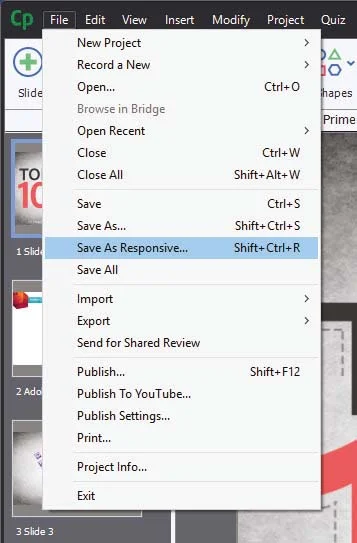
When Captivate 8 was released and introduced responsive design to eLearning, one question came up again and again. "What about my old projects?" I was hoping to see this addressed in Captivate 9 but unfortunately, it was not. In a way, I'm glad because I don't think Captivate 9 would have handled it well. With Captivate 2017 I can open a non-responsive project and save it as responsive. It literally is that easy. Of course when you open the newly created responsive project there will be some work ahead of you as you tweak most of the items and their placement on each slide, however, it will be a fraction of time compared with what it would be prior to Captivate 2017.
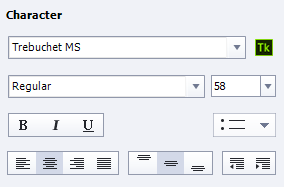
Adobe Captivate 2017 Edition also comes with Typekit integration. I like this feature but I want to give a warning. If you are a casual Adobe Captivate user, in other words, if you might not have or maintain a license of Captivate in the future you might want to think long and hard about using this feature. Typekit integration expects that you maintain your license to use the fonts that are included with any paid subscription. For example, if you subscribe to the Creative Cloud, there are certain fonts that are available to you. If you use those fonts in an eLearning project and your Creative Cloud membership lapses, so do your access to those fonts. You could be breaking your clients eLearning project if you don;t keep your subscription up to date. Of course, there are many fonts that you can use just by maintaining your free Adobe ID. You might want to consider using those if you don't know what the future has in store for you.
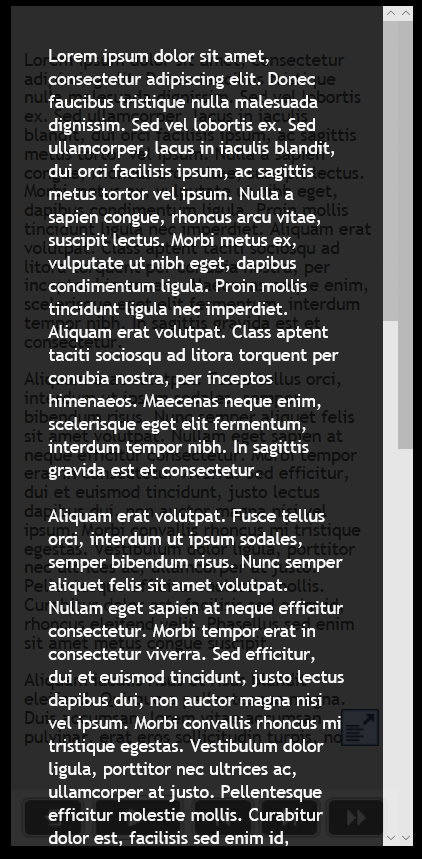
Responsive text support in Adobe Captivate 2017 is really good. There are two aspects to this. The first is that fonts will scale down as your project is displayed on smaller screen sizes. You can control what the bottom limit is. For example, on a desktop computer, your course could display a 28 point font, as you view that course on increasing smaller devices that font size will shrink until it reaches a limit that you get to set. If the amount of text cannot be further scaled down your users will see a small pop out icon that when tapped will open a semi-transparent window that will display the full text of what your user isn't able to see. tapping a second time will close the text window and return the user to the regular project. If there is too much text even for the pop out window users will be able to scroll up and down and see all the text.
If you are a learning department manager or a freelance designer like me, this upgrade gets a recommendation from me. Adobe Captivate 2017 Edition is an important milestone in the goal of responsive design eLearning. To me, there continues to be no better value in eLearning design tools. Adobe has cemented their position as the industry leader in mobile eLearning design for years to come.
When Captivate 8 was released and introduced responsive design to eLearning, one question came up again and again. "What about my old projects?" I was hoping to see this addressed in Captivate 9 but unfortunately, it was not. In a way, I'm glad because I don't think Captivate 9 would have handled it well. With Captivate 2017 I can open a non-responsive project and save it as responsive. It literally is that easy. Of course when you open the newly created responsive project there will be some work ahead of you as you tweak most of the items and their placement on each slide, however, it will be a fraction of time compared with what it would be prior to Captivate 2017.
Adobe Captivate 2017 Edition also comes with Typekit integration. I like this feature but I want to give a warning. If you are a casual Adobe Captivate user, in other words, if you might not have or maintain a license of Captivate in the future you might want to think long and hard about using this feature. Typekit integration expects that you maintain your license to use the fonts that are included with any paid subscription. For example, if you subscribe to the Creative Cloud, there are certain fonts that are available to you. If you use those fonts in an eLearning project and your Creative Cloud membership lapses, so do your access to those fonts. You could be breaking your clients eLearning project if you don;t keep your subscription up to date. Of course, there are many fonts that you can use just by maintaining your free Adobe ID. You might want to consider using those if you don't know what the future has in store for you.
Responsive text support in Adobe Captivate 2017 is really good. There are two aspects to this. The first is that fonts will scale down as your project is displayed on smaller screen sizes. You can control what the bottom limit is. For example, on a desktop computer, your course could display a 28 point font, as you view that course on increasing smaller devices that font size will shrink until it reaches a limit that you get to set. If the amount of text cannot be further scaled down your users will see a small pop out icon that when tapped will open a semi-transparent window that will display the full text of what your user isn't able to see. tapping a second time will close the text window and return the user to the regular project. If there is too much text even for the pop out window users will be able to scroll up and down and see all the text.
If you are a learning department manager or a freelance designer like me, this upgrade gets a recommendation from me. Adobe Captivate 2017 Edition is an important milestone in the goal of responsive design eLearning. To me, there continues to be no better value in eLearning design tools. Adobe has cemented their position as the industry leader in mobile eLearning design for years to come.
Adobe Captivate 2017 Edition also comes with Typekit integration. I like this feature but I want to give a warning. If you are a casual Adobe Captivate user, in other words, if you might not have or maintain a license of Captivate in the future you might want to think long and hard about using this feature. Typekit integration expects that you maintain your license to use the fonts that are included with any paid subscription. For example, if you subscribe to the Creative Cloud, there are certain fonts that are available to you. If you use those fonts in an eLearning project and your Creative Cloud membership lapses, so do your access to those fonts. You could be breaking your clients eLearning project if you don;t keep your subscription up to date. Of course, there are many fonts that you can use just by maintaining your free Adobe ID. You might want to consider using those if you don't know what the future has in store for you.
Responsive text support in Adobe Captivate 2017 is really good. There are two aspects to this. The first is that fonts will scale down as your project is displayed on smaller screen sizes. You can control what the bottom limit is. For example, on a desktop computer, your course could display a 28 point font, as you view that course on increasing smaller devices that font size will shrink until it reaches a limit that you get to set. If the amount of text cannot be further scaled down your users will see a small pop out icon that when tapped will open a semi-transparent window that will display the full text of what your user isn't able to see. tapping a second time will close the text window and return the user to the regular project. If there is too much text even for the pop out window users will be able to scroll up and down and see all the text.
If you are a learning department manager or a freelance designer like me, this upgrade gets a recommendation from me. Adobe Captivate 2017 Edition is an important milestone in the goal of responsive design eLearning. To me, there continues to be no better value in eLearning design tools. Adobe has cemented their position as the industry leader in mobile eLearning design for years to come.
Responsive text support in Adobe Captivate 2017 is really good. There are two aspects to this. The first is that fonts will scale down as your project is displayed on smaller screen sizes. You can control what the bottom limit is. For example, on a desktop computer, your course could display a 28 point font, as you view that course on increasing smaller devices that font size will shrink until it reaches a limit that you get to set. If the amount of text cannot be further scaled down your users will see a small pop out icon that when tapped will open a semi-transparent window that will display the full text of what your user isn't able to see. tapping a second time will close the text window and return the user to the regular project. If there is too much text even for the pop out window users will be able to scroll up and down and see all the text.
If you are a learning department manager or a freelance designer like me, this upgrade gets a recommendation from me. Adobe Captivate 2017 Edition is an important milestone in the goal of responsive design eLearning. To me, there continues to be no better value in eLearning design tools. Adobe has cemented their position as the industry leader in mobile eLearning design for years to come.
If you are a learning department manager or a freelance designer like me, this upgrade gets a recommendation from me. Adobe Captivate 2017 Edition is an important milestone in the goal of responsive design eLearning. To me, there continues to be no better value in eLearning design tools. Adobe has cemented their position as the industry leader in mobile eLearning design for years to come.
Adobe Captivate Fluid Boxes
In my most recent live stream, we discussed some of the known issues surrounding fluid boxes and how you can work around them...
In my most recent live stream, we discussed some of the known issues surrounding fluid boxes and how you can work around them.
Captivate 9 - Still Relevant
I'm seeing several people on the Adobe eLearning Community and my own YouTube channel who are upset that they don't qualify for the complimentary upgrade to Adobe Captivate 2017. You would qualify for the complimentary upgrade if you purchased Adobe Captivate 9 very recently...
I'm seeing several people on the Adobe eLearning Community and my own YouTube channel who are upset that they don't qualify for the complimentary upgrade to Adobe Captivate 2017. You would qualify for the complimentary upgrade if you purchased Adobe Captivate 9 very recently. I don't have the exact time frame in front of me but it's approximately 1 month or less. You can check your eligibility here:
https://helpx.adobe.com/x-productkb/policy-pricing/upgrade-policy-product-announcement.html
When I purchased Captivate 7, I did so very late in the Captivate 7 product life cycle. So late in fact that less than 30 days after I purchased version 7, Captivate 8 was launched. I reached out to the Adobe eLearning team and asked if I would be eligible to receive a complimentary license upgrade. I was pleased to learn that I was and former eLearning evangelist Pooja Jaisingh arranged to get me a new license key for version 8.
If you fall outside of the eligibility, please remember that if you are using Adobe Captivate 9 or even Adobe Captivate 8 you still have an incredible piece of software that is capable of producing some amazing eLearning. Sure there are some great new features in Captivate 2017 and I'm looking forward to using most of them. Several of my clients will not be ready for Captivate 2017 for some time. I will continue to develop content for them in Captivate 9 as I need to maintain compatibility with the software that they are still using. Try not to fret too much.
Adobe Captivate 2017 Released!
I'm really excited to report that the next major release of Adobe Captivate has launched. Adobe has made the decision to break from the product numbers of the past and with what would have been version 10 is now simply called Adobe Captivate 2017. In this article, I cover off some of the new features for you to consider...
I'm really excited to report that the next major release of Adobe Captivate has launched. Adobe has made the decision to break from the product numbers of the past and with what would have been version 10 is now simply called Adobe Captivate 2017. In this article, I cover off some of the new features for you to consider.

The most notable addition to this software is a new way to develop responsively designed courses. A feature known as fluid boxes allows users to divide up their slides into containers where the objects placed within them respond in a much more predictable manner than with other methods. Here is a tutorial that shows some of the basics of working with fluid boxes.
Another area related to responsive design is the ability to save non-responsive projects as responsive design projects. In the past, if users wanted to convert an older project into responsive design, it required a much more manual process of copying individual slides and their elements usually one slide at a time. Here is a tutorial that shows this process in action.
With the migration to HTML5 and responsive design, text in eLearning projects became actual text instead of just another graphical image as was the case when Flash based eLearning was the norm. HTML5 offer many advantages but this limited developers to the commonly used fonts, namely web safe fonts. This prevented developer's ability to use new and interesting fonts in their design. With Adobe Captivate 2017 that problem has been solved through the introduction of being able to add Typekit fonts to your eLearning projects. Typekit fonts are cloud-based and with a Typekit account, many of these cloud-based fonts will now be available to Captivate 2017 developers as well. Creative Cloud customers get a limited number of Typekit fonts at their disposal. Here is a tutorial that shows how easy it is to add Typekit fonts to your eLearning projects.
When Captivate 9 was released, many developers were excited at the number of multi-state objects available to them. Most notable was the ability to have a variety of buttons that were previously just static. There were some exceptions to which types of buttons could have multi-states, however, this has been addressed in Captivate 2017. Developers now can have multi-state buttons on question slides, shape buttons on master slides, buttons on drag and drop slides, and buttons on your quiz results slide. Here is a video where I demonstrate these enhancements.
About five years ago I had a client ask me if I could make the closed captioning window on a course I had developed smaller. They complained that users who wished to use closed captioning had to read the text across the entire width of the project window and this was causing fatigue for users of closed captioning. There was no way to modify the closed captioning window size in previous versions. Adobe Captivate 2017 has introduced the ability to not only create custom sizes of closed captioning windows but their placement can now be on any part of the slide. Furthermore, developers can also use custom font formatting for part or all of the captions they display to their audience. Watch this video to see me customize my closed captions for a small project.
Lastly, there have been some enhancements to advanced actions in Captivate 2017. In previous versions of Captivate a best practice developed to make all advanced actions conditional. The reason for this was that it could be difficult to deal with a change from a standard set of actions to a conditional set of actions part way through development. Often this was achieved by making the condition of the advanced action something that would always be true. For example, developers could write the condition to be something like IF 1 == 1 or something like that.
Captivate 2017 solves this by making advanced actions and conditional actions one and the same. Instead of having to rewrite the standard action into a whole new conditional action and updating all the places where that standard action was previously referenced, now you can modify the standard action and change it to a conditional action by checking off the Conditional Tab. There you can add your IF statement and retain all the previous actions as part of the conditional action.
Also, the IF statement of conditional actions has been joined by the While statement which gives developers the opportunity to create advanced actions that will loop while all, any or some of the conditions are true.
Each time a new version of Captivate is released I always say the same thing. This is the best version of Captivate ever. I think that's very true in this case. I should point out that I use Captivate for most, if not all the features. If these new features have little to no impact on your process there is no reason to upgrade (at least not right away). For example, if you use Captivate to make Video Demo tutorials to be uploaded to YouTube, there is no improvement for you. If you are a Captivate subscription customer you can upgrade at a point that will not interfere with the development of any current projects. If you purchase a perpetual license of Captivate and you can see how your clients would benefit with these features, also upgrade to this version, again at a time that is appropriate.
Adobe eLearning Conference
I know this article is somewhat last minute as there are only two weeks to go until the conference but I wanted to gather all my thoughts about this upcoming event and why I think you should go...
I know this article is somewhat last minute as there are only two weeks to go until the conference but I wanted to gather all my thoughts about this upcoming event and why I think you should go.
I'll just say it...
If you use Adobe Captivate every day, like I do, you have to be at this event. This conference will be discussing the future of eLearning at Adobe. You will learn things at this conference that were previously unknowable. This is especially true if you plan on attending my session. My session is called What's New in Adobe Captivate? I personally wouldn't have added the question mark because I would want people to expect answers from my session, not questions. Seeing as Adobe Captivate 9 has been out for over a year and a half you can guess what I'll be talking about. My session is one of the first sessions of the day, which I'm glad about. I like the idea of getting my stuff out of the way and then enjoying the rest of the day.
After my session, you will have a choice of learning about rapidly building mobile learning from fellow Canadian Phil Cowcill, the basic tenets of instructional design with Brian Duck, and getting into custom interactions with Joe Ganci. If I was going to pick just one of these events I would likely pick Joe's session but it might be a little more advanced for some.
Lunch!
After lunch, you will have an opportunity to learn about video-based eLearning from Damien Brundonckx. Don't worry I can't pronounce his last name either. He's from Belgium but a really great guy and very knowledgeable about Adobe products.
You could also attend Anita Horsley as she talks about responsive design. She's awesome. I attribute half of my knowledge about Adobe Captivate responsive design to her. If your organization is making the switch or even thinking about switching to responsive design you will want to be in her session.
You might want to attend EJ LeBlanc's session on 3D game-based eLearning. I've read some of his stuff and listened to a podcast on what he's been up to recently and EJ is really cutting edge. He's the kind of guy who won't sit still. He's always trying to break and reinvent eLearning.
Once all the sessions are complete we will be getting back together as a larger group and listening to Tridib Roy Chowdhury speak. I've heard him before and he is very inspirational. He leads the worldwide business for the Adobe eLearning Solutions and is like the Indian Steve Jobs as far as I'm concerned.